React Native App Review: How Store Approval Really Works
Your React Native app review explained: how Apple and Google Play approve builds, the most common rejection causes, and how to resubmit fast in 2026.
LetsDeployIt Team ·
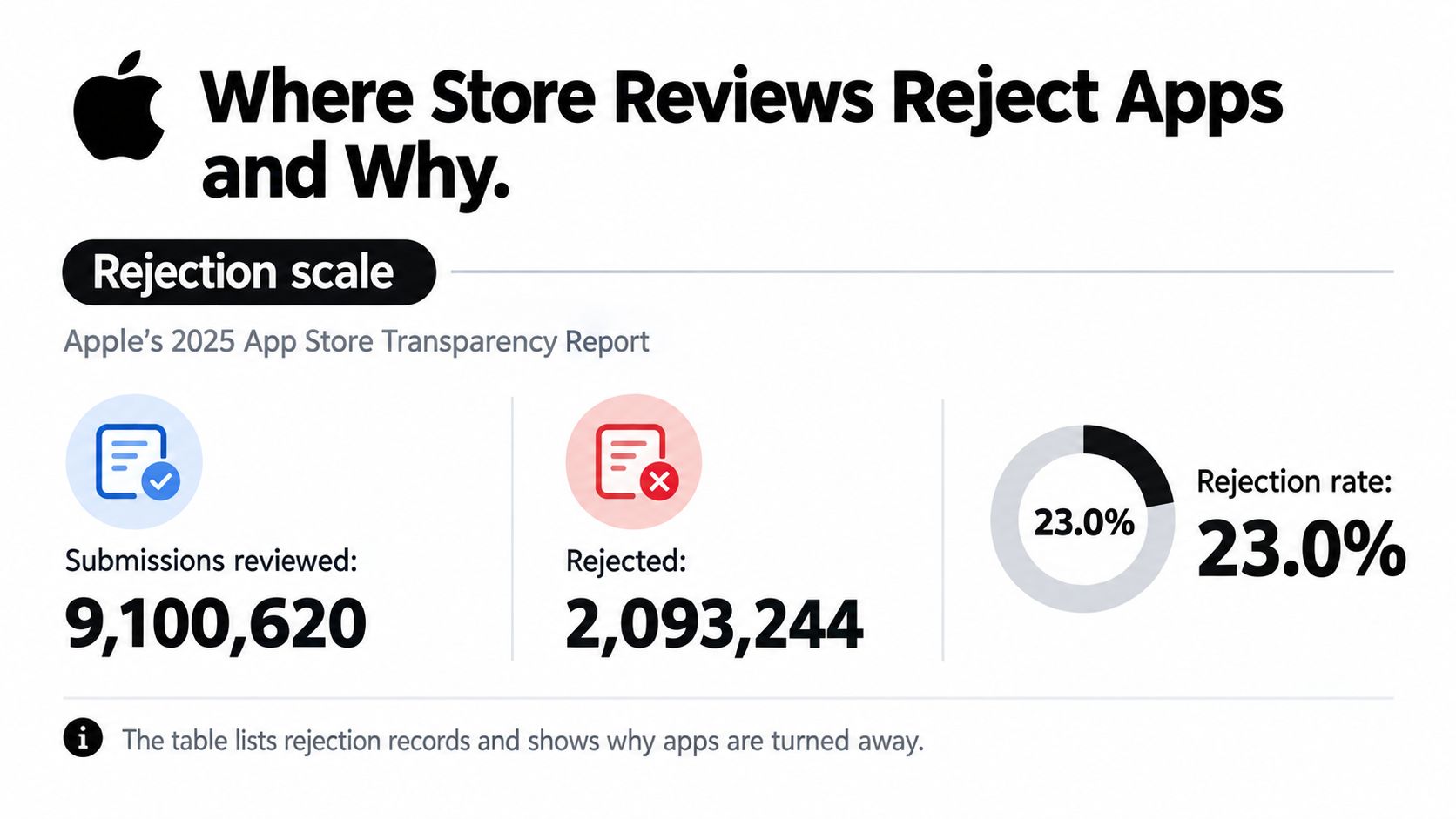
Roughly 23.0% of app submissions reviewed were rejected in Apple's 2025 App Store Transparency Report, as summarized by AppFollow's App Store review guide: 2,093,244 rejected submissions out of 9,100,620 reviewed. That's a store-wide figure, not a React Native rejection rate. It reframes the practical question: can a reviewer use the finished product, understand its data practices, and verify what the listing promises?
A React Native app review isn't a review of your framework choice. Reviewers encounter the installed app, its permissions, its content, and its supporting information. Your job is to make that experience complete and reproducible.
Table of Contents
- Where Store Reviews Reject Apps and Why
- How the Store Review Runs From Upload to Decision
- Completeness Checks That Decide Most Reviews
- React Native Build Problems Behind Rejections
- Privacy Disclosures Across SDKs and AI Features
- Confirm Your Next Step Before Resubmitting
<a id="where-store-reviews-reject-apps-and-why"></a>
Where Store Reviews Reject Apps and Why
Apple's 2025 report records more than 1.3 million performance-related rejection instances. That category is a useful starting point, but review outcomes also depend on whether an app's design, business model, safety controls, and privacy disclosures are complete.
<a id="apple-rejection-records-by-category-2025"></a>
Apple rejection records by category, 2025
These category records can overlap, so the rows should not be added together as a count of unique rejected submissions.
| Category | Rejection records | What it means for a React Native app |
|---|---|---|
| Performance | 1,354,418 | Crashes, slow launches, or unstable native modules, including problems that appear only in release builds |
| Legal | 495,673 | Privacy policy, terms, account deletion, and data-use obligations |
| Design | 415,532 | Placeholder screens, broken layouts, and unfinished interface states |
| Business | 283,820 | Payment flows, in-app purchase rules, and paid-feature gating |
| Safety | 151,159 | User-generated content controls and safety features |
| Privacy violations | 72,000 | SDK data collection disclosed inaccurately or not at all |
The category points to the kind of issue, not necessarily its technical cause. A loading screen that never finishes could result from JavaScript initialization, a native dependency, or an unavailable API. The reviewer encounters the same unusable screen in each case.
Some rejection reasons concern the product's identity rather than whether its code runs. An app may work reliably and still offer an experience reviewers consider repetitive or too similar to other apps. This guide to handling an App Store spam rejection covers that separate concern.
Release checks therefore need owners beyond engineering. Someone must confirm that the listing, commercial flows, safety controls, and disclosures match the app reviewers can open. A React Native build can introduce release-only failures, but the review still comes down to a complete product and clear data practices.
<a id="how-the-store-review-runs-from-upload-to-decision"></a>
How the Store Review Runs From Upload to Decision
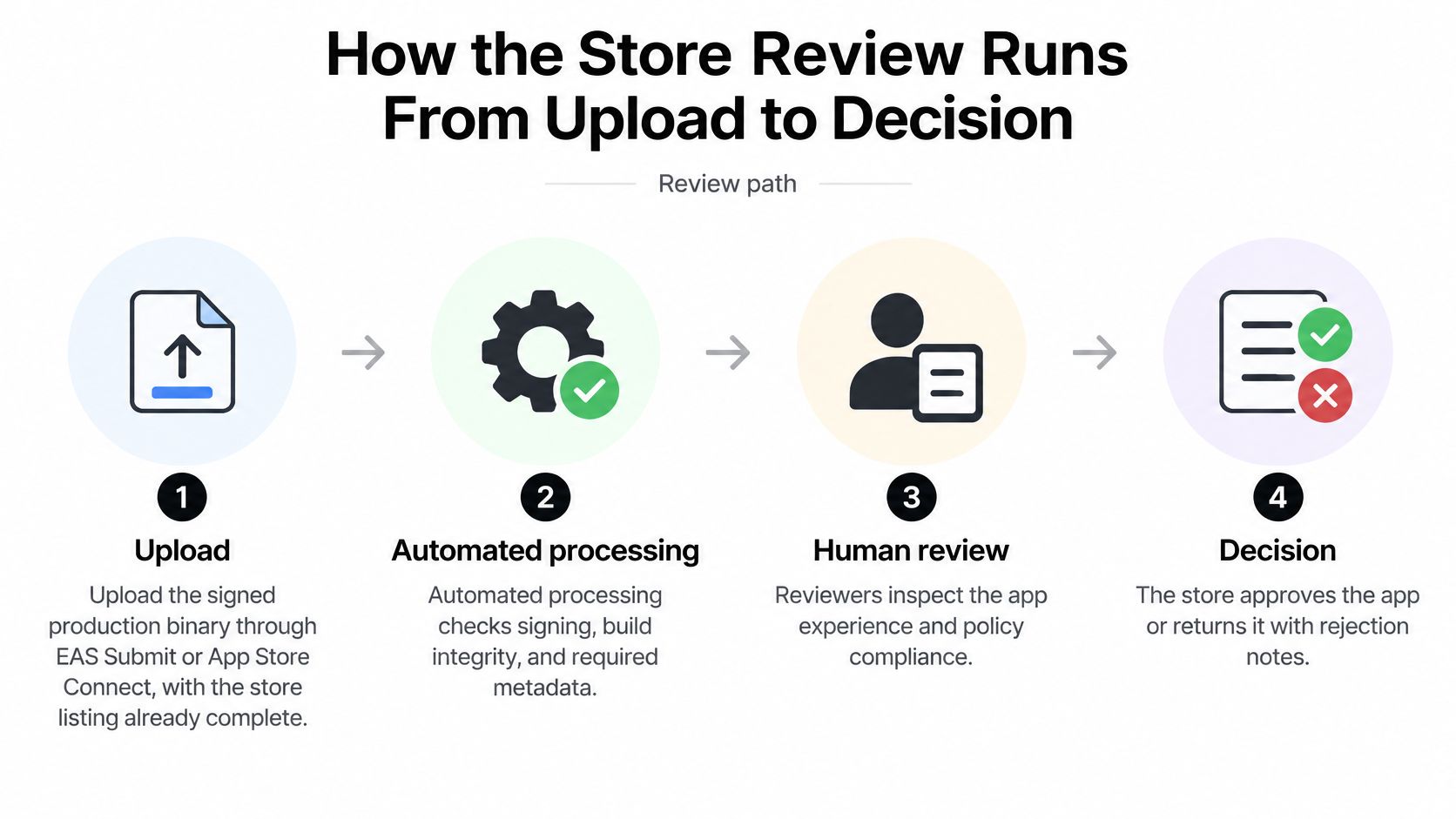
The upload and the submission are different actions. Sending a binary to the store doesn't mean that a reviewer has started evaluating it, and successful processing isn't approval.
<a id="follow-the-build-through-each-stage"></a>
Follow the build through each stage
-
Upload the signed production binary. For Expo projects, EAS Submit can deliver the build; for iOS, Xcode or Transporter can upload it to App Store Connect. Prepare the listing and select the intended build before submitting the version for review.
-
Wait for automated processing. Store systems inspect signing, build integrity, and related configuration. A provisioning or entitlement failure can stop progress before anyone opens the app, so monitor processing messages rather than assuming an upload completed the job.
-
Enter the review queue. Apple's App Review guidance says that, on average, 90% of submissions are reviewed in less than 24 hours, while incomplete submissions can take longer or fail review. That's a planning benchmark, not a launch appointment.
-
Make the reviewer's device session possible. The reviewer opens the app and evaluates its experience and policy compliance. If authentication is necessary, the review notes should explain how to enter and use the product independently without relying on help from your team.
-
Read the decision. Approval allows the release process to continue according to your release settings. A rejection normally identifies a guideline and explains the observed problem, sometimes with supporting screenshots.
-
Respond or replace the build. A clarification or metadata correction may resolve an issue without another binary. If code or native configuration must change, increment the build number, upload the replacement, select it, and resubmit under the same app record.
<a id="plan-for-dependencies-not-just-the-queue"></a>
Plan for dependencies, not just the queue
For Google Play, inspect the current testing requirements shown in Play Console before committing to a launch date. Account-specific testing prerequisites can affect the schedule before production review starts.
Planning rule: Leave room for investigation, correction, and another review cycle. A fast review doesn't compensate for a release candidate your team can't reproduce.
Keep an owner available to answer reviewer messages. Scheduling a submission immediately before the team becomes unavailable creates an avoidable operational delay.
<a id="completeness-checks-that-decide-most-reviews"></a>
Completeness Checks That Decide Most Reviews
Start at the first screen with no existing session. A reviewer who reaches a login wall needs a clear route into the product, not an explanation of how well it worked on the developer's phone.
According to Apple's guidance on common app rejections, more than 40% of unresolved App Review issues involve Guideline 2.1, App Completeness. Runtime stability and review readiness are different: a crash-free app can still appear unfinished when its dashboard is empty and its support link fails.
<a id="completeness-checks-before-submitting-a-react-native-app"></a>
Completeness checks before submitting a React Native app
| Check | What reviewers see | Fix before you submit |
|---|---|---|
| Core experience without sign-in | Login wall with no way to reach the main feature | Provide a demo account or guest mode and name it in the review notes |
| Seeded demo data | Empty lists and blank dashboards that look unfinished | Preload realistic sample content for the test account |
| Empty and error states | Blank screens after a failed request | Show a clear message and a retry control for network failures |
| Account deletion path | Deletion missing or hidden deep in settings | Make in-app account deletion reachable from account settings |
| Placeholder content | Lorem text, test images, or coming-soon screens | Remove placeholder copy and unfinished routes from the release |
| Working links | Support, privacy, or terms URLs return errors | Open each URL from a clean browser session |
| Production backend | Build points at staging, or the server is unavailable | Confirm production endpoints and keep services live during review |
| Screenshots and listing | Screens don't match the shipped product | Capture the release build on each required device size |
Guest mode isn't a universal requirement. If the product needs an account, provide a usable review account rather than redesigning authentication solely for review.
For example, a scheduling app's demo account should contain appointments that let the reviewer open details and change a booking. Don't populate it with real customer records. Make sample content realistic enough to explain the workflow without exposing personal information.
An MVP can have a narrow scope. Every feature you present as available should work from beginning to end.
A store-testing prerequisite is a separate task from this walkthrough. Teams launching on Android can use the Google Play tester requirement guide to prepare that work without mistaking tester enrollment for completeness validation.
Run this pass against the archived release candidate. Then write reviewer notes naming the account, available sample content, and exact navigation path to the main feature.
<a id="react-native-build-problems-behind-rejections"></a>
React Native Build Problems Behind Rejections
A development client contains conveniences that the submitted application doesn't share. Metro serves JavaScript during development, local settings may supply configuration, and a previously granted permission can conceal a broken first-run experience.
The Apple App Review Guidelines call for final submissions with complete metadata, functional URLs, no placeholder content, and on-device testing for bugs and stability. For React Native teams, the important distinction is the production artifact, not merely the same source code running in debug mode.
<a id="review-symptoms-react-native-causes-and-fixes"></a>
Review symptoms, React Native causes and fixes
These are investigation starting points, not diagnoses. Confirm the cause with device logs, crash reports, and the submitted build's configuration.
| Symptom in review | Likely React Native cause | Fix |
|---|---|---|
| Crash on launch, only in release builds | Hermes configuration, minified JavaScript, or missing production environment variables | Inspect crash logs and test the archived release on a physical device |
| Permission prompt fails, or the app crashes when requesting access | Missing iOS usage description or incorrect platform permission setup | Add iOS descriptions to Info.plist; configure Android manifest and runtime permissions; retest denial |
| Reviewer cannot sign in | Staging API URL or expired credentials in release configuration | Verify the compiled endpoint and validate the review account |
| Feature missing or different from the description | Expo config plugin not applied, or native module not linked | Compare plugin configuration and generated native projects with the submitted artifact |
| Build rejected during processing | Signing profile or entitlement mismatch | Regenerate affected provisioning profiles and align entitlements with enabled capabilities |
| Core behavior changed after review | An over-the-air update replaced the experience tested | Submit material feature changes through review rather than using updates to bypass it |
<a id="exercise-the-native-boundaries"></a>
Exercise the native boundaries
Install the build distributed through TestFlight on physical iOS hardware. Launch it without Metro, then exercise JavaScript bundle loading, native-module initialization, deep links, push notifications, and offline behavior.
Include cold and warm launches, background and foreground transitions, and rotation where supported. Deny permissions before granting them, and test on the minimum supported operating system rather than only your newest device.
For Expo projects, inspect generated configuration after applying config plugins. Changing a plugin or adding native code requires a compatible native build; publishing JavaScript alone won't install that native capability.
Keep the archive, source commit, build profile, and update channel identifiable. Otherwise, a successful retest might prove only that a different artifact works.
<a id="privacy-disclosures-across-sdks-and-ai-features"></a>
Privacy Disclosures Across SDKs and AI Features
Store privacy review comes down to whether an app's disclosures match the data its code and SDKs send. A React Native app faces the same checks as a native app: reviewers look at what information leaves the device, who receives it, and why.
<a id="build-an-inventory-from-actual-traffic"></a>
Build an inventory from actual traffic
Use a network inspection tool such as Charles Proxy or Proxyman in a controlled test environment, then compare observed requests with SDK documentation and backend logs. Traffic inspection can miss certificate-pinned or deferred requests, as well as transfers made server to server.
For each integration, record:
- Data sent: Identifiers, device information, account details, user text, images, or diagnostic content.
- Recipient and purpose: The service receiving the data and the feature or operational need it supports.
- Collection timing: Whether transmission starts at launch, after sign-in, after consent, or after a deliberate action.
- Retention and deletion: Where information remains and how deletion requests reach each relevant system.
Include analytics, authentication, advertising, crash reporting, and AI API calls. Review crash-report attachments and breadcrumbs, too. Diagnostic events can accidentally contain sensitive screen content.
<a id="explain-ai-sharing-before-it-happens"></a>
Explain AI sharing before it happens
A meal-planning app that sends a pantry photo to an external model should explain the transfer and its purpose before the user submits the photo. Handle any applicable consent at that point.
Use the inventory to complete the relevant App Store privacy answers, Google Play Data Safety answers, and in-app explanations. The forms use different categories, so check what each question asks rather than copying identical answers across them.
Encryption protects data in transit; it does not mean collection or sharing did not occur. And if an app describes a feature as private or local, its implementation should not send that content to a remote processor.
Architecture choice: If you cannot explain an SDK's downstream data handling, removing it may be safer than publishing a disclosure you cannot support.
Connect retention to the actual in-app account deletion workflow, including requests to downstream services where relevant. Recheck the inventory when a package, analytics configuration, or AI provider changes. Privacy review belongs in release management as well as in the submission forms.
<a id="confirm-your-next-step-before-resubmitting"></a>
Confirm Your Next Step Before Resubmitting
Say a reviewer rejects a React Native scheduling app for incompleteness because they can't reach its booking feature. The app requires an account, and the submission doesn't explain how the reviewer can obtain one.
That doesn't automatically call for an authentication rewrite. The useful fix is a deterministic reviewer path: valid access, suitable sample appointments, and instructions that match the interface they receive.
<a id="turn-the-message-into-a-reproducible-test"></a>
Turn the message into a reproducible test
-
Read the entire rejection message. Identify the guideline and the specific action the reviewer couldn't complete. Separate an access problem from a crash or an unavailable feature.
-
Reproduce the session. Use a physical device and the submitted release build, starting without an existing login. Follow only the instructions currently available to the reviewer.
-
Apply the smallest complete correction. Prepare the demo account, seed suitable bookings, and verify the booking journey. If the correction requires a binary change, increment the build number and test the replacement artifact.
-
Reply with evidence. In the App Store Connect review conversation, state what changed, where to tap, and which credentials to use. Don't send a broad claim that everything is fixed.
-
Resubmit the appropriate artifact. Confirm that the selected build and review notes agree. Keep someone available to monitor the response instead of treating resubmission as the end of the work.
A useful reply describes an observable result: the review account opens the calendar, a sample appointment is available, and the reviewer can complete the booking flow. It doesn't require them to infer the intended journey.
Before sending: Ask a teammate who didn't implement the fix to follow the review instructions literally.
Allow time for another review cycle rather than promising an immediate release. If you prefer to delegate submission operations, a launch service is an alternative to managing the listing, compliance paperwork, and reviewer correspondence internally.
Run the completeness and symptom checks on the archived build this week.
LetsDeployIt offers submission support for React Native and Expo apps, including listing preparation, screenshots, privacy documentation, reviewer notes, and handling resubmissions. If you'd rather have a team coordinate that work, visit LetsDeployIt to discuss your build and store-launch requirements.