App Store Submission Time: Realistic 2026 Timelines
App store submission time in 2026: Apple often decides in 24-48 hours, while new Google Play accounts need 14 days of testing plus review.
LetsDeployIt Team ·
Apple typically decides at least 50 percent of submissions in under 24 hours and 90 percent in under 48 hours, while a new personal Google Play account needs 14 continuous days with at least 12 testers before a production-access review that usually takes seven days or less. Those clocks measure different milestones, and neither guarantees that your app is publicly downloadable when the clock stops.
The planning mistake is to treat app store submission time as the interval between uploading a build and announcing a launch. A release lead needs to distinguish a review decision, permission to enter production, and an actual public download. Otherwise, a fast store response can still leave the marketing team waiting for a usable listing.
Table of Contents
- Typical App Store and Google Play Times
- How Review Time Becomes Launch Time
- What Actually Delays a Submission
- Example Calendars by Account Type
- How to Cut Avoidable Review Cycles
- Plan the Release Around the Slowest Gate
<a id="typical-app-store-and-google-play-times"></a>
Typical App Store and Google Play Times
Match your store and account to the appropriate row before naming a ship date. These are typical outcomes and policy gates, not guaranteed service levels, and an account with little review history deserves more caution than a routine update.
App store submission time by store and account
| Scenario | What the clock measures | Typical time | Not included |
|---|---|---|---|
| Apple, any account, review decision | Time to approval or rejection | Apple App Review typically reviews at least 50% under 24 hours and 90% under 48 hours; most submissions are reviewed within 48 hours | Preparation, rejection fixes, and publication after approval |
| Apple, first-time or thin review history | Review decision with possible additional verification | Additional verification may extend the usual decision window; no separate duration is specified | A promise of first-pass approval |
| Apple, after approval | Time until the listing becomes available | Publication has its own post-approval clock, separate from review | The review itself |
| Google Play, established account | Processing an app change or production release | Allow for processing rather than assuming an immediate release; the operational range appears in the worked calendars below | The new personal-account tester gate |
| Google Play, personal account created after November 13, 2023 | Closed testing before requesting production access | Google's personal-account requirements require at least 12 testers continuously opted in for 14 days | Production-access review |
| Google Play, that same new personal account | Review of the production-access request | Google says this usually takes seven days or less, although it can take longer | Closed testing and subsequent release processing |
| Google Play, organizational account | Production or update review | Use the app-change processing window, without the personal-account closed-testing gate | Separate account-verification delays |
<a id="read-each-clock-literally"></a>
Read each clock literally
Apple's published percentages describe a decision, which can be approval or rejection. They don't describe the share of developers who finish their launch within that interval. A reviewer can respond promptly and still send the developer back to correct a broken login or incomplete disclosure.
Apple also runs App Review around the clock. That makes a business-day-only interpretation of its queue misleading, although your own team might not be available to answer reviewer questions outside working hours.
For Google Play, the account distinction matters before any discussion of queue speed. An established publisher can plan around the release being processed. A qualifying new personal account must first become eligible to request production access.
<a id="why-there-isnt-a-useful-universal-average"></a>
Why there isn't a useful universal average
A blended average would combine incompatible events: a routine app change, a first production-access application, and an organization completing verification. Even if the arithmetic were correct, it wouldn't tell a specific publisher when to schedule a campaign.
Planning rule: Choose the row that describes your account and release track, then identify what still has to happen after that clock ends.
Organizational status isn't a promise of immediate approval. It removes the cited personal-account testing requirement, not every other verification or review obligation. Likewise, an established account doesn't make an incomplete submission ready for publication.
<a id="how-review-time-becomes-launch-time"></a>
How Review Time Becomes Launch Time
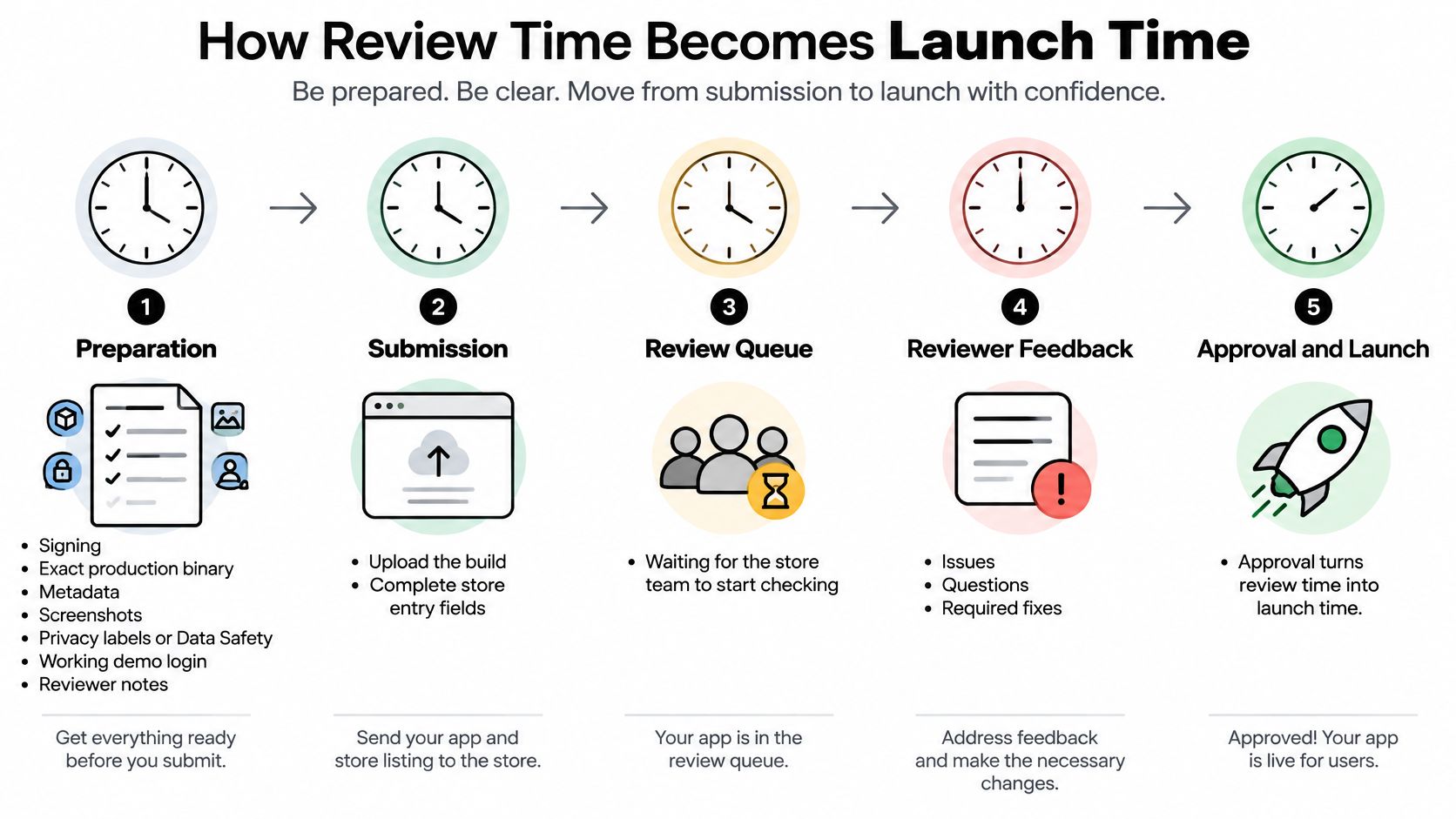
Treat the release as separate operational clocks, not a single queue. Review is the customs desk, not the voyage from a finished build to the shelf.
For a React Native or Expo app, “finished” might mean the development build works on the team's phones. Launch readiness means the signed production artifact, store entry, disclosures, and reviewer access all describe the same working product.
<a id="separate-the-operational-clocks"></a>
Separate the operational clocks
Preparation includes signing, the production binary, screenshots, metadata, privacy labels or Data Safety answers, demo credentials, and reviewer notes. Assign owners to unfinished items rather than assuming they're complete.
Waiting for review starts once the submission is ready for the store to examine. Keep that state separate from active review in your release log, even when the platform's published turnaround combines the experience into a submission-to-decision measure.
The review decision tells you whether the submission can proceed. It doesn't retrospectively include your preparation work, and it doesn't guarantee the next submission will receive the same turnaround.
Remediation covers reading the feedback, correcting the relevant behavior or information, validating the change, and submitting again. Some issues need a new binary; others concern information the reviewer couldn't verify.
Post-approval availability is another clock: Apple's review-status guidance says an approved app can take up to 24 additional hours to appear on the App Store. Don't schedule the announcement solely from the approval notification.
<a id="build-a-usable-forecast"></a>
Build a usable forecast
Use the following sequence to turn an optimistic estimate into a release forecast.
- Identify the publishing route. Record the store, release track, account category, and whether the Android account is subject to closed-testing eligibility. Confirm this in the actual console, not from someone's recollection.
- Estimate unfinished preparation. Ask the people doing the work how much remains. Screenshots that haven't been captured and a demo account that hasn't been tested aren't zero-duration tasks.
- Add the applicable store process. Keep closed testing, production-access evaluation, and app-release processing as separate entries. Don't substitute a quick update experience for a first-launch requirement.
- Include availability after approval. Check release settings and publication status before treating approval as completion. A deliberately held release also needs an owner to publish it.
- Add risk-based remediation contingency. For a first release, an untested production binary, or unclear policy compliance, allow for fixing and resubmitting. Label that allowance as contingency rather than claiming every app will be rejected.
- Publish a conditional date range. State the assumptions alongside it, including working reviewer access and no product changes during submission.
A useful forecast reads: “Public availability is expected within the planned release window if the submission passes without remediation; confidence is lower until production access is confirmed.” It doesn't promise an exact hour or invent a numerical probability.
Approval is an intermediate milestone. The launch is complete when a user in the intended market can find and download the intended version.
Platform review times are controlled by Apple and Google and are outside LetsDeployIt's control. A submission service can prepare a more complete package and handle responses, but it can't convert a store's typical turnaround into a contractual deadline.
<a id="what-actually-delays-a-submission"></a>
What Actually Delays a Submission
Incomplete submissions are the self-inflicted delays to eliminate first. Missing access instructions, contradictory disclosures, and an untested production login are problems the team can investigate before asking a reviewer to investigate them.
Sort the remaining risks by what they do to the calendar. Waiting for an account check isn't the same problem as correcting a crash, and neither is the same as completing a testing-eligibility requirement.
Delay causes and what they do to the calendar
| Cause | Where it hits | Calendar effect |
|---|---|---|
| Incomplete metadata, privacy labels, or Data Safety | Apple and Google Play | Requests for information or rejection can require correction and another review |
| Demo login, reviewer notes, or permission flow fails | Especially Apple's reviewer-access path | Reviewers may be unable to complete assessment until access is corrected |
| Crash or uploaded binary doesn't match the tested artifact | Both stores | A binary defect requires correction, validation, and resubmission |
| Policy issue such as misleading functionality or a missing required deletion path | Both stores | The developer must address the underlying policy issue, not simply wait |
| Thin review history or additional account verification | Both, particularly first releases | Extra verification can extend the elapsed schedule |
| Tester opts out or the eligible group loses continuity | Qualifying new personal Play accounts | Testing eligibility can be delayed independently of app review |
| Closed track versus production track | Google Play | Separate review stages can occur rather than a single upload event |
<a id="distinguish-defects-from-administrative-waiting"></a>
Distinguish defects from administrative waiting
A privacy policy should match what the app and its included SDKs do. Use the iOS app privacy policy guide to check the policy alongside the app's disclosures, rather than treating a hosted document as the whole compliance task.
For reviewer access, reproduce the path from a fresh installation. A session cached on a developer's device can hide a login failure, missing entitlement, or dependence on a private backend.
A rejection changes the work required. If the reviewer cannot reach a feature, you need to repair or explain that path; if the feature itself violates a policy, rewriting the reviewer notes doesn't resolve the product problem.
<a id="dont-confuse-examination-minutes-with-launch-days"></a>
Don't confuse examination minutes with launch days
A Google Play developer-community discussion records 36 minutes and 52 seconds of actual review time across closed and production tracks in a documented case. That isn't a platform average or a reasonable promise for another app.
The useful lesson is that reviewers' examination time can be a small part of elapsed publishing time. Developers still have to account for account checks, track-specific steps, policy declarations, testing eligibility, and release administration.
Keep a blocker log with the console status, the person responsible, and the action needed to proceed. Label each item waiting, needs correction, or eligibility incomplete so the team doesn't respond to every delay by rebuilding the app.
Once the blocker is identified, update the forecast from that point forward. Don't retain the original announcement date merely because the uploaded binary hasn't changed.
<a id="example-calendars-by-account-type"></a>
Example Calendars by Account Type
Consider the same working app taking different publishing routes. The calendars below use a hypothetical Monday kickoff, with complete assets unless the scenario says otherwise; they illustrate sequencing rather than promise particular dates.
Google's testing and production-access guidance requires qualifying personal accounts created after November 13, 2023 to complete 14 continuous days with at least 12 testers before applying for production access, whose review usually takes seven days or less; it also says app changes can take a few hours to seven days, or longer exceptionally, to process.
<a id="apple-with-an-established-developer-account"></a>
Apple with an established developer account
On kickoff Monday, the release lead uploads the tested production archive and submits the completed store entry. The campaign remains unscheduled until the team sees the decision and confirms availability.
If review proceeds cleanly, the team can move from submission to checking the public listing without additional product work. If the reviewer reports a broken login, the calendar branches: an engineer fixes access, someone validates the reviewer path, and the release lead handles the response or resubmission.
The lesson isn't to assign a guaranteed launch date to that Monday upload. It's to reserve people who can act on feedback while the app is under review, rather than discovering that the only engineer with production access is away.
<a id="google-play-with-an-established-or-organizational-account"></a>
Google Play with an established or organizational account
For an established Play account, kickoff Monday can be the production-submission milestone rather than the beginning of mandatory new-account testing. The team uses the processing range in Google's guidance, not a same-afternoon assumption.
An organizational account isn't subject to the cited personal-account testing gate. However, unresolved organization verification still belongs on the calendar, and a production release still needs processing.
For either account, schedule the campaign against confirmed production availability, not the successful upload message in Play Console. A testing-track listing isn't the public production launch.
<a id="google-play-with-a-qualifying-new-personal-account"></a>
Google Play with a qualifying new personal account
On kickoff Monday, the team starts the closed test and checks that the intended testers have opted in. The production-access application comes only after eligibility is satisfied, so a ready binary doesn't make the intervening testing period disappear.
Think of this as a testing block followed by an access-evaluation block, with release processing still to manage. About three weeks is a planning allowance for testing plus a typical access evaluation, not a structural minimum or a guaranteed public-launch deadline. Google may finish evaluating access sooner, take longer, or require further work.
Keep a recruitment buffer and monitor continuity. A tester who leaves doesn't invalidate everyone else's participation, but that person's interrupted participation can't be treated as continuous.
Our Google Play tester-requirement guide explains the coordination involved. Our Android closed-testing add-on provides 12 testers for 14 days, managed by our team, and is only for personal Play accounts.
For a dual-store launch, start eligible Android testing while Apple assets are being finalized. Use parallel work to reduce idle time, not to imply that an eligibility gate can be skipped.
<a id="how-to-cut-avoidable-review-cycles"></a>
How to Cut Avoidable Review Cycles
The most effective action is a pre-submission acceptance check against the actual production build. Apple's App Review guidance explicitly warns that incomplete submissions can delay review or cause rejection, so treat the binary, disclosures, credentials, and notes as a single release package.
Don't assign “submission ready” based only on an engineer's successful local build. Have another person follow the reviewer instructions without private context.
<a id="validate-what-reviewers-will-receive"></a>
Validate what reviewers will receive
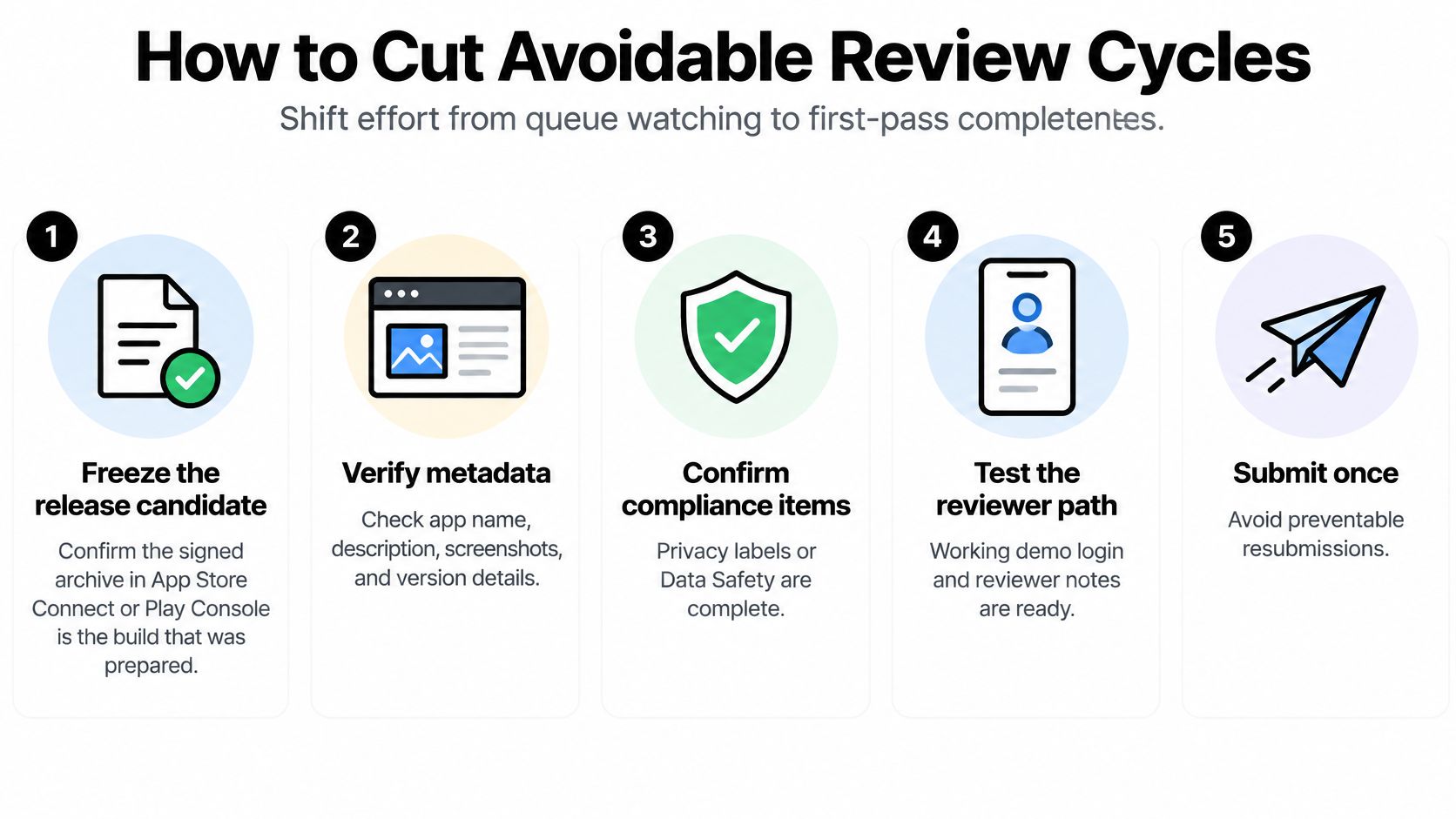
- Freeze the release candidate. Record the commit, version, build identifier, and signed artifact. In App Store Connect or Play Console, confirm that the selected build is the one the team validated.
- Inspect the store entry. Compare the description and screenshots with the shipping functionality. Remove placeholders and explain features that aren't obvious from the opening screen.
- Reconcile compliance details. Check privacy declarations against SDKs, permissions, and backend behavior. Verify an account-deletion path where applicable rather than relying on a sentence in the policy.
- Test access on physical devices. Start from a fresh install, exercise permission prompts, and log in with the reviewer account. Confirm the account reaches the screens reviewers need without a private network or developer intervention.
- Write navigable reviewer notes. Give the login path, explain relevant regional restrictions, and identify how to reach paid or permissioned features. Describe necessary steps, not the architecture of the entire app.
For Expo projects, keep the EAS Build artifact and submission configuration aligned with the intended production environment. A correctly signed app can still point at the wrong backend, so signing success isn't functional acceptance.
<a id="handle-exceptions-without-betting-the-launch-on-them"></a>
Handle exceptions without betting the launch on them
Don't build the schedule around expedited review. Treat an exceptional request as a request that the platform must assess, not as a reserved priority slot or a substitute for preparation.
If rejected, start with the exact message and guideline or policy citation. Reproduce the issue, decide whether it concerns the product, metadata, or reviewer access, and make the smallest complete correction that resolves it.
Then validate the changed path and explain the resolution in the response. If you disagree with the finding, provide precise evidence rather than repeatedly submitting the same package with a vague assurance that it works.
Reduce the work reviewers must do to understand and access the app. Don't try to reduce their work by concealing functionality.
Use our App Store rejection help when the remaining task is interpreting feedback and preparing a compliant response. We won't submit apps that violate published platform policies, including deceptive functionality or regulated categories without required licensing.
The practical gain is fewer preventable review cycles, not control over the queue.
<a id="plan-the-release-around-the-slowest-gate"></a>
Plan the Release Around the Slowest Gate
Submit when the package is ready; wait to promise a coordinated launch until the controlling gate is understood. For Apple, a complete production build and usable reviewer account support submission now, but an urgent campaign date still needs publication and remediation contingency.
For a qualifying new personal Play account, an unfinished closed test is a reason to move the announcement, not a reason to demand faster app review. For established or organizational accounts, focus instead on outstanding verification, production processing, and release settings.
<a id="decide-what-can-run-in-parallel"></a>
Decide what can run in parallel
A dual-store launch doesn't require every preparation task to happen in sequence. Recruit Android testers while preparing screenshots, validate the Apple reviewer account while checking Data Safety answers, and assign someone to monitor each console.
For the engineering side, AskYourQA's guide to release pipelines for engineering teams provides useful context for separating build, testing, and deployment work. Apply that discipline to store submissions by keeping reproducible artifacts and explicit handoffs, without assuming automation can bypass platform review.
- Go when preparation is complete. Submit the validated release package and keep the people responsible for reviewer replies available.
- Wait on an unsupported announcement. If account eligibility or a material compliance issue remains unresolved, don't sell the campaign date as confirmed.
- Verify before promoting. Check the public listing, intended market, and downloadable version before sending traffic to the store.
<a id="use-outside-help-for-work-someone-can-actually-perform"></a>
Use outside help for work someone can actually perform
Submission help fits when the app already builds and runs and the remaining work involves native builds, assets, compliance, reviewer communication, and resubmission. It isn't a replacement for finishing the product.
We provide that done-for-you submission work, and most apps are live in 3 to 4 weeks. You must own and control your Apple Developer and Google Play Console accounts and grant the access needed for submission.
That end-to-end service timeline isn't an Apple or Google review statistic. Judge the schedule by completed prerequisites and remaining gates, not by whichever queue anecdote sounds fastest.
LetsDeployIt handles native builds, store assets, compliance, testing, submission, and reviewer responses for working apps. Visit LetsDeployIt and share your app's link and target stores so we can assess the remaining launch work and identify which account or review gates your schedule needs to include.