Play Store App Privacy Policy: Step-by-Step Guide for 2026
Learn how to write a Play Store app privacy policy that passes review, with required clauses, Data Safety matching and a launch checklist.

The popular advice to generate a privacy policy, paste its URL into Play Console, and move on misses the hardest part. A Play Store app privacy policy has to describe the app you ship, including its SDKs, background requests, and deletion behavior. A polished page won't fix a declaration that contradicts the release build.
Treat the policy as a release artifact, not website decoration. Start with the shipped app, turn its data flows into disclosures, and keep the policy and Data safety answers under the same change-control process.
Table of Contents
- What Google Play Requires in Your Privacy Policy
- Map Every Data Flow Before You Write a Word
- Clauses Every Play Store Policy Needs
- GDPR, COPPA and CCPA Add-Ons by Region
- Host, Link and Fix Rejections Fast
- Confirm Your Policy Before You Submit
- Keep Data Safety and Your Policy in Sync
<a id="what-google-play-requires-in-your-privacy-policy"></a>
What Google Play Requires in Your Privacy Policy
Google Play requires every app to provide a privacy policy, including apps that collect no personal or sensitive data, according to its User Data policy. You must provide the link in Play Console and make the policy accessible inside the app.
Publish a clearly labeled, public HTTPS webpage that opens in a normal browser. Don't put it behind authentication or geographic restrictions, and don't use a PDF as the policy page. Identify the developer or entity associated with the store listing and provide a working privacy contact.
<a id="policy-requirements-by-app-type"></a>
Policy requirements by app type
| App case | What the policy must cover | Data safety impact |
|---|---|---|
| No data collected | Links in Play Console and the app, plus an accurate explanation of what stays on-device and why no personal data is collected | Declare no collection only when the build supports that answer |
| SDK-only data, such as analytics, crash reporting, or ads | SDK categories, the data accessed, recipients, and purposes | Assess SDK collection and sharing, not just your own code |
| Account creation | Account information held, retention, and deletion instructions | Address account deletion, including the in-app route and web request resource |
| Paid app with payments | Payment processor, transaction information you receive or retain, and its purpose | Declare purchase data and processor handling where applicable |
A paid download doesn't automatically mean your app receives card details. Describe the transaction information your systems handle rather than copying a payment clause intended for a different checkout model.
For the accompanying website, Coto & Waddington, Attorneys at Law's guide to what website privacy policies should cover provides useful context. Your app policy still needs app-specific disclosures that a website-only document may omit.
Submission test: Reconcile every SDK and permission in the release build against the policy. An unexplained dependency or data-access permission means the review isn't finished.
“No data collected” changes the explanation you write. It doesn't remove the policy obligation.
<a id="map-every-data-flow-before-you-write-a-word"></a>
Map Every Data Flow Before You Write a Word
Inventory the production APK or AAB, not just the repository. Google's Data safety guidance makes developers responsible for disclosures about SDK behavior as well as their own code.
Use this workflow to connect build inspection with policy drafting.
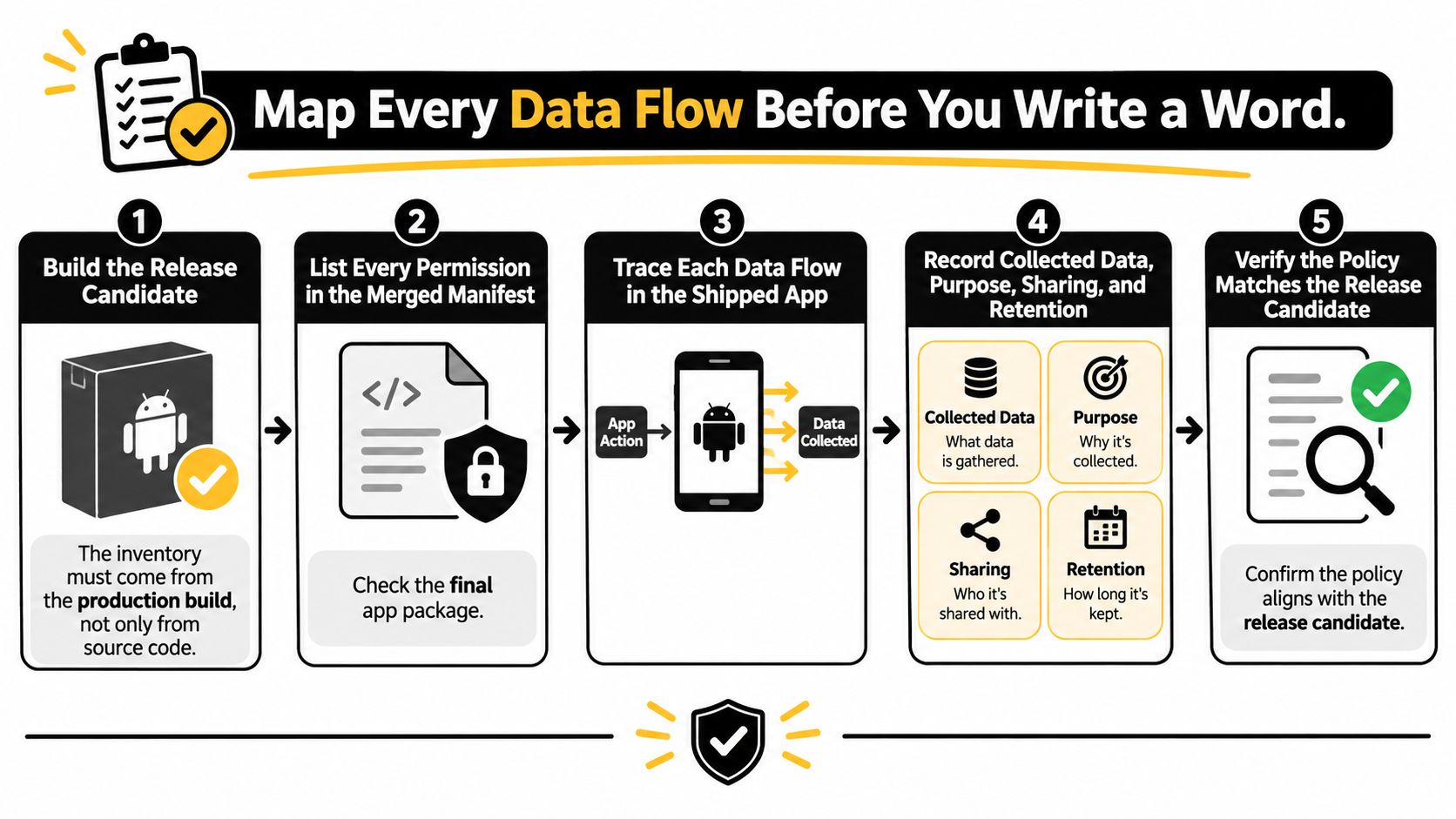
- Build the release candidate. Use the production configuration you intend to submit. Debug analytics settings and disabled advertising modules can give you a misleading inventory.
- Inspect the merged manifest. Android Studio's merged manifest view exposes permissions contributed by dependencies. Investigate permissions you didn't deliberately add.
- Inventory SDKs and storage. Include analytics, crash reporting, advertising, attribution, authentication, and cloud services. Record local databases and cached account information too.
- Observe runtime requests. Exercise onboarding, sign-in, purchases, background activity, and deletion on a test device. Inspect network traffic where technically possible and reconcile endpoints with vendor documentation.
- Record each data decision. Map the item to its Play data category, collection status, recipient, purpose, and lifecycle. Separate an observed transfer to a processor from the questionnaire's specific definition of sharing.
- Test permission outcomes. Run both grant and denial paths. Check whether the app stops collection or switches to another identifier.
<a id="data-flow-decisions-by-item"></a>
Data flow decisions by item
These are illustrative inventory entries, not declarations to copy without verification.
| Data item | Collected | Shared with third party | Purpose | Retention and deletion |
|---|---|---|---|---|
| Crash reporter device model and app identifiers | Yes | Yes, crash processor receives it | App stability | Vendor's configured retention schedule and deletion process |
| Advertising identifier | Yes | Yes, ad network | Serving and measuring ads | Verified network retention settings and deletion procedures |
| Account email and profile | Yes | No, in this example | Sign-in and account management | Kept until account deletion |
| Purchase record | Yes | Yes, payment processor | Processing payments | Documented transaction-retention schedule, including applicable recordkeeping obligations |
A processor receiving data doesn't automatically require a “shared” answer under every Play definition. Apply the questionnaire's exceptions carefully without hiding that recipient from the policy.
Complete App content > Data safety, including purposes, encryption in transit, and deletion availability. Compare the preview with your policy line by line, then save screenshots, SDK documentation, and test evidence alongside the release.
<a id="clauses-every-play-store-policy-needs"></a>
Clauses Every Play Store Policy Needs
Write clauses that a user can understand and an engineer can verify. Organize them around identity, data handling, recipients, and lifecycle rather than opening with a page of legal generalities.
Use the review visual as a reminder to check the policy against the app, not just for spelling.
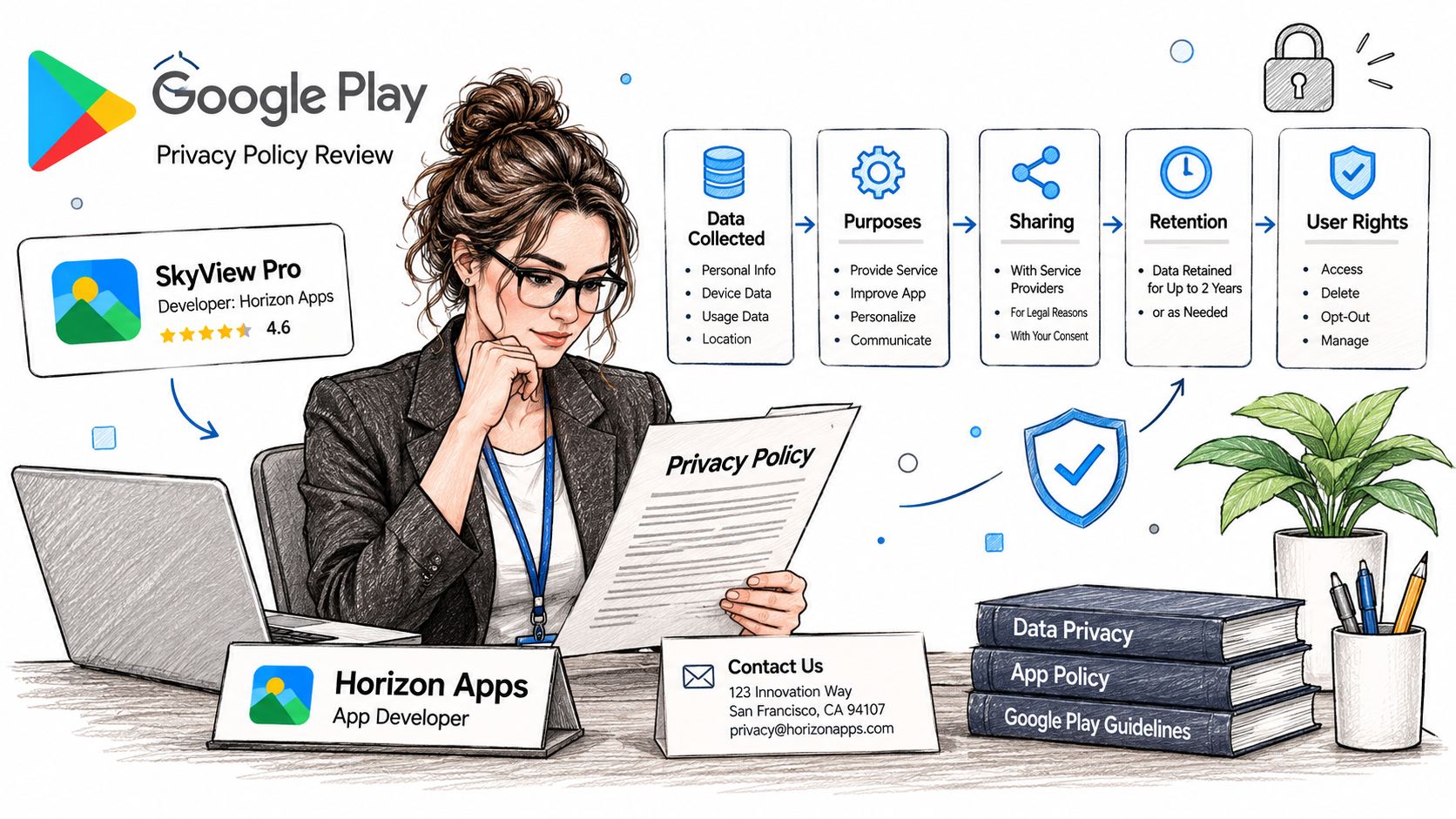
- Identity and contact. Name the responsible developer or entity consistently with the listing. Give users a monitored contact method.
- Data and purposes. Identify true categories, such as account email, crash logs, purchase records, or advertising identifiers. Explain why each is needed.
- Recipients and sharing. Name relevant SDKs and processors, distinguishing service providers from advertising or analytics partners. Avoid treating every recipient as an interchangeable third party.
- Security. Describe safeguards you implement, including encryption in transit where verified. Don't promise absolute security.
- Retention and deletion. State actual periods or clear retention criteria, then explain the in-app deletion route and web request process. Identify legitimate retained records and backup handling.
- Audience and changes. Include an accurate children's-data statement and a last-updated date. Don't claim an adult-only audience if onboarding and distribution say otherwise.
<a id="write-statements-you-can-prove"></a>
Write statements you can prove
For a hypothetical app, adapt sentences such as: We use Firebase Crashlytics to process device model information and crash logs so we can diagnose stability failures. Or: We retain your account email while your account is active and remove it through the account-deletion process described below.
Use these only if the implementation supports them. Remove filler such as broad assurances about valuing privacy when it replaces a concrete explanation.
For cross-platform releases, use the iOS app privacy policy guide to check the other build separately. Shared branding doesn't guarantee identical SDK behavior.
This video offers additional context for app privacy preparation.
<iframe width="100%" style="aspect-ratio: 16 / 9;" src="https://www.youtube.com/embed/r_ACQbYkrQM" frameborder="0" allow="autoplay; encrypted-media" allowfullscreen></iframe>A company-wide policy can work if readers can identify each app's practices. A generator can help draft it, but its output still needs the same content and hosting checks as a handwritten page.
<a id="gdpr-coppa-and-ccpa-add-ons-by-region"></a>
GDPR, COPPA and CCPA Add-Ons by Region
Where are your users, and who is the app intended for? Store compliance and legal compliance aren't interchangeable. A working policy URL doesn't resolve questions about lawful processing, children's information, or regional privacy rights.
Use the following comparison as a legal-review checklist, not a determination that every listed law applies to your app. Geography matters, but so do your activities, audience, and business status.
<a id="privacy-law-clauses-by-audience-and-region"></a>
Privacy law clauses by audience and region
| Law | Applies when | Policy must add |
|---|---|---|
| GDPR | Processing falls within its scope, including relevant offering of services to or monitoring of people in the EU or EEA | Lawful bases, applicable rights such as access and erasure, and international-transfer information |
| COPPA | The service is directed to children covered by the law, or the operator has actual knowledge of covered child users | Parental-consent practices, collection limits, and parental deletion procedures |
| CCPA / CPRA | The business meets applicable eligibility thresholds and handles California residents' personal information | Information categories, applicable rights to know and delete, and sale or sharing opt-outs |
| Other local laws | Users or processing activities bring the app within another jurisdiction's privacy statutes | Locally required notices and rights, confirmed with counsel |
A meditation app offered to users in Germany and California should assess both European and California requirements even if its developer operates elsewhere. It shouldn't automatically claim that both regimes apply solely because someone in either location can download it.
<a id="turn-rights-into-working-processes"></a>
Turn rights into working processes
An access or deletion clause needs an operational owner. Decide how requests are authenticated, how vendors are contacted, and how the user receives confirmation without collecting unnecessary identity documents.
Email authentication deserves its own review because verification messages and associated logs introduce additional processing. Mailbeam's guide to GDPR-compliant email verification for SaaS provides useful implementation context for that flow.
For deletion implementation problems, the account-deletion rejection guide helps connect policy language with an actionable user route. Google's account-deletion guidance requires apps supporting account creation to offer an in-app deletion route and a web resource for requesting deletion.
List your intended regions and audience groups before submission. Have counsel confirm applicability, then add clauses your support and engineering teams can fulfill.
<a id="host-link-and-fix-rejections-fast"></a>
Host, Link and Fix Rejections Fast
If the policy URL fails to open, fix access before rewriting clauses. Google's privacy-policy requirements call for a public, app-specific webpage rather than a PDF, login-protected resource, or geographically restricted page.
Open it in a private browser window. Check HTTPS, redirects, mobile readability, and whether the page identifies the developer associated with the listing.
<a id="privacy-rejection-signals-causes-and-fixes"></a>
Privacy rejection signals, causes and fixes
| Rejection signal | Likely cause | Fix |
|---|---|---|
| Policy link does not open | Login wall, geofencing, PDF, or broken HTTPS | Publish public HTML over HTTPS without access restrictions |
| Policy not reachable in app | Missing settings or onboarding link | Add a visible in-app link and verify the Console entry |
| Policy seems generic | Missing SDK, retention, or deletion details | Replace template clauses with verified app-specific practices |
| Data safety does not match policy | Undeclared advertising or analytics behavior | Correct both disclosures against runtime behavior and review the preview |
| Deletion claimed but not working | Missing or broken in-app or web route | Implement and test both routes before resubmitting |
Fix access problems immediately, but don't promise a same-day resolution for missing backend deletion functionality. That requires implementation, not a wording change.
A rejection message identifies a symptom. Resubmission needs evidence that you fixed the underlying cause.
If you compare public documents such as Knobee AI's privacy policy, use them to assess readability, not as proof that their clauses fit your build.
Our app-store rejection help addresses implementation as well as paperwork. For privacy, data-safety, and crash rejections, we fix the privacy policy, Data safety answers, and build stability before resubmitting.
<a id="confirm-your-policy-before-you-submit"></a>
Confirm Your Policy Before You Submit
Don't submit a build with unresolved disclosure mismatches. Carnegie Mellon researchers analyzed 1,039,003 Android apps and found that nearly half lacked privacy-policy links, according to the university's privacy-compliance study summary. That finding is a reason to verify your own release, not evidence that a particular policy will pass.
Use a signed-off checklist rather than relying on memory.
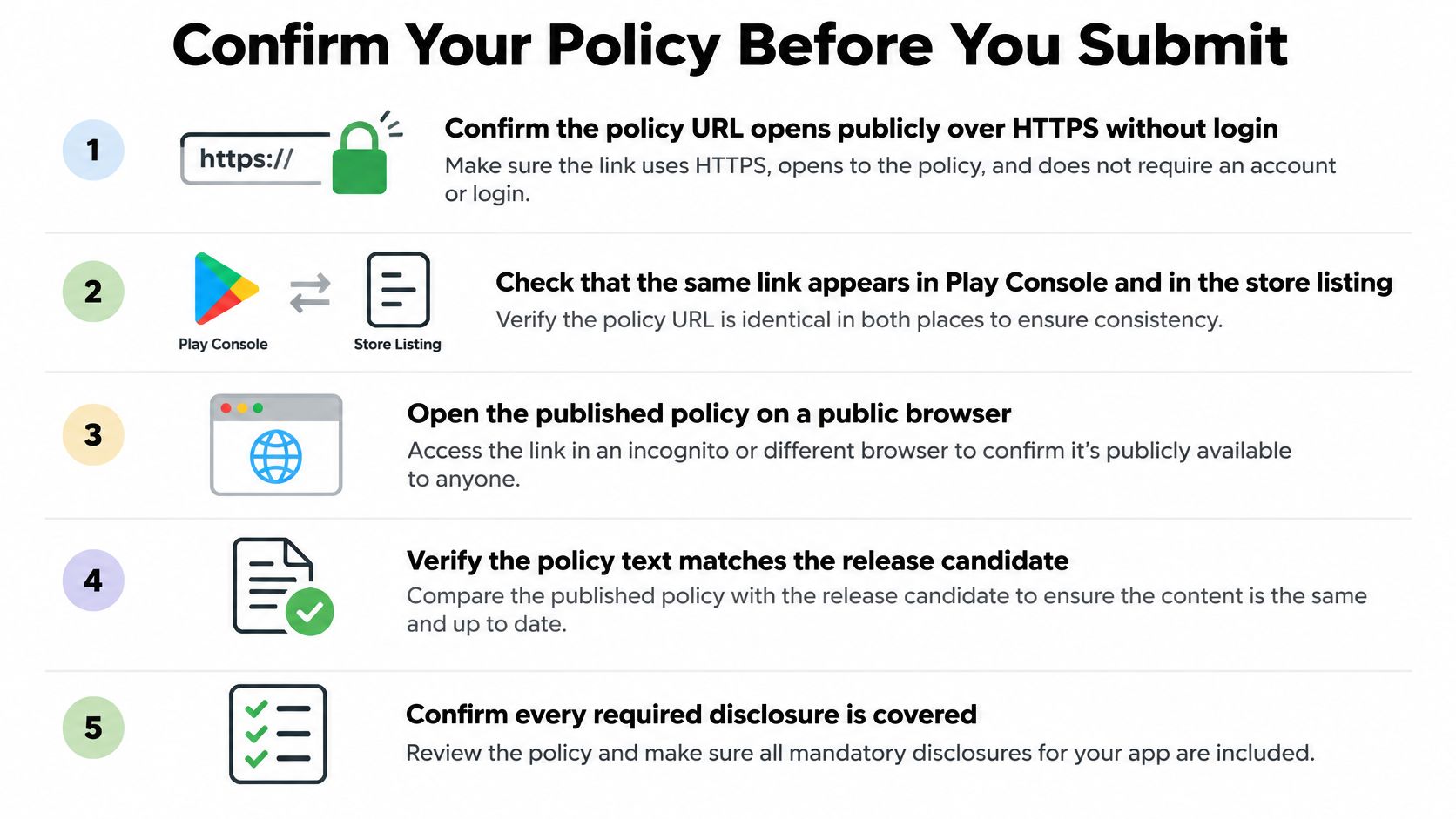
- Access. Open the public HTTPS policy without authentication and verify its placement in Console and the app.
- Build coverage. Reconcile the dependency and permission inventory with the published disclosures.
- Declaration accuracy. Match each Data safety answer to policy language and supporting implementation evidence.
- Lifecycle behavior. Exercise deletion and verify the stated retention settings.
- Regional coverage. Confirm audience-specific clauses and save the legal-review decisions.
- Evidence. Archive screenshots, SDK documentation, network observations, and test results with the release.
<a id="apply-the-audit-to-each-data-flow"></a>
Apply the audit to each data flow
Judge discoverability, completeness, purpose accuracy, sharing accuracy, and lifecycle controls separately. A reachable page can still omit device identifiers; a complete data list can still misstate why an SDK uses them.
Our price includes a hosted privacy policy and terms, Apple privacy labels and the Data safety form, an account-deletion flow, a Guideline 4.2 compliance pass, and reviewer correspondence. Those deliverables still need to describe the actual release candidate.
Before pressing submit, assign someone to resolve every failed checkpoint and attach the evidence packet to the release record. A green checklist without supporting evidence isn't a useful approval gate.
<a id="keep-data-safety-and-your-policy-in-sync"></a>
Keep Data Safety and Your Policy in Sync
The policy stops being accurate when the implementation changes without a disclosure review. Google's developer policy updates emphasize maintaining accurate Data safety information, including third-party SDK practices and consistency with the privacy policy.
Put privacy review into the release checklist, not a calendar reminder that developers can forget between launches.
<a id="changes-that-require-a-fresh-decision"></a>
Changes that require a fresh decision
- New SDK or permission. Reinspect data access, collection, recipients, and the corresponding form categories.
- New analytics event. Check the payload, especially account identifiers and user-entered content.
- Backend or vendor migration. Revisit recipients, security statements, storage locations, and deletion propagation.
- Retention adjustment. Update policy language and verify production settings, including backups.
- New audience or region. Reassess legal applicability and user-rights workflows.
- Account-flow change. Test creation, authentication, and deletion together rather than reviewing isolated screens.
Say you add an advertising SDK to the next release. Before rollout, inspect its configured behavior, update recipient and purpose clauses, and revise the relevant Data safety answers. A disabled personalization toggle isn't enough evidence that the SDK collects nothing.
<a id="keep-one-release-record"></a>
Keep one release record
Assign an owner to each dependency and record changes in a privacy change log. Each entry should connect the implementation change to its policy clause, questionnaire answer, vendor documentation, and test result.
Older builds still distributed through Play also count toward the app's disclosures. Don't describe only the newest build while an available older build continues different collection.
Release rule: A dependency update isn't complete until someone has checked whether its data behavior changed.
For vendor backups, document what deletion removes immediately, what remains temporarily, and the verified retention conditions. Don't promise instant removal from every system if your processor can't provide it.
Review the upcoming release's dependency diff and backend changes before rollout. If either changes what users disclose, who receives it, or how long it remains, update the relevant artifacts before shipping.
LetsDeployIt prepares and hosts app privacy policies, completes Google Play Data safety disclosures, and handles account-deletion flows and reviewer correspondence. Visit LetsDeployIt to get your release build, policy, and submission disclosures prepared together rather than fixing mismatches after rejection.