App Privacy Policy URL Generator: How to Create and Host
Learn how to create and host your app privacy policy URL generator. Generate policies easily and stay compliant with our guide.

You're deep in App Store Connect, the build is ready, screenshots are uploaded, and then the form stops you at the privacy policy field. The policy text exists in a doc, maybe even in Notion or Google Docs, but what Apple and Google want is a live HTTPS URL that a reviewer can open right now. That gap, between “we have policy text” and “we have a store-ready link,” is where a lot of React Native and Expo launches stall.
An app privacy policy URL generator closes that gap fast, but speed is only the easy part. The essential work is making sure the URL stays public, stable, and synchronized with what your app truly does. If you've ever had a reviewer reject a build because the policy was unreachable, out of date, or inconsistent with the privacy labels, you already know why this matters.
Table of Contents
- Why You Need a Live Privacy Policy URL Before Submission
- Generating Your Policy Text Without Creating Compliance Gaps
- Choosing Where to Host Your Privacy Policy URL
- URL Best Practices That Prevent Store Rejections
- The Hidden Risks of Generated Privacy Policies
- Adding Your URL to Store Listings and Testing Before Launch
<a id="why-you-need-a-live-privacy-policy-url-before-submission"></a>
Why You Need a Live Privacy Policy URL Before Submission
The painful moment usually comes at the end of the build. You've fixed the last crash, the binary is uploaded, and then App Store Connect or Google Play Console asks for a privacy policy link. At that point, a file on your laptop is useless. Apple and Google need a publicly accessible HTTPS URL, and the generated link can be pasted directly into App Store Connect and the Play Console. The policy has to be reachable before release, not “almost ready.”
That's why a PDF, a private Google Doc, or a local file link usually fails the test. Generator tools emphasize that the URL must live on a stable HTTPS page, because reviewers need to open it without logging in or jumping through access controls. A hosted page is not just a convenience. It's the thing the stores can validate.
Practical rule: if a reviewer can't open the policy in one tap from a fresh device, the link isn't launch-ready.
The distinction matters because policy text and policy URL are not the same asset. You can write a strong policy and still fail submission if the URL is broken, private, or temporary. The app-store field is a technical requirement, not a ceremonial checkbox. A missing link blocks release, and a bad link can do the same.
For mobile apps, this is especially unforgiving because stores expect the link to line up with what's disclosed in the listing and inside the app itself. A policy that exists only in a draft folder doesn't help when the reviewer clicks the field during review. A live page does. That's why many teams host the policy rather than generating text and pasting it somewhere later. The store wants a URL it can trust, not a promise that one will exist soon.
<a id="generating-your-policy-text-without-creating-compliance-gaps"></a>
Generating Your Policy Text Without Creating Compliance Gaps
The first mistake is rushing straight into the generator questionnaire. Inventory every data flow first. That means account fields, analytics events, crash reporting, ad SDKs, push tokens, device identifiers, and anything else your app sends off-device. If the policy generator asks whether you use analytics and you've embedded Firebase, the truthful answer isn't optional. Generator guidance warns that answering “no” in that situation creates policy text that is false.
<a id="start-with-the-data-map-not-the-form"></a>
Start with the data map, not the form
Write down what the app collects, who collects it, and where it goes. In React Native and Expo builds, that usually includes first-party inputs plus third-party SDKs that collect automatically. The safest workflow is to document the stack before you open the generator, then use that inventory to answer each prompt accurately. A policy generated from incomplete answers is worse than no generator at all, because it creates a false sense of readiness.
From there, customize the draft so it matches the app you're shipping. A generic mobile template is a starting point, not the finish line. The policy should clearly cover collection, use, retention, contact details, and update behavior, because those are the clauses reviewers and regulators look for when they compare the policy to the app's disclosures. The important part isn't legal drama, it's accuracy.
Good policy text mirrors the app's real data behavior, not the app's roadmap or intentions.
<a id="keep-the-questionnaire-aligned-with-sdk-reality"></a>
Keep the questionnaire aligned with SDK reality
Ads, analytics, and crash reporting are where teams get tripped up most often. If your app ships Firebase Analytics, ad mediation, or crash tools, those are not invisible details. They affect what the policy says, what the store labels say, and what the data safety answers say. A mismatch between those three surfaces is exactly the kind of thing that makes review painful.
That's also where a lot of one-page “instant policy” tools fall short. They can draft text quickly, but they can't know whether you've enabled a dormant SDK, changed consent behavior for a market, or added ad tracking after launch. You still need to verify every clause against the app binary and the current build configuration. A generator can draft the shell. You're responsible for making it true.
<a id="choosing-where-to-host-your-privacy-policy-url"></a>
Choosing Where to Host Your Privacy Policy URL
Once the text is accurate, hosting becomes the key strategic decision. Generator-hosted policies are the fastest path because the service creates and maintains the page for you, and the verification burden is low at launch. That speed is exactly why hosted privacy policy URL generators have become their own product category. Some providers emphasize that they can produce a live HTTPS policy link in minutes or even seconds, which is useful when a deadline is already in motion.
<a id="compare-the-hosting-choices-before-you-commit"></a>
Compare the hosting choices before you commit
| Hosting Type | Setup Time | Cost | Control | Best For |
|---|---|---|---|---|
| Generator-hosted | Fastest | Usually bundled or low-friction | Lower, tied to the provider | Solo developers and fast launches |
| Static site hosting | Moderate | Often minimal | High, you own the page | Teams that want long-term control |
| CMS-based hosting | Slower | Higher operational overhead | High, but heavier to manage | Teams already running a content site |
Generator-hosted pages are attractive because they remove setup friction. The trade-off is dependency. If you swap tools later, or the provider changes how the URL is managed, you have another migration to handle. Static hosting gives you more control over the page and the path, but you're also the one responsible for keeping it live, responsive, and current. CMS hosting works, but for a single legal page it can be more machinery than you need.
<a id="pick-for-stability-not-just-convenience"></a>
Pick for stability, not just convenience
The best choice depends on how you work. If you're a solo developer trying to get through App Review this week, a hosted generator may be the cleanest move. If you're part of a small team that expects to update SDKs often, static hosting gives you better control over continuity. If your company already uses WordPress for legal pages, a CMS can fit, but only if the page stays simple and public.
What matters most is whether the URL can survive future changes. A privacy policy that launches cleanly and breaks six months later is a maintenance failure, not a launch success. Reviewers care less about where the page lives than whether it remains accessible, accurate, and stable.
<a id="url-best-practices-that-prevent-store-rejections"></a>
URL Best Practices That Prevent Store Rejections
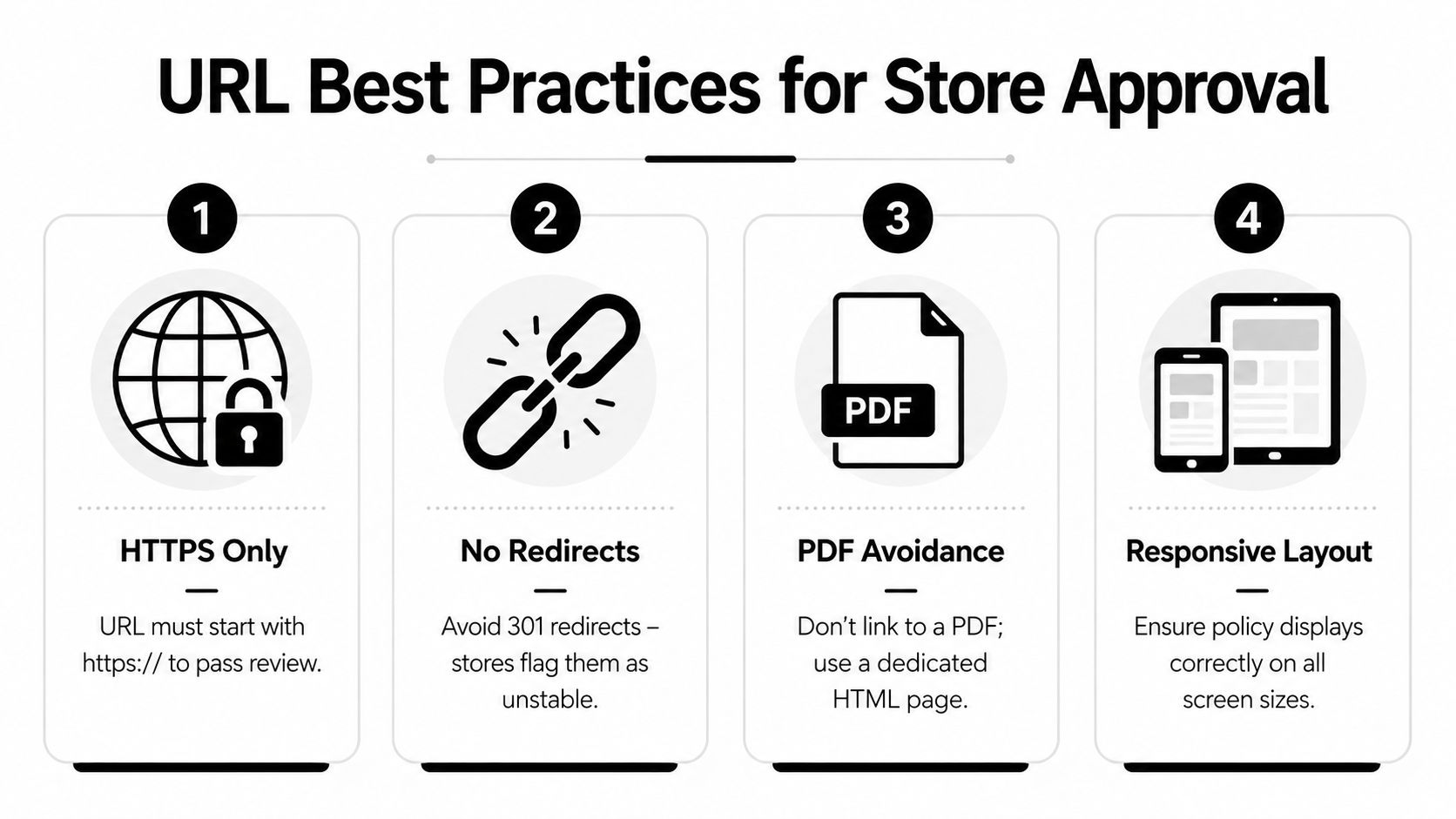
A policy URL can look fine in your browser and still get flagged during review if the implementation is sloppy. Apple and Google care about HTTPS, public access, and a path that doesn't keep changing. They're also less friendly to unstable links, query-string-only URLs, login walls, and geo-blocks. If the policy behaves like a temporary marketing page, reviewers notice.
<a id="keep-the-path-permanent"></a>
Keep the path permanent
Use a stable HTML page on a permanent path, and don't move it every time you redesign the site. Query-string-only links are fragile, and unstable redirects make review harder than it needs to be. A reviewer wants the exact same URL to work when they open it today and when they check the listing later. That's why versioning should happen in the page content, not in the link itself.
The page should also show the basics clearly, especially contact email and effective date. Those details help reviewers confirm the policy is a real legal page, not a placeholder. If you update your SDKs, ad stack, or retention behavior, update the policy content right away. A stale page is one of the fastest ways to create a mismatch between what the app does and what the store sees.
<a id="make-the-page-accessible-everywhere"></a>
Make the page accessible everywhere
Public accessibility matters as much as technical validity. The page should load without login walls, region locks, or device-specific barriers. If you can only see it while signed in on desktop, you've created a reviewer problem. The same goes for broken mobile rendering. If the policy is unreadable on a phone, that's not a minor issue for a mobile app.
A good test is simple. Open the link from an incognito window, on a phone, and on a network that isn't your office Wi-Fi. If any of those fail, the URL isn't ready. The stores don't reward cleverness here, they reward boring reliability.
<iframe width="100%" style="aspect-ratio: 16 / 9;" src="https://www.youtube.com/embed/87If0LmVxng" frameborder="0" allow="autoplay; encrypted-media" allowfullscreen></iframe><a id="the-hidden-risks-of-generated-privacy-policies"></a>
The Hidden Risks of Generated Privacy Policies
A generated policy URL can pass first review and still become a problem later. The weak point is usually synchronization. You change hosting providers, swap a generator, add an SDK, or adjust consent behavior, and the policy no longer matches the app, the store listing, or the in-app disclosure. The page still exists, but the compliance picture is fragmented.
<a id="mismatches-are-what-get-teams-in-trouble"></a>
Mismatches are what get teams in trouble
A common rejection reason is the gap between the privacy policy and the privacy labels. If the store says one thing and the policy says another, reviewers may treat the app as inconsistent or misleading. That problem gets worse when analytics or ad SDKs are present but not reflected in the policy language. The fix is not more marketing copy, it's tighter operational discipline.
A privacy policy URL generator can't solve that by itself. It can output a page, but it can't police what happens when your product team adds a new SDK, marketing enables retargeting, or your retention rules change after launch. The policy has to stay synchronized with the app's actual behavior, the store forms, and the disclosures inside the app. If one of those changes, the others need a review.
A policy that's accurate on launch day but stale after the next sprint is a maintenance bug.
<a id="changing-hosts-is-a-real-risk"></a>
Changing hosts is a real risk
Swapping hosts sounds harmless until the old URL 404s or the redirect chain changes. Reviewers and users may still have the original link from the store listing or the app's settings screen. If that link breaks, you've created a trust problem that didn't need to exist. This is why the earlier advice about a stable path matters so much.
Regulatory scrutiny also goes beyond “does the page load.” The policy has to stay aligned with the data you collect, how you use it, and where users can contact you. Generator pages usually focus on formatting and speed, but the operational question is whether the page stays true as the product evolves. That's the part most guides skip, and it's the part that hurts later.
<a id="adding-your-url-to-store-listings-and-testing-before-launch"></a>
Adding Your URL to Store Listings and Testing Before Launch
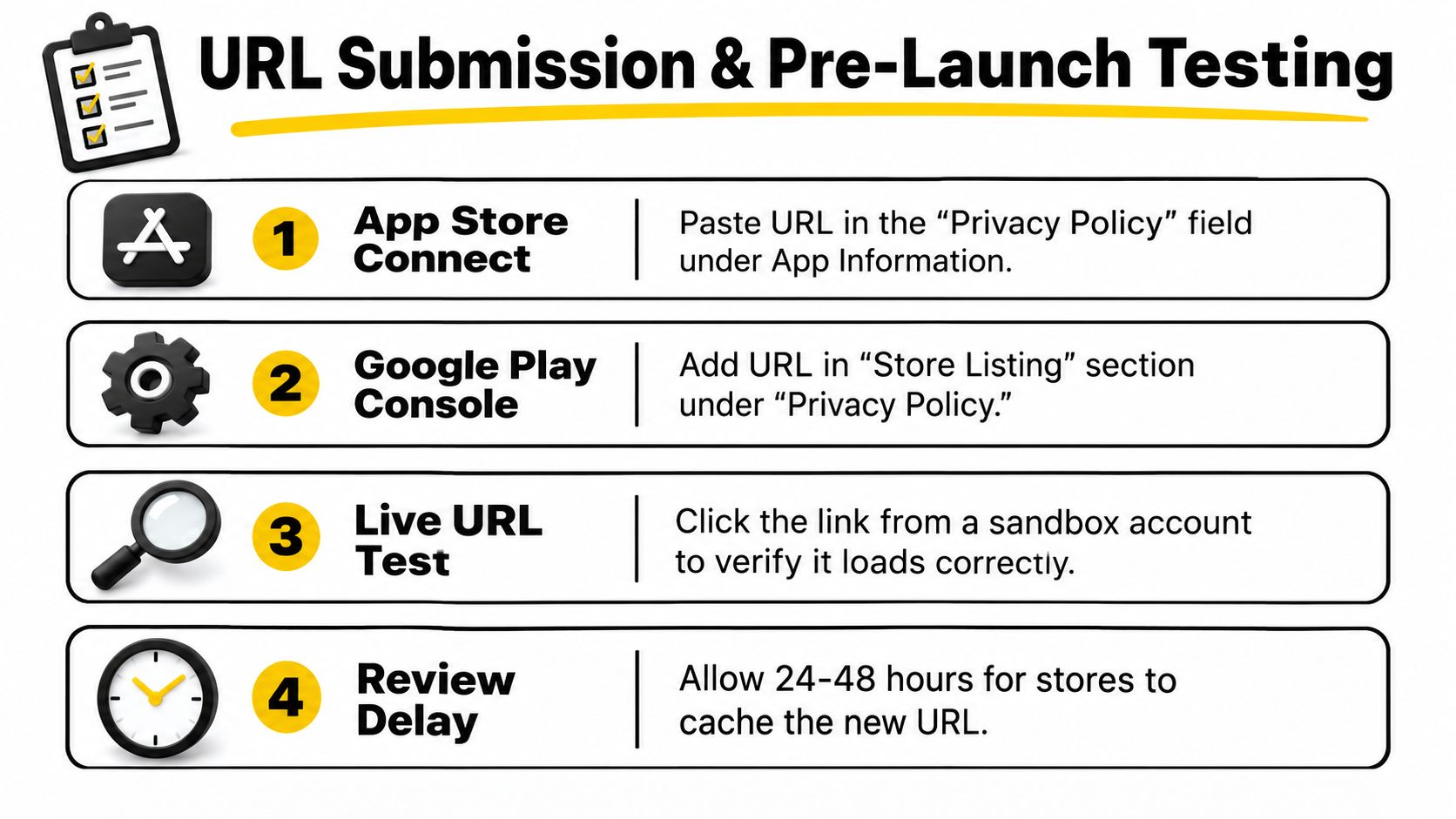
Paste the URL in App Store Connect under the app information privacy policy field, and in Google Play Console under the store listing privacy policy area. Then add the same link inside the app, usually in Settings, About, or Legal. The stores want the policy link. Users want a place to find it again after install.
<a id="test-the-link-like-a-reviewer-would"></a>
Test the link like a reviewer would
Open the URL on a phone, in a fresh browser session, and without being logged in. Confirm that the SSL certificate is valid, the page loads cleanly, and the content matches the privacy-label answers you gave in the store forms. If your app uses ads, analytics, or crash reporting, the policy should describe those behaviors plainly and consistently. If it doesn't, fix the policy before submission.
The Google Play data safety form deserves the same treatment. It should line up with the policy instead of telling a different story. When those two documents disagree, review gets slower and explanations get longer. If a reviewer flags the link, check accessibility first, then alignment, then the page's stability.
<a id="keep-monitoring-after-launch"></a>
Keep monitoring after launch
A live URL is not a one-time task. Pages break, hosts change, and legal text drifts out of date as apps evolve. Set up a quick manual check whenever you update SDKs, ads, or retention logic. That's much cheaper than discovering the problem when a reviewer or user is already staring at a broken link.
If you're shipping an app this quarter, don't wait until review day to solve the privacy policy problem. Build the policy, host it on a stable HTTPS page, and verify the store forms against the live page before submission. If you need a team that handles the compliance page, reviewer notes, and store submission together, visit LetsDeployIt and see how they help React Native and Expo apps get through Apple and Google with fewer launch surprises.