App Store Keyword Analysis: A Practical Guide for 2026
Master app store keyword analysis with proven research methods, prioritization frameworks, and tracking strategies. Learn how to find winnable keywords that

Most app store keyword advice starts with the wrong question: Which keywords have the highest volume? That sounds rational, but it pushes teams toward broad terms that attract heavy competition, vague intent, or both. A keyword can look impressive in a research tool and still be a poor use of limited metadata space.
Effective app store keyword analysis is a winnability exercise. You need to find terms that describe a real user need, fit your app precisely, and offer a credible path to visibility. In 2026, that means combining popularity and difficulty with semantic coverage, scenario-based intent, creative assets, and downstream behavior. Apple's newer first-party reporting makes that shift especially important, because teams can now connect acquisition keywords with impressions, tap-through rate, conversion rate, retention cohorts, and in-app purchase revenue through App Store Connect, including its web dashboard, mobile app, and Analytics Reports API. AppTweak's overview of App Store keyword ranking data describes this move from rank estimation toward keyword-level behavioral analysis.
Table of Contents
- Why Most Keyword Strategies Fail Before They Start
- Building and Scoring Your Seed Keyword List
- Understanding the Metrics That Matter
- Optimizing for Semantic Search and Intent Clusters
- Monitoring Rankings and Adapting to Volatility
- Putting It All Together for Your Next App Launch
<a id="why-most-keyword-strategies-fail-before-they-start"></a>
Why Most Keyword Strategies Fail Before They Start
High-volume keywords aren't automatically valuable. They may be too difficult for a new app to rank for, too broad to communicate a clear benefit, or so loosely related to the product that the resulting visitors don't convert. More impressions don't compensate for attracting people who wanted a different solution.
The better question is: Can this app win visibility for a search that reflects a genuine use case? That question forces a useful trade-off. A narrower phrase may have less apparent demand, but stronger relevance and clearer intent can make it more commercially useful than a popular category term.
<a id="the-volume-trap"></a>
The volume trap
Popularity scores are often treated as if they were search counts. They aren't. Apple-style popularity scores are relative indices, so a score of 35 cannot be read as 35 searches per day or week, as explained in AppTweak's guide to App Store keyword research. The score helps compare opportunities within a tool's model, but it doesn't tell you the absolute size of the audience.
Difficulty creates a second trap. A term with popularity 45 and difficulty 80 can be a worse target for a new app than one with popularity 25 and difficulty 14, because the first opportunity may require far more authority and conversion strength before it produces meaningful visibility. The right decision depends on the app's current position, not just the keyword's headline demand.
Practical rule: Treat popularity as directional evidence, not a promise of traffic. Treat difficulty as a constraint on what your current app can realistically win.
<a id="replace-single-terms-with-intent-clusters"></a>
Replace single terms with intent clusters
A strong strategy maps related searches around a user objective. For a budgeting app, a cluster might include expense tracking, recurring bills, spending categories, and budget alerts. Those phrases don't need to be forced into one field as a repetitive list. They should appear naturally across the title, subtitle, description, screenshots, custom product pages, and other relevant surfaces.
Current ASO analysis increasingly accounts for semantic relationships and intent signals. Apps may rank for queries that aren't written as exact matches in metadata, while broad head terms are becoming less dependable and specific, scenario-led searches are becoming more useful. Stormy's discussion of semantic search and App Store keyword ranking frames the opportunity as semantic coverage plus winnability, rather than volume alone.
The market is large enough to support serious analysis. A November 2025 U.S. App Store study examined the top 250 apps in every category, totaling 7,500 apps, according to Appfigures. That scale reinforces an important point: mature ASO decisions should come from category patterns and competitive data, not from a handful of manually inspected apps.
<a id="building-and-scoring-your-seed-keyword-list"></a>
Building and Scoring Your Seed Keyword List
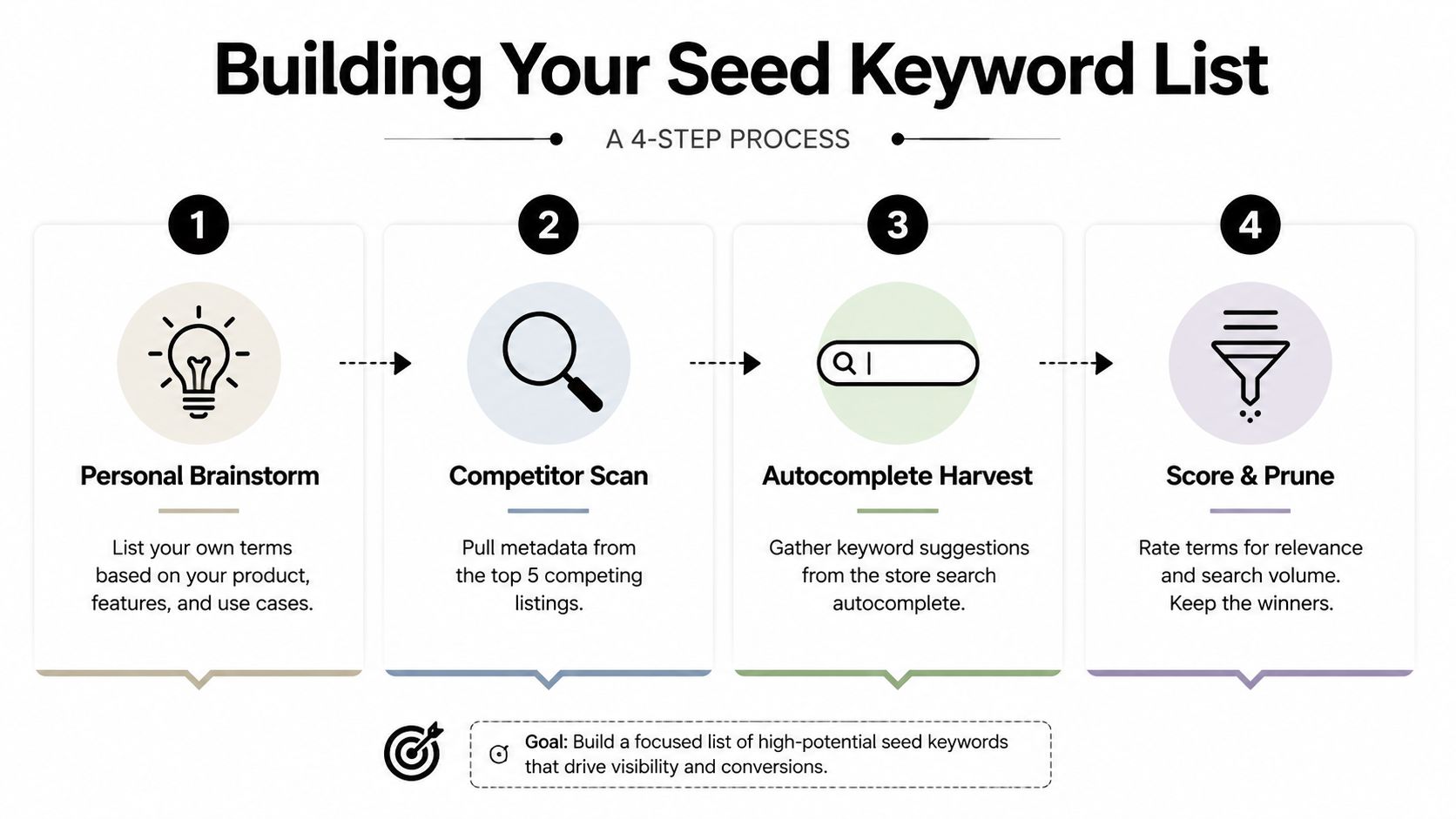
Keyword research should begin with user intent, not a popularity leaderboard. In 2026, only a small share of available terms are both valuable and winnable for a specific app. Build a working list of 30 to 50 terms from your product vocabulary, competitor metadata, and store autocomplete suggestions. The workflow described in Sonar's app store keyword research workflow compares popularity with difficulty before assigning terms to store metadata. Use that process as a filter, then add intent and semantic fit before making final choices.
<a id="step-one-write-the-user-vocabulary"></a>
Step one, write the user vocabulary
Start without a keyword tool. Describe the app in plain language:
- Core function: What does the product help someone do?
- User group: Who needs it most?
- Situation: When does the problem occur?
- Desired outcome: What result does the user want?
- Alternatives: What would the user call the solution if they did not know your brand?
A meal planning app might produce phrases such as recipe planner, grocery list, weekly meals, family meal planner, and diet planner. Keep obvious terms at this stage. The goal is raw material that reflects how people describe a problem, not a polished shortlist.
<a id="step-two-inspect-competitors-carefully"></a>
Step two, inspect competitors carefully
Review direct competitors serving a similar audience and solving the same problem. Record visible titles, subtitles, short descriptions, and repeated feature language. Terms that appear across strong listings deserve investigation, especially when your app supports the capability they describe.
Competitor metadata provides hypotheses, not instructions. A rival may rank because of brand strength, historical installs, or a feature your app lacks. Confirm the product fit and user intent before carrying a phrase into your own list. A high-volume term that describes the wrong experience can attract impressions without meaningful conversions.
<a id="step-three-harvest-autocomplete"></a>
Step three, harvest autocomplete
Search the App Store and Google Play with your core terms, then record the suggested completions. Autocomplete exposes the language users add after a broad starting word, including feature-specific and scenario-specific searches. Keep each store's suggestions separate because indexing and search behavior differ between platforms.
Group suggestions by the job the user is trying to complete. “Weekly meals” and “family meal planner,” for example, may support the same planning objective while addressing different levels of specificity. This grouping helps reveal semantic coverage before a tool assigns scores.
<a id="step-four-score-and-prune"></a>
Step four, score and prune
Record five fields for every candidate:
- Relevance, whether the app directly satisfies the query.
- Popularity, used as a comparative demand signal.
- Difficulty, indicating how hard visibility may be to earn.
- Intent clarity, showing whether the search expresses a specific need.
- Semantic role, identifying the cluster or user objective the term supports.
A common expert filter removes terms above difficulty 70 or below popularity 5, as documented in the Sonar workflow. Those thresholds are filters, not universal rules. Retain a term outside them when its intent is unusually strong or its strategic role fills a clear gap. Remove a popular term when the app cannot plausibly satisfy the search.
<a id="map-terms-according-to-platform-mechanics"></a>
Map terms according to platform mechanics
On iOS, assign the highest-priority terms to the title, use the subtitle for another important query and a clear value proposition, and place additional relevant combinations in the keyword field. Readability still matters. Awkward repetition can weaken the listing even when it adds another exact phrase.
Google Play needs a different allocation. The title, short description, and full description must communicate naturally because the platform has no equivalent hidden keyword field. Use the same semantic core across both stores, then adapt wording and placement to each platform.
Finish with a scored shortlist containing primary clusters, backup terms, and a reason for every selection. If the user intent, semantic role, and competitive angle are unclear, the keyword is not ready for implementation.
<a id="understanding-the-metrics-that-matter"></a>
Understanding the Metrics That Matter
Keyword volume alone is a weak launch plan. The useful question is whether a term is valuable, relevant, and winnable for this app in 2026. Only a small fraction of candidates meet all three conditions, so scoring should expose trade-offs rather than reward the largest demand estimate.
Three metrics shape most decisions. Popularity indicates whether users appear to search for a term. Difficulty estimates how hard visibility may be to earn. Relevance tests whether those users want what the app provides. Popularity without relevance brings unqualified traffic. Relevance without winnability creates a target that may never gain reach. Difficulty without product context is just a number.
<a id="read-popularity-as-a-relative-signal"></a>
Read popularity as a relative signal
A popularity score helps compare terms inside the same research environment, but it is not an absolute volume figure. Two keywords with similar scores may still represent different amounts of demand, and a small difference in a relative index does not imply a proportional difference in users.
Difficulty also depends on the app. A new product with limited history and weak conversion signals should choose more accessible targets than an established app with strong category authority. The same keyword can be a sensible long-term bet for one product and wasted effort for another.
| Keyword Profile | Popularity | Difficulty | Best For | Risk Level |
|---|---|---|---|---|
| Broad demand, highly competitive | 45 | 80 | Established apps with strong authority | High |
| Moderate demand, accessible competition | 25 | 14 | Newer or focused apps seeking winnable visibility | Lower |
| Low demand, highly specific intent | Low relative signal | Low | Feature or scenario clusters with strong relevance | Moderate |
| Relevant but difficult head term | High relative signal | High | Long-term testing, not the only launch target | High |
| Weak relevance with attractive demand | Attractive score | Variable | Usually reject | Very high |
The first two rows show the central trade-off described in AppTweak's keyword research guidance. A term with apparently larger demand is not automatically the better investment when its difficulty is much higher.
<a id="give-relevance-veto-power"></a>
Give relevance veto power
A keyword should describe a feature, problem, audience, or outcome that the app supports. A loose match can hurt conversion and retention because visitors arrive expecting a product experience the app cannot provide.
Use this decision sequence:
- Could the app satisfy the search immediately?
- Would the screenshot sequence confirm that promise?
- Does the phrase belong to a meaningful intent cluster?
- Can the app plausibly compete for it now?
- Will success appear in acquisition and downstream behavior, not only ranking?
The final question can be measured on iOS through App Store Connect keyword-level reporting. Teams can connect a search term with impressions, tap-through rate, conversion rate, retention cohorts, and in-app purchase revenue, then judge traffic quality after the click. The AppTweak explanation of Apple's keyword ranking data describes these first-party measurement capabilities.
Use scores to prioritize investigation, not to make the decision alone. A strong shortlist balances semantic intent, product proof, competitive access, and user behavior. A high-volume term that fails those checks belongs in testing, not at the center of the launch plan.
<a id="optimizing-for-semantic-search-and-intent-clusters"></a>
Optimizing for Semantic Search and Intent Clusters
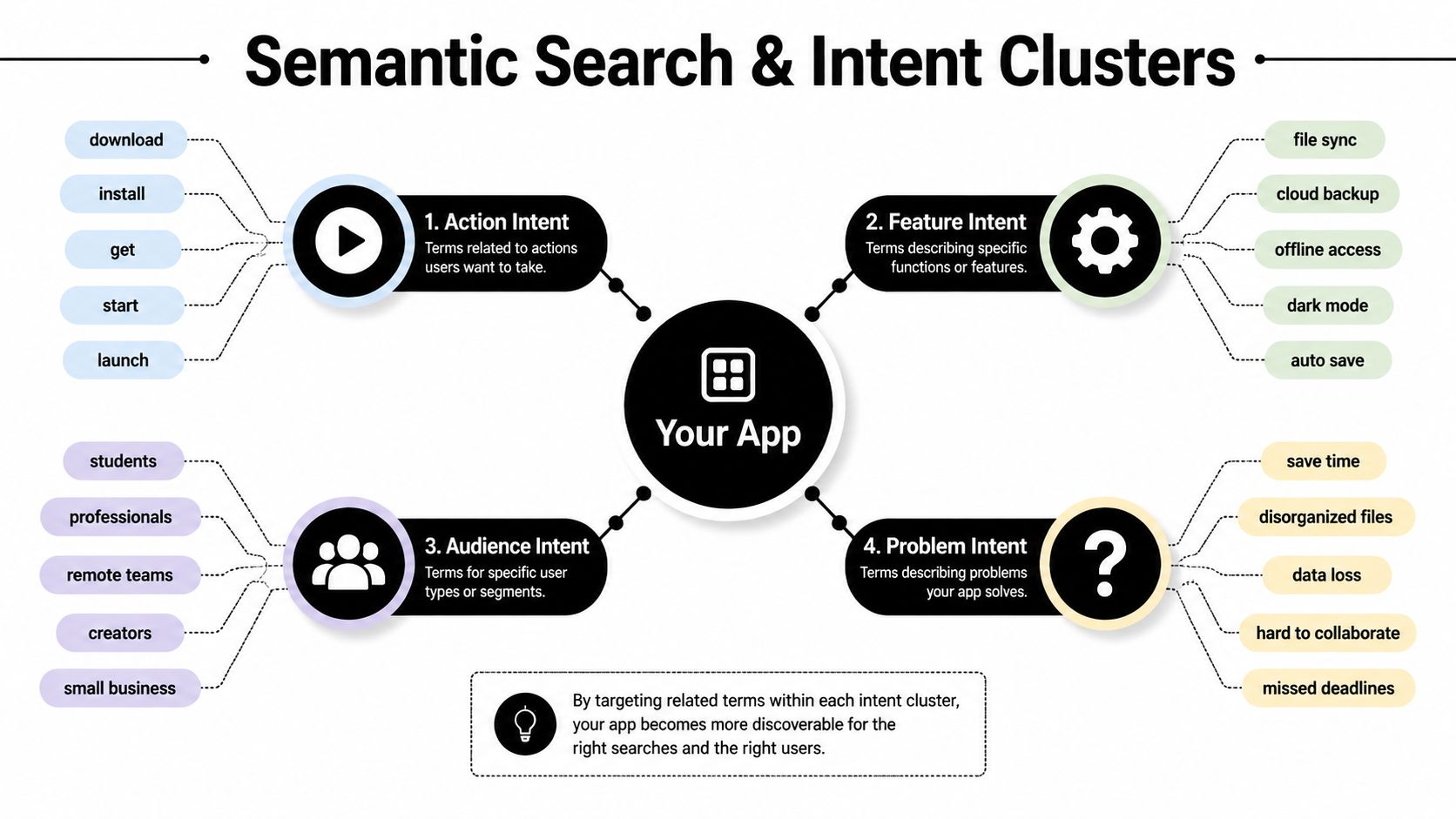
Exact-match placement still contributes to discoverability, but keyword volume alone is a weak planning tool. Apple and Google interpret related meaning, user intent, product features, and creative context. The practical target is an intent cluster, a group of searches connected by the job a user wants completed.
<a id="build-clusters-around-user-jobs"></a>
Build clusters around user jobs
Organize candidate terms into four groups:
- Action intent: Searches that imply an action, such as organizing, tracking, scanning, or planning.
- Feature intent: Queries naming a function, such as reminders, recurring entries, collaboration, or offline access.
- Audience intent: Language tied to a user type, such as students, families, freelancers, or travelers.
- Problem intent: Searches describing the frustration the app resolves, such as missed deadlines, scattered receipts, or inconsistent routines.
An app may serve all four groups, but every cluster needs clear product proof. If the screenshots promise a feature that users cannot recognize after installation, semantic relevance may generate attention without qualified acquisition or retention.
<a id="measure-coverage-not-repetition"></a>
Measure coverage, not repetition
Create a coverage map with one row for each intent cluster. Record the supporting metadata term, screenshot message, relevant app feature, target audience, and performance signal for each row.
A travel app might connect “offline maps” with a screenshot showing downloaded destinations, a feature description explaining offline access, and a custom product page for travelers preparing for limited connectivity. That connection gives each asset a job. Repeating “travel app” throughout every available field does not.
Custom product pages and localized or segmented listings can present different clusters to different audiences. Keep the promise consistent across metadata, screenshots, and the landing experience. Users should be able to classify the app quickly and see why it fits their situation.
The strongest semantic strategy makes the app easy to classify and easy to choose.
Long-tail phrases deserve serious testing because they often describe a specific situation more clearly than a broad category term. A scenario-based query may attract less traffic while bringing users with a clearer need. It also gives the creative team a concrete message to demonstrate.
The same approach counters volume obsession. In 2026, only 6.8% of App Store keywords and 2.3% of Google Play keywords were both winnable and associated with real traffic, according to Stormy's semantic search analysis. Broad terms can still work, but a tiny fraction of available keywords combine attainable rankings with meaningful value. Test each candidate for relevance, attainability, and value before assigning scarce metadata space.
The video below demonstrates how semantic search and intent clusters affect app discoverability. Use it to see how related queries can be grouped around user needs instead of treated as isolated keyword rows.
<iframe width="100%" style="aspect-ratio: 16 / 9;" src="https://www.youtube.com/embed/aHEtzy7NdyY" frameborder="0" allow="autoplay; encrypted-media" allowfullscreen></iframe><a id="monitoring-rankings-and-adapting-to-volatility"></a>
Monitoring Rankings and Adapting to Volatility
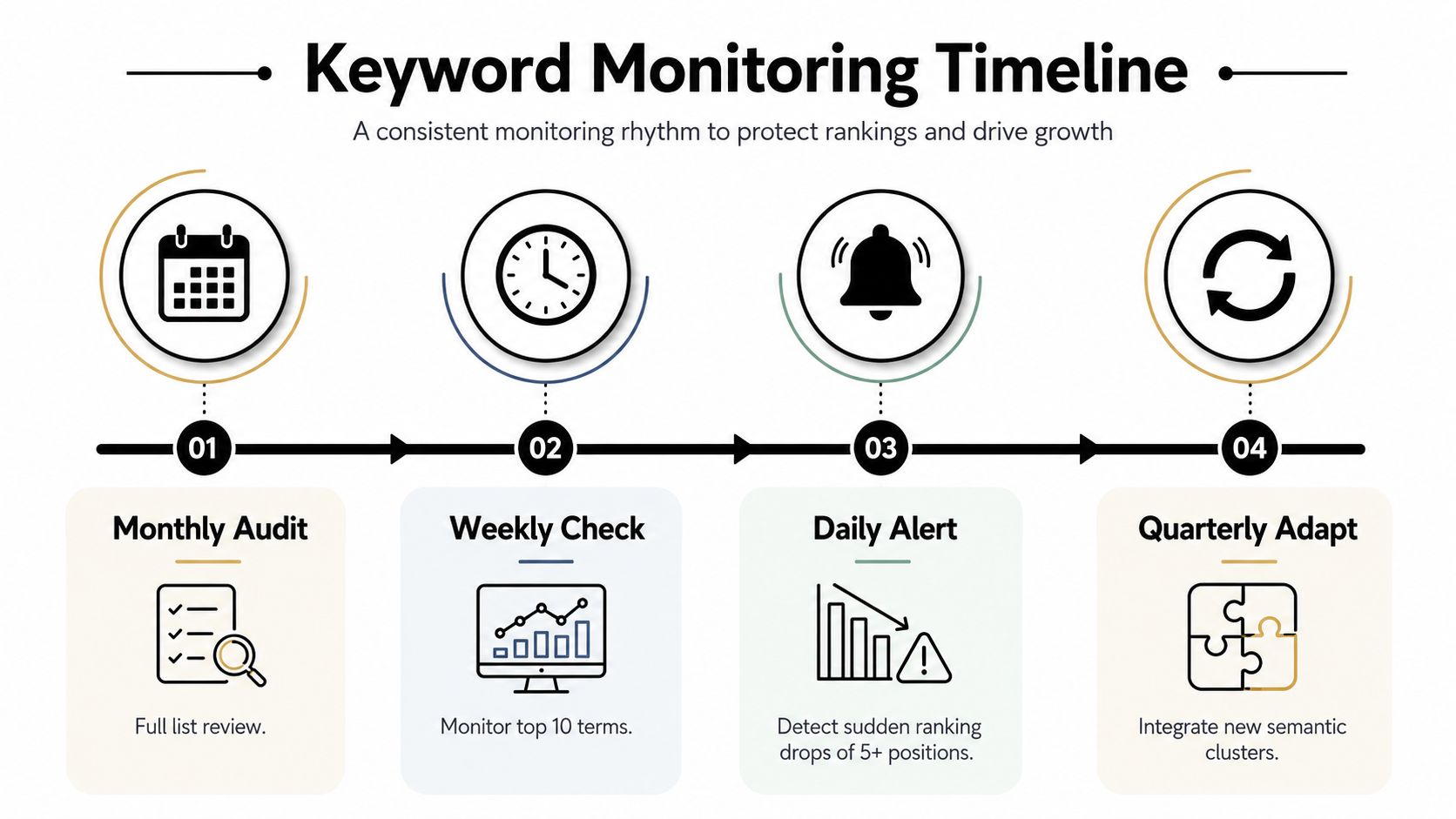
A keyword list is not a publish-once asset. Rankings shift as competitors revise metadata, platforms change retrieval systems, user language develops, and new intent patterns appear. The operating model needs scheduled reviews plus alerts for unusual movement, so teams can distinguish a signal from routine fluctuation.
<a id="use-a-practical-review-cadence"></a>
Use a practical review cadence
Review target rankings weekly, then refresh the keyword set quarterly, using the cadence outlined earlier. Weekly checks preserve the context needed to connect movement with a metadata or creative change. Quarterly reviews create room for competitor language, emerging scenarios, and terms that no longer earn their metadata space.
Mature apps can see 20 to 30 percent keyword turnover per cycle, according to the previously cited workflow. Use that figure as a planning benchmark, not a replacement quota. Remove a keyword when its relevance, winnability, or business value has weakened. A calendar alone is not a reason to change it.
<a id="separate-noise-from-a-real-shift"></a>
Separate noise from a real shift
Compare ranking movement with impressions, taps, conversion, and retention whenever first-party reporting connects those outcomes. A rank decline with stable acquisition may need observation. A decline paired with weaker impressions and conversion calls for investigation.
Single-day snapshots can create the wrong diagnosis. ASOWorld's April 2026 App Store trends coverage reported a U.S. App Store shock involving 16,170 keyword ranking losses in one day. A change at that scale warrants checking whether the decline affects one app, one intent cluster, or the wider market before anyone rewrites metadata in panic.
<a id="make-replacement-decisions-explicit"></a>
Make replacement decisions explicit
Keep a keyword when the app remains relevant, rankings are recovering, and downstream behavior stays healthy. Investigate sudden movement before replacing the term, especially when several apps in the category show the same pattern. Replace it when the query no longer describes the product, repeatedly brings weak conversion, or is consistently outmatched by a more precise alternative.
Monitor emerging query forms without treating novelty as value. The same ASOWorld coverage points to a 300% increase in AI-related search terms over the past year, while broader 2026 analysis emphasizes scenario-based and feature-specific queries. Add a new term to an intent cluster only when the product, metadata, and store assets can support the underlying user need. Otherwise, it adds noise to the report rather than improving discoverability.
<a id="putting-it-all-together-for-your-next-app-launch"></a>
Putting It All Together for Your Next App Launch
A small team launching a React Native or Expo productivity app should begin with user language, competitor listings, and autocomplete suggestions. From there, it can build a seed list of 30 to 50 terms, then group candidates by jobs such as daily planning, recurring reminders, shared tasks, and deadline management.
Volume alone does not decide the shortlist. The team scores each term for relevance, relative popularity, difficulty, and intent clarity, then removes phrases the app cannot realistically win or satisfy. It selects one primary intent cluster for the iOS title and subtitle, assigns supporting terms to the keyword field, and builds Google Play description copy around the same semantic core. Screenshots should demonstrate those use cases, so the promise in search results matches the product experience.
Only a small share of keywords are both valuable and winnable in 2026. Semantic intent mapping makes that constraint visible. A phrase with lower apparent volume can outperform a larger term when it describes a clearer need and produces stronger conversion.
<a id="a-launch-checklist-that-survives-review"></a>
A launch checklist that survives review
- Research: Build the seed list from product language, competitor metadata, and autocomplete.
- Prioritize: Remove weak or implausibly difficult terms, then select clusters tied to a clear user problem.
- Implement: Distribute terms according to iOS and Google Play indexing mechanics.
- Visualize: Match screenshot headlines and preview assets to the highest-value intent clusters.
- Validate: Confirm that every target phrase describes a real feature or outcome.
- Measure: Configure ranking monitoring and connect visibility with acquisition and conversion data where available.
- Adapt: Review rankings weekly and refresh the keyword set quarterly. Investigate sudden disruption before making broad changes.
Keyword analysis belongs inside the submission workflow. Metadata, screenshots, reviewer notes, compliance checks, localization, and post-launch monitoring should reinforce one product promise. Ranking for a query does not guarantee success if the listing fails to convert or the app misses the searcher's expectation.
The durable process is an evidence-based loop: map intent, select winnable clusters, express them in text and visuals, submit carefully, inspect behavior, and revise. This approach gives teams a better chance of winning relevant searches than a volume-first list that looks impressive but attracts the wrong audience.
LetsDeployIt prepares React Native and Expo launches with ASO keywords, store listing copy, screenshots, compliance checks, reviewer notes, and end-to-end submission support. If you want a launch workflow that connects app store keyword analysis with the rest of your store approval process, visit LetsDeployIt to discuss your next app.