App Store Privacy Policy: A Step-by-Step Guide
Create an app store privacy policy that meets Apple and Google requirements, avoids rejections, and matches your real SDK data flows.

A rejection risk isn't a missing app store privacy policy; it's a policy that says one thing while your third-party SDKs do something else. Treat the policy as a reconciliation artifact, and write it after you inventory the SDKs, not before.
Apple made the policy link mandatory in App Store Connect, but the store also checks whether the policy is reachable, whether it matches your App Privacy disclosures, and whether the app exposes the policy in a usable way. Large-scale analysis of more than 2 million App Store listings found that 58.5% included a privacy-policy link, 39.3% had no link at all, and only 38.4% of the links that did exist led to a valid privacy policy document, which tells you the weak point isn't just the text, it's the whole chain of disclosure study.
Table of Contents
- Why Most App Store Privacy Policies Get Rejected
- The Clauses Every Reviewer Reads
- Running a React Native and Expo SDK Inventory First
- Filling In the Store Specific Fields Correctly
- Hosting, Linking, and In-App Access Requirements
- Rejection Triggers and How to Fix Them
- Pre-Submission Checklist and When to Outsource It
<a id="why-most-app-store-privacy-policies-get-rejected"></a>
Why Most App Store Privacy Policies Get Rejected
The common advice is still “publish a privacy policy page.” That advice is too shallow for App Store review, because reviewers are checking three separate surfaces at once: the public policy URL, the declarations in App Store Connect, and the data the app and its SDKs collect at runtime. If those three do not match, the policy becomes a liability instead of protection.
<a id="the-policy-is-a-consistency-check"></a>
The policy is a consistency check
Apple treats the policy as a formal requirement, not a nice-to-have. Guideline 5.1.1(i) requires a privacy policy link in App Store Connect metadata and inside the app in an easily accessible place, and Apple's App Privacy setup asks developers to declare data collection categories so the policy and the App Privacy label stay aligned Apple review guidelines. The reviewer is not just asking whether you have a document. They are checking whether the document, the label, and the app behavior tell the same story.
Practical rule: draft the policy from an SDK and data-flow inventory, not from a template. If Sentry, analytics, ads, or payments are present, the policy has to describe their real behavior, not the version you wish the build shipped with.
React Native and Expo teams get caught here because a shared codebase makes it easy to overlook a package that still touches device identifiers, crash data, purchase events, or usage telemetry. The review problem is rarely the absence of a sentence. It is the mismatch between the sentence and the build that ships.
The store-level failure is also more ordinary than many founders expect. In the large-scale App Store analysis, a substantial share of apps failed at the link-validation layer, which means review friction starts before anyone reads the policy body. If the URL is broken, hidden, or misleading, the rest of the policy does not matter yet.
<a id="the-clauses-every-reviewer-reads"></a>
The Clauses Every Reviewer Reads
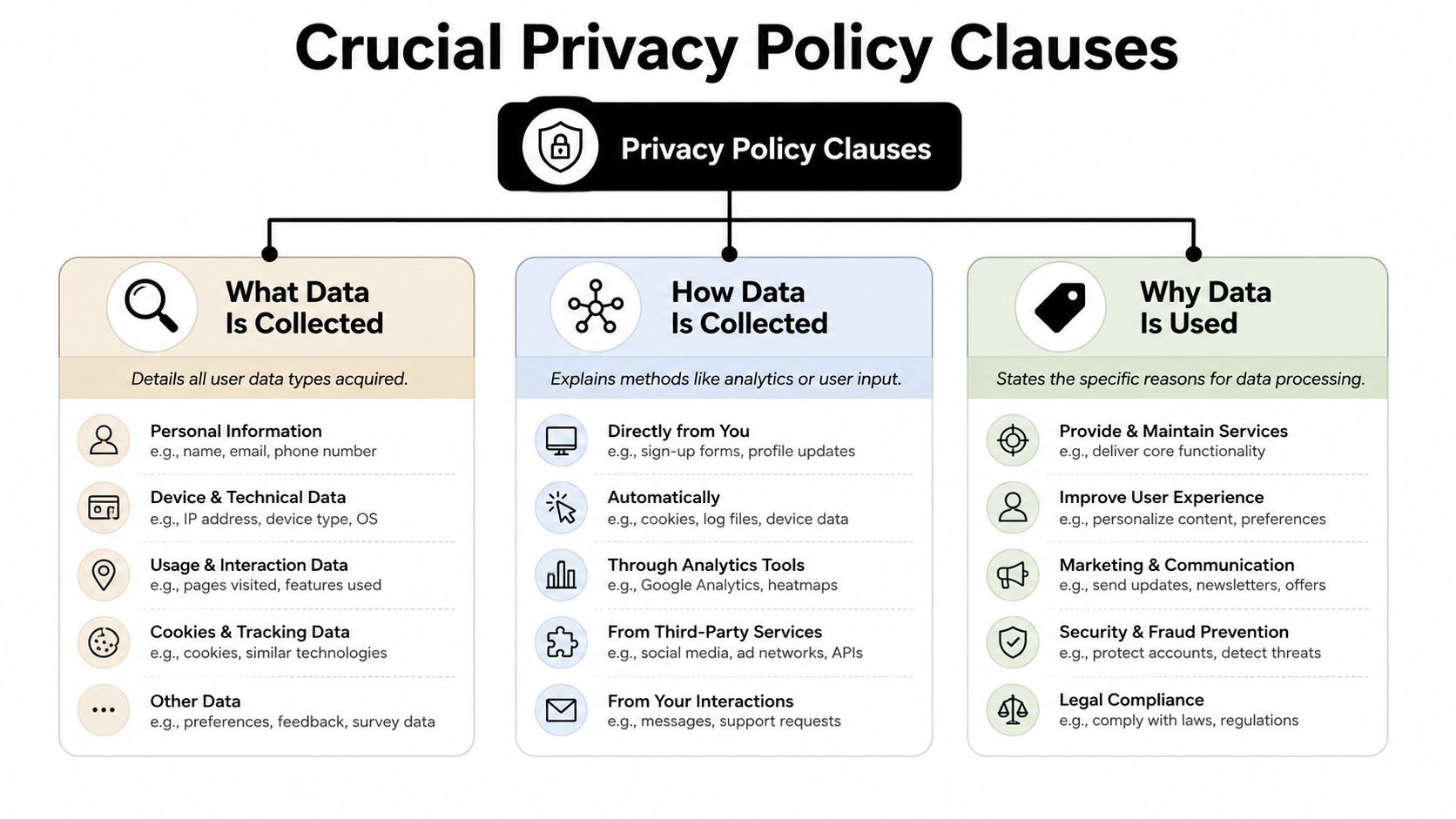
Reviewers usually scan the same core clauses first. They want to see what data is collected, how it is collected, why it is used, third-party sharing, retention, deletion, revocation of consent, and how users can reach the policy from the app. A privacy page that stays vague usually fails because it dodges those points or hides them inside general language TermsFeed iOS privacy guide. The policy has to read like an operating document, not a placeholder.
<a id="write-for-the-data-categories-not-for-legal-poetry"></a>
Write for the data categories, not for legal poetry
Start with what data is collected. List the actual categories, such as account details, device data, usage data, receipts, crash data, or location if that applies. Avoid “we may collect information” language unless you immediately specify what that information is. The policy needs to identify what the app collects, and vague phrasing usually invites follow-up.
Next, explain how the data is collected. That usually means two paths, user-supplied data and automatic collection. Reviewers do not need a systems lecture, but they do need to know whether the user typed it, the SDK captured it, or the app inferred it from device behavior. For analytics and crash tools, say the collection method plainly rather than hinting at it.
<a id="the-clauses-that-trigger-the-most-follow-up"></a>
The clauses that trigger the most follow-up
A few sections deserve especially direct language:
- Purpose of use: State precisely why the data exists, for example account creation, analytics, fraud prevention, support, or payments.
- Third-party sharing: Name the type of third party, such as analytics providers, ad networks, SDK vendors, or payment processors, and do not pretend they are invisible.
- Retention and deletion: Explain how long data is kept or what event causes deletion. If you do not have a fixed timetable, describe the governing rule accurately.
- Consent withdrawal and deletion requests: Tell users how to revoke permissions or request deletion.
“If a user can't find the deletion path, reviewers assume the policy is incomplete.”
That line holds up in practice because reviewers are looking for operability, not just disclosure. A policy that describes deletion but gives no usable route to request it reads like a stub. A policy that names the data, the purpose, and the user action usually passes faster because it looks like a real operating document.
<a id="running-a-react-native-and-expo-sdk-inventory-first"></a>
Running a React Native and Expo SDK Inventory First
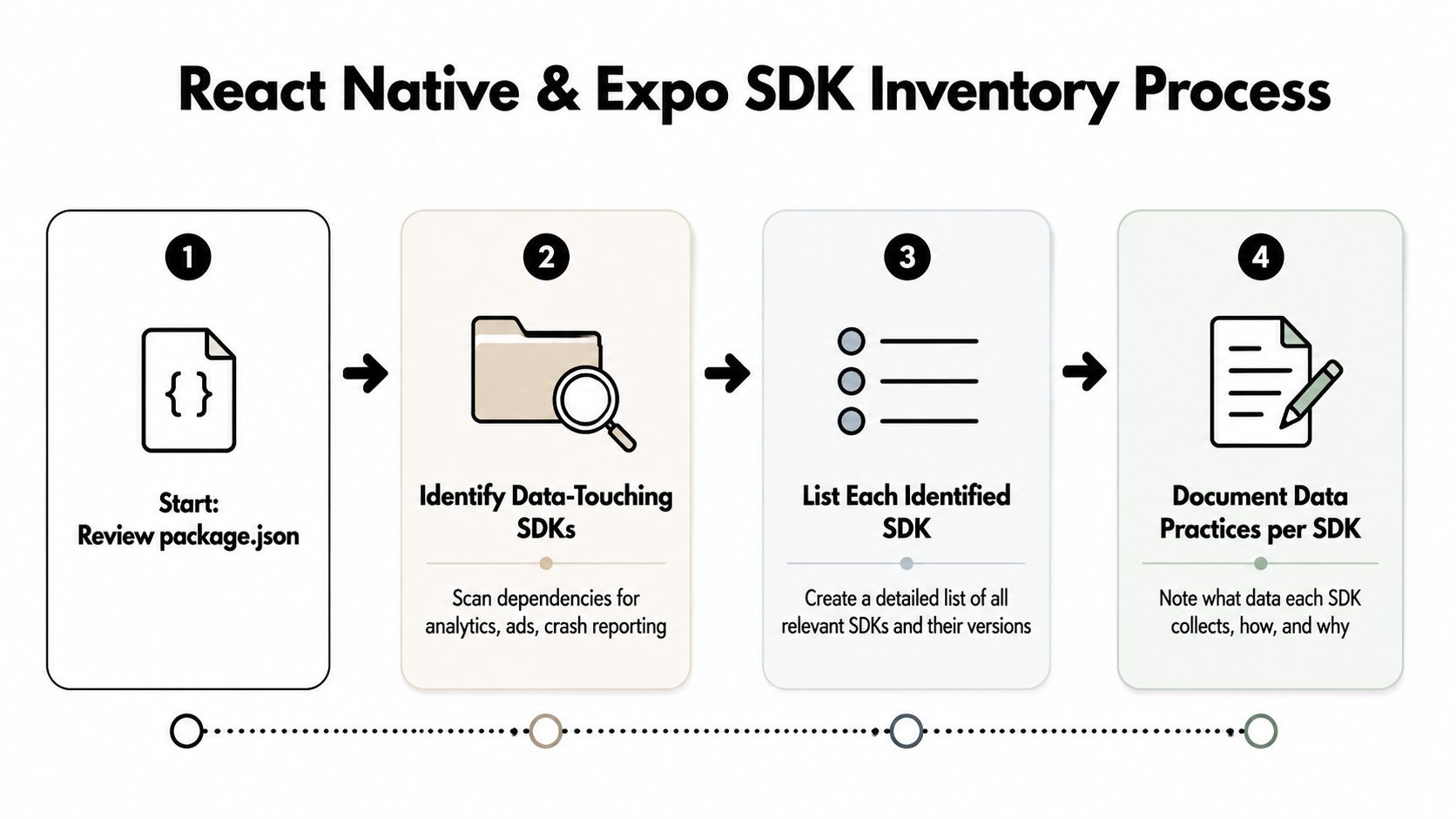
The fastest way to write a wrong policy is to start with the policy draft. In React Native and Expo projects, the right first step is a dependency inventory that lists every package touching user data, even indirectly. Analytics, ads, crash reporting, auth, payments, attribution, and custom API clients all need a line in that inventory before the policy is written.
<a id="start-with-packagejson-then-trace-actual-behavior"></a>
Start with package.json, then trace actual behavior
Scan package.json, then confirm what each package does at runtime. A package like Sentry can pull crash and device data, while an ad SDK may touch identifiers or tracking-related signals, and a billing layer may handle receipt validation or purchase records. Expo projects can also introduce build-time or submission-time metadata through EAS, so the inventory should include what the app ships, not just what the app imports.
Map each SDK to the categories Apple expects in App Store Connect, then compare that map to the wording you plan to put in the policy. If the inventory says a library sends diagnostic data, the policy cannot say the app collects nothing. If a package supports tracking, the App Tracking Transparency posture needs to be reviewed before release.
<a id="use-the-inventory-to-write-the-policy-not-the-other-way-around"></a>
Use the inventory to write the policy, not the other way around
A practical inventory worksheet is simple:
- Package name and version: keep the exact dependency and version on record.
- Data-touching function: note whether it handles analytics, ads, crashes, payments, auth, or support.
- Data categories: align the package with Apple's declared fields.
- Policy clause impact: identify which paragraph the package changes.
- Reviewer risk: mark anything that could create a mismatch.
That process matters because React Native and Expo apps often accrete SDKs over time. A library added for a quick experiment can stay in the bundle long after the feature is removed from the UI. Reviewers don't care why it's there, only whether it still behaves as declared.
Practical rule: don't freeze the policy until the inventory is frozen. If the SDK list changes after drafting, update the policy and store declarations in the same release cycle.
<a id="filling-in-the-store-specific-fields-correctly"></a>
Filling In the Store Specific Fields Correctly
The policy can still pass legal review and fail at submission if the store fields disagree with it. Apple and Google each collect privacy data through their own forms, and reviewers treat those fields as part of the same compliance record, not as optional admin work. In practice, the fastest rejection usually comes from a mismatch between the policy page, the store declarations, and what the app does.
<a id="apples-fields-and-manifests-need-to-agree"></a>
Apple's fields and manifests need to agree
In App Store Connect, fill in the privacy policy URL under the app information or App Privacy area, then complete the App Privacy questionnaire with the data types and purposes that match the app's behavior. If the app uses Required Reason APIs, include the PrivacyInfo.xcprivacy privacy manifest in the iOS build. If the app tracks users across apps or websites, App Tracking Transparency must be in place before tracking begins.
The common mistake is treating these as separate checkboxes. They are not. The policy, the questionnaire, and the manifest need to tell the same story about the same inventory. If one says “no data collected” and another shows analytics or identifiers, the submission looks sloppy even if the legal wording is clean.
Apple also expects the policy to line up with what gets declared in the app's metadata and what ships inside the binary. A reviewer does not care whether the mismatch came from legal, product, or engineering. They care that the submission set is inconsistent.
<a id="google-play-asks-different-questions-but-the-same-truth"></a>
Google Play asks different questions, but the same truth
Google Play's Data safety form asks for the same underlying facts through different fields, so do not copy Apple's wording into it without checking the prompts. The store also requires a privacy policy for new tester-facing flows, and closed testing can stall if the documentation is not ready before the test track goes live.
The practical move is to keep one source of truth for data collection and generate both store disclosures from that record. That avoids the common failure where one person updates the policy page, another updates App Store Connect, and nobody touches the Play Console form. For launch teams that want outside help, one option is a submission service such as LetsDeployIt, which handles privacy policy hosting, reviewer notes, and the Play Console questionnaire as part of its release workflow.
| Surface | Apple App Store Connect | Google Play Console |
|---|---|---|
| Privacy policy URL | Required in metadata and accessible in-app | Required in the store listing and related forms |
| Data disclosure form | App Privacy questionnaire and labels | Data safety questionnaire |
| Runtime alignment | Must match manifest, ATT, and in-app behavior | Must match app behavior and declared handling |
<a id="hosting-linking-and-in-app-access-requirements"></a>
Hosting, Linking, and In-App Access Requirements
A policy that reads well can still fail review if nobody can reach it. Reviewers check the URL, confirm that it is public, and look for a path to the policy inside the app. If the page is hidden behind authentication, broken on mobile, or only accessible after several taps through unrelated screens, the submission looks incomplete even when the text itself is fine.
<a id="host-it-like-a-release-asset-not-a-blog-post"></a>
Host it like a release asset, not a blog post
Use HTTPS, keep the page public, and make sure it renders cleanly on a phone. The policy should not depend on a login session, and it should not disappear after a deploy. If you host it on your own domain, treat it like any other production endpoint and verify the certificate, redirect chain, and mobile rendering before you send the build.
Apple expects in-app access in an easily accessible manner. In practice, that means a visible entry in Settings, About, or Legal, not a buried submenu behind unrelated content. Reviewers want to get to it quickly without hunting through the app.
<a id="make-the-in-app-path-obvious"></a>
Make the in-app path obvious
Put the link where a reviewer can find it in a couple of taps from the main navigation. If the app has a side drawer, account page, or settings hub, the policy link belongs there. If the app asks for signup, checkout, or sensitive permissions, placing the link near those entry points makes the review easier because the policy sits next to the moment the user is asked to trust the app.
For iOS bundles, keep the PrivacyInfo.xcprivacy file in the expected bundle path and verify that it ships in the release artifact. Expo config plugins can generate this in some setups, but the generated file still needs a release check. If the manifest is present in source but missing from the archived build, reviewers only see the missing artifact.
<a id="rejection-triggers-and-how-to-fix-them"></a>
Rejection Triggers and How to Fix Them
Most rejections in this area are not philosophical. They're mechanical. Reviewers see a mismatch, ask for clarification, and the fix is usually a one-line correction rather than a rewrite.
<a id="the-failures-that-keep-showing-up"></a>
The failures that keep showing up
-
Policy URL returns 404 or redirects to marketing content.
Fix: point the store field to a stable HTTPS page that always serves the policy. -
Policy says no data is collected, but Sentry, AdMob, or analytics SDKs are in the build. Fix: rewrite the data-collection and sharing clauses to match the SDK inventory.
-
App Privacy labels say Data Not Collected, but the policy mentions analytics or usage data.
Fix: reconcile the App Privacy questionnaire and the policy text from the same source inventory. -
No deletion or consent-withdrawal path is described.
Fix: add a clear support route, in-app setting, or email process for requests. -
The in-app privacy link is hidden too well. Fix: move it to a top-level settings or legal screen with a short tap path.
A lot of teams try to solve these with more legal language. That usually makes the problem worse. Reviewers don't reward density, they reward clarity and consistency. If the policy and the app disagree, more prose only creates more places to contradict yourself.
The other mistake is updating one surface at a time. Teams edit the public policy page, forget App Store Connect, or update the app and leave the privacy form stale. The cleanest fix is a release checklist that treats privacy disclosure like build output, not like documentation.
<a id="pre-submission-checklist-and-when-to-outsource-it"></a>
Pre-Submission Checklist and When to Outsource It
Before every submission, freeze the SDK inventory, confirm the policy matches it, verify the App Privacy label and Play Console data safety form agree, and check that the PrivacyInfo.xcprivacy manifest ships in the iOS archive. Then open the app on a phone, tap through the main navigation, and confirm the policy URL returns a live page without login.
One helpful automation habit is to run the policy link on mobile networks, not just on your office Wi-Fi. That catches broken certificates, stale redirects, and auth walls before a reviewer does. If your team keeps getting bounced on privacy or release packaging, outsourcing can make sense, especially for React Native and Expo launches that need submission work, privacy policy hosting, and reviewer response handling in one queue.
The safer question isn't “Can someone write a policy?” It's “Can someone keep the policy, console fields, manifest, and app behavior aligned through review?” Choose a launch partner only after you verify who is handling submissions, resubmissions, and store access.
If you want the submission loop handled by a team that already works through React Native and Expo release checks, privacy policy hosting, and store reviewer responses, visit LetsDeployIt and compare its launch workflow with your current process. It's a practical fit when you'd rather spend your time fixing the app than chasing store rejections.