ASO Best Practices: Actionable Guide for 2026
Apply these ASO best practices to improve app discoverability and conversions with guidance on keywords, visuals, reviews, and localization.

Most app teams still treat ASO as a keyword exercise. That misses the harder part. App stores must first match your app with the right search intent, then persuade a user to understand its value quickly, trust the listing, and complete the download. Search is central to that process: 65% to 70% of App Store downloads begin with a search query, while more than 50% of Google Play installs are search-driven, according to AppRadar's ASO guide.
The strongest ASO best practices connect discovery with conversion and launch readiness. Metadata, screenshots, localization, reviews, privacy documentation, platform requirements, and post-launch testing all belong to the same workflow. That's especially true for React Native and Expo teams, where a polished product can still face delays if store assets, signing, reviewer notes, or data disclosures aren't ready.
This guide follows ten practical steps, from keyword research and positioning through creative production, trust signals, compliance, submission, and continuous optimization. LetsDeployIt can support that preparation by coordinating listing copy, ASO keywords, screenshots, icons, preview video, policy hosting, compliance checks, reviewer notes, and submission for React Native and Expo launches.
Table of Contents
- 1. Keyword Research and Optimization
- 2. Compelling App Title and Subtitle Optimization
- 3. Strategic App Description and Long-Form Copy
- 4. High-Quality Screenshot Design and Localization
- 5. Professional App Icon Design and Branding
- 6. Video Preview and Demo Content Creation
- 7. Ratings, Reviews, and Social Proof Management
- 8. Compliance Documentation and Privacy Policy Hosting
- 9. Platform-Specific Optimization and Submission Best Practices
- 10. Continuous Monitoring, A/B Testing, and ASO Analytics
- 10-Point ASO Best Practices Comparison
- Turn ASO Into a Repeatable Growth System
<a id="1-keyword-research-and-optimization"></a>
1. Keyword Research and Optimization
Effective keyword research begins with the user's problem and the app's actual workflow. A fitness app built around guided intervals should target a phrase such as “HIIT workout timer” instead of relying on the broad term “fitness.” Specific intent can attract users who already understand the function they need.
Search visibility and conversion are separate jobs. Metadata helps stores match an app with a query, while the listing and product experience determine whether the right users install, engage, and leave positive reviews. A keyword that brings irrelevant traffic can weaken those downstream signals.
<a id="build-a-keyword-map-before-writing-metadata"></a>
Build a keyword map before writing metadata
Create a working map with four groups:
- Core function: What the app directly does, such as “task management” or “secure money transfer.”
- Use case: The situation users want to solve, such as “remote team tasks.”
- Audience: Terms that identify a relevant group, such as freelancers, students, or small businesses.
- Long-tail intent: Specific phrases such as “task management for remote teams” rather than a generic category term.
Review competitor titles, subtitles, descriptions, and review language. Tools such as data.ai, Sensor Tower, and MobileAction can surface candidate terms, but product knowledge decides whether each phrase describes the app accurately and meets store-policy requirements.
Map terms to the metadata fields available on each platform, then put the strongest relevant keyword in the title when it reads naturally. Avoid repeating every variation. A React Native budgeting app presented as a “crypto investment tracker” may attract the wrong audience, leading to weak engagement and poor reviews when users cannot find that workflow after installation.
Practical rule: Choose a term you can rank for, explain clearly, and satisfy after installation. Search volume alone isn't a strategy.
Keyword work continues after launch. Track rankings by market, compare movement after releases, and reassign terms when search behavior or product priorities change. ASOMobile's 2026 guide recommends dynamic tracking, keyword redistribution every 2 to 4 weeks, and testing one hypothesis per release. For React Native and Expo teams, include those checks in the release workflow so metadata changes, localization updates, and production builds are reviewed together.
<a id="2-compelling-app-title-and-subtitle-optimization"></a>
2. Compelling App Title and Subtitle Optimization
App titles are both discovery inputs and conversion signals. The title should help the store classify the app while letting people recognize its purpose immediately. A memorable brand name without context may be hard to find. A keyword-filled title with no clear identity can look interchangeable with competing listings.
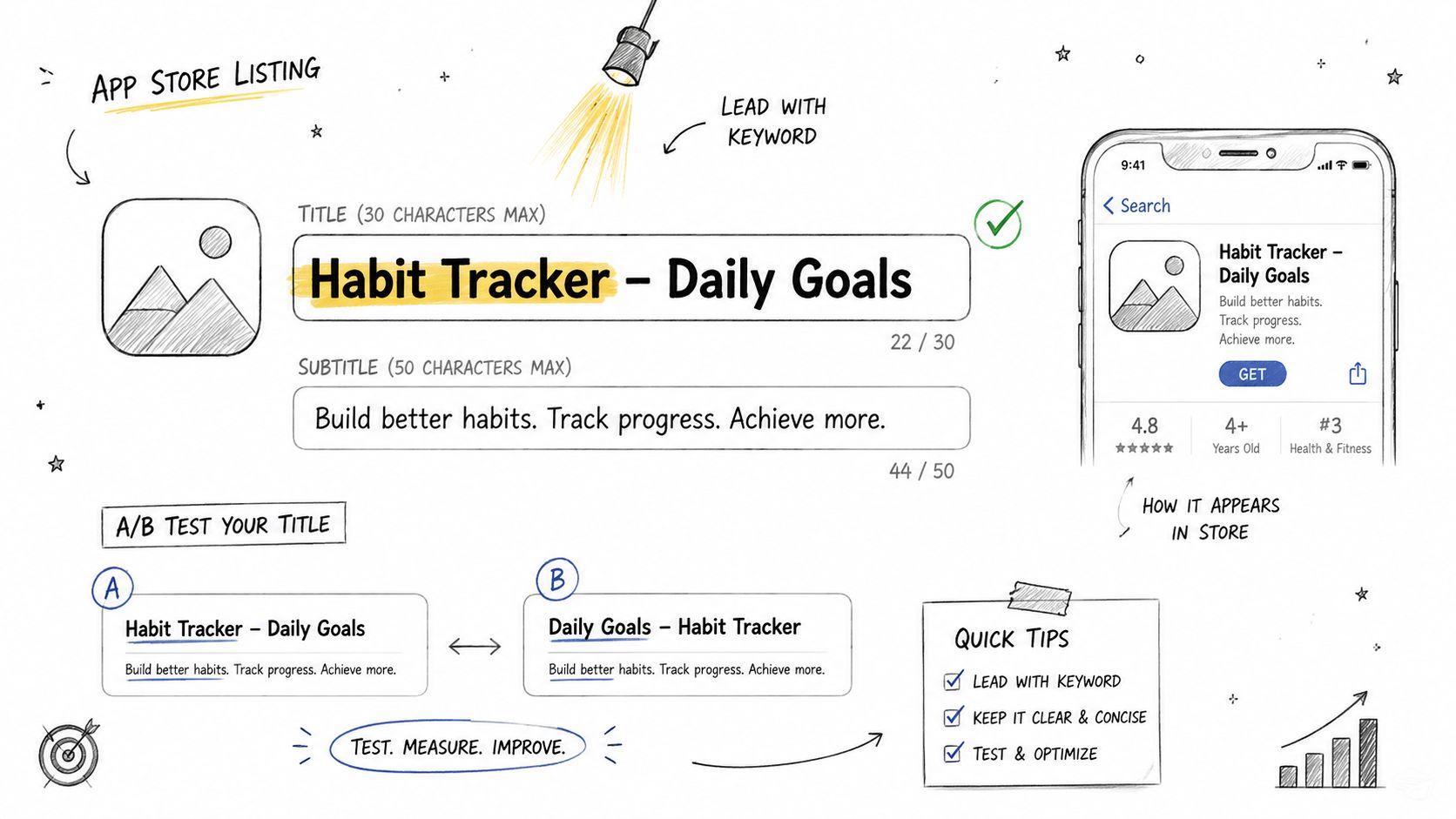
Lead with the primary category or user outcome. “FocusFlow, Pomodoro Timer” gives a branded focus app a clear use case. “TeamBoard, Remote Task Management” makes a collaboration product easier to understand. Use wording that sounds like a product name and accurately describes the installed experience.
<a id="make-the-first-impression-legible"></a>
Make the first impression legible
Search results are scanned quickly, and stores may shorten titles on some devices or surfaces. Put the main meaning near the beginning. Remove decorative symbols, repeated terms, and claims the app cannot substantiate.
On iOS, the subtitle can express a supporting benefit or secondary search intent. Google Play offers different metadata fields and limits, so adapt the message instead of copying the same line across platforms. A meditation app might lead with “Sleep Stories and Breathing” in one market, while a work-oriented version could use “Short Mindfulness Breaks.”
Metadata also sets expectations for launch readiness. If a title promises “Secure Money Transfer,” the relevant flow should be easy to find after opening the app, and the screenshots, privacy materials, and onboarding should support that promise. A mismatch can reduce conversion and produce recurring negative review themes.
<a id="treat-title-changes-as-controlled-experiments"></a>
Treat title changes as controlled experiments
Set a baseline before changing a title or subtitle. Record impressions, product-page visits, installs, keyword positions, and downstream quality signals. Change one meaningful variable where possible, document the hypothesis, and review approval implications before submitting the build.
A title that raises visibility while attracting low-intent users is not automatically successful. The useful target is relevance, recognition, and qualified conversion, supported by a listing that matches the React Native or Expo app users receive. Review results by market and platform, then carry validated metadata decisions into the next release rather than treating ASO as a one-time launch task.
<a id="3-strategic-app-description-and-long-form-copy"></a>
3. Strategic App Description and Long-Form Copy
Description copy should answer a user's practical questions in the order they ask them. What does this app do? Is it for someone like me? Why should I trust it? What will I be able to accomplish after installing it?
Open with the strongest value proposition, not a company history or technical explanation. A productivity app could begin by explaining how it helps remote teams assign, prioritize, and complete work. Only after that should it mention integrations, sync behavior, or implementation details.
<a id="write-for-scanning-and-intent"></a>
Write for scanning and intent
Use short paragraphs, clear benefit statements, and meaningful section breaks. Describe features through outcomes:
- Shared task views: Help distributed teams see ownership and deadlines.
- Offline access: Let users review important information without a stable connection.
- Secure transfer flow: Explain what users can do and what protections the product provides, without making unsupported security claims.
React Native and Expo teams should avoid exposing internal framework details unless those details matter to the user. Users don't download an app because it uses a particular JavaScript runtime. They download it because the app solves a problem reliably.
Keywords should appear naturally in the title, short copy, and long description where each platform allows. Repetition that makes the copy awkward can reduce trust. The description also shouldn't promise features that aren't available in the submitted build, because reviewers and users may both treat that mismatch as a problem.
<a id="use-proof-only-when-its-real"></a>
Use proof only when it's real
Awards, press mentions, certifications, customer counts, and testimonials can strengthen a listing, but only when you can verify and support them. Don't invent social proof to fill a blank section. A precise explanation of the app's workflow is more credible than an inflated claim.
End with a direct action, such as inviting users to create a free account, start a first plan, or explore a specific feature. The call to action should describe the next step, not just say “download now.”
<a id="4-high-quality-screenshot-design-and-localization"></a>
4. High-Quality Screenshot Design and Localization
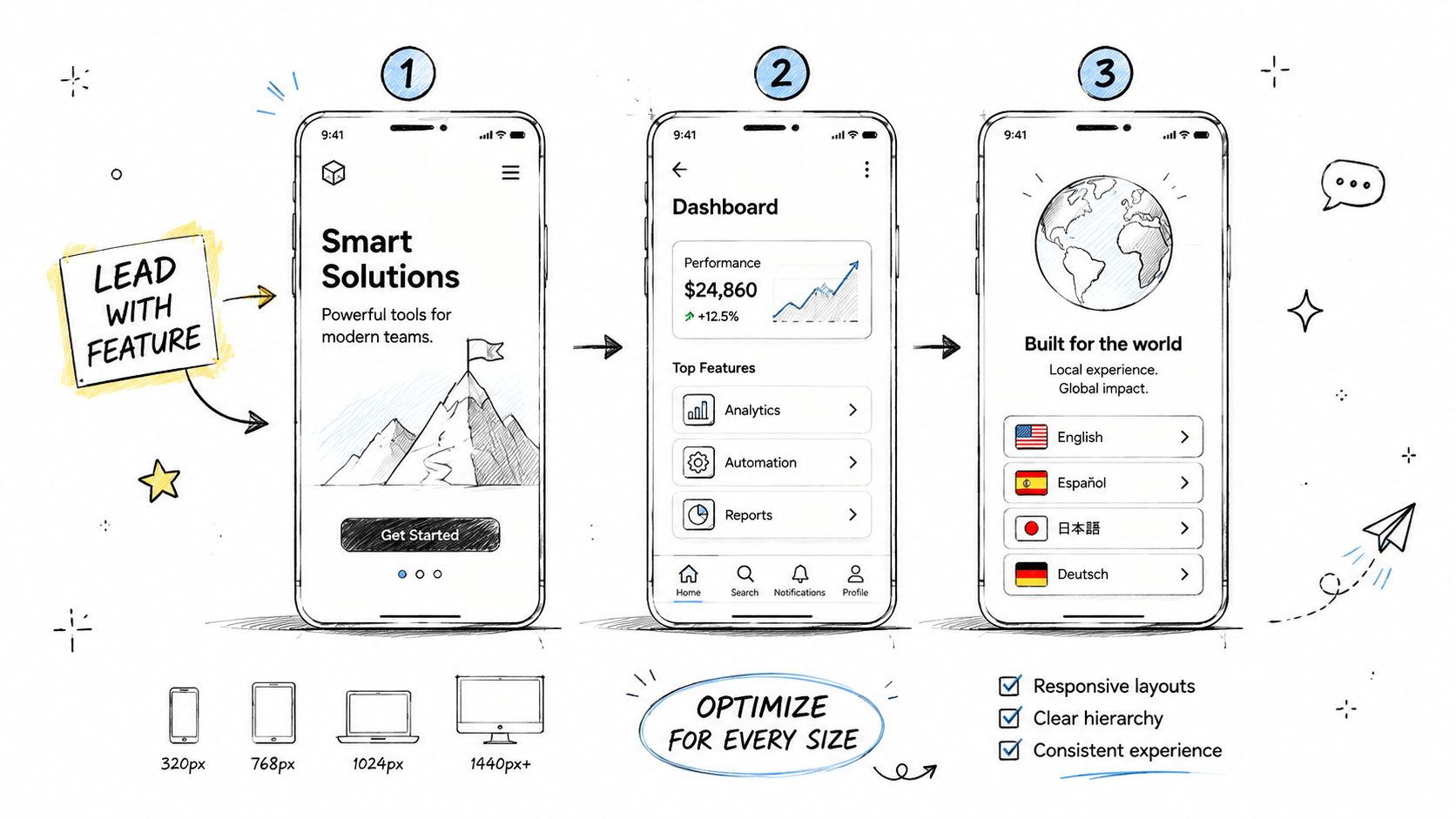
Screenshots are sales assets, not a gallery of interface states. The first image should communicate the app's main outcome before a user studies the interface. A scheduling app might lead with a clean weekly plan and the phrase “Coordinate Remote Work,” while a language app could show a lesson in progress and explain the learning benefit.
The visible portion of the listing deserves disproportionate attention. Store-page behavior data reports average App Store search conversion of about 30% to 35%, App Store page-view-to-install conversion of 33.7%, and Google Play page-view-to-install conversion of 26.4%. The same AppDrift ASO statistics report typical page time of 10 seconds on iOS and 14 seconds on Android, with around 90% of iOS users and 80% of Android users never scrolling past the first 10% of the page.
<a id="build-a-visual-story"></a>
Build a visual story
Use the opening screenshots to answer the largest objections:
- What does the app help me accomplish?
- How does the main workflow look?
- Why should I trust this product?
- What makes it more useful than an alternative?
Keep captions short, high contrast, and readable on smaller devices. Show real product UI whenever possible. A polished mockup can create doubt if the downloaded app looks different.
Prepare exports for the device configurations and store requirements that apply to each platform. Check every screenshot in the actual listing context, not only in a design file. Text that looks clear on a large monitor may become unreadable in search results.
<a id="localize-meaning-not-just-words"></a>
Localize meaning, not just words
Localization should adapt examples, imagery, terminology, and calls to action to each market. A finance app may need different explanations for transfers, budgeting, or identity checks depending on local expectations. A fitness app may need different exercise references and imagery to feel relevant.
Machine translation often misses intent and tone. Have a fluent reviewer confirm that the screenshots and metadata sound like something local users would search for.
<a id="5-professional-app-icon-design-and-branding"></a>
5. Professional App Icon Design and Branding
The icon appears before a user reads the description, and it continues to represent the product after installation. It must work in search results, promotional placements, and the device home screen. That makes icon design an ASO decision as much as a branding decision.
Start with the product's identity and category context. A banking app may need to communicate confidence and clarity, while a creative tool can use a more expressive visual language. The icon shouldn't imitate a leading competitor so closely that users confuse the two products.
<a id="optimize-for-small-size-recognition"></a>
Optimize for small-size recognition
Design the source artwork at a high resolution, then test it at the small sizes users encounter. Fine text, intricate illustrations, and multiple competing symbols usually disappear. A strong icon often uses a simple shape, clear contrast, and a limited color system.
Avoid placing the full app name in the icon unless the lettering remains legible at thumbnail size. The title already carries the verbal identity. The icon's job is to provide a memorable visual cue.
Check the icon against light and dark backgrounds, different device themes, and adjacent competitor icons. A pale mark may look attractive in a brand presentation but vanish in a store interface. Accessibility also matters, so confirm that contrast supports users with limited vision.
Design test: Reduce the icon until its details are barely visible. If the core symbol still reads, the concept is doing useful work.
For React Native and Expo teams, the icon must also be applied consistently across the build, store listing, splash configuration, and platform-specific assets. A polished store icon paired with an outdated in-app icon creates unnecessary friction. Verify the final packaged build rather than assuming the source asset propagated correctly.
<a id="6-video-preview-and-demo-content-creation"></a>
6. Video Preview and Demo Content Creation
A preview video can explain a workflow faster than a paragraph, but only when it shows the product clearly. Don't begin with a logo animation or a generic brand message. Start with the moment that proves the app's value.
For a remote-team planner, the opening could show a task moving from assignment to completion. For a bill-splitting app, it could show a group adding expenses and settling the balance. These sequences give viewers a reason to continue watching.
<a id="demonstrate-outcomes-not-implementation"></a>
Demonstrate outcomes, not implementation
React Native and Expo apps should use the video to show a smooth user experience, not to advertise the framework or build pipeline. Capture the interface and demonstrate the shortest path to a meaningful result. If the product requires onboarding, show enough context to make the workflow understandable without turning the preview into a tutorial.
Assume sound may be unavailable. Add captions for narration, labels, and important actions. Keep visual pacing active but comprehensible, and test playback on physical devices. A video with clipped text, poor resolution, or a broken loading state can lower trust instead of improving it.
Use the opening moments to establish the category and benefit. Then show one or two differentiating workflows. Finish with a clear next step that matches the store and product experience.
<a id="keep-claims-consistent-across-assets"></a>
Keep claims consistent across assets
The video, screenshots, title, and description should tell the same story. If the screenshots highlight secure transfers but the video focuses only on account settings, the listing feels disconnected. Align the sequence with the user journey:
- Recognize the problem.
- See the main action.
- Understand the outcome.
- Know what to do next.
Preview videos require platform-specific exports and review. Confirm that every frame represents the submitted version, particularly after UI changes close to launch.
A video isn't mandatory for every app. If the core value is already obvious in strong screenshots, a weak video can add production cost without improving the page. Use it when motion clarifies the experience or demonstrates a workflow that static images can't explain.
<a id="7-ratings-reviews-and-social-proof-management"></a>
7. Ratings, Reviews, and Social Proof Management
Ratings and reviews serve two jobs: they provide social proof and expose product problems. People comparing similar apps often scan recent comments for evidence about reliability, support, onboarding, billing, and missing features. Treat ratings and reviews, retention and quality, download velocity, conversion rate, and update cadence as signals that can affect discoverability and listing performance.
Request a review after a successful action, not during first launch. Someone who has completed a workout, sent a transfer, or finished a project has enough context to judge the app. The prompt should respect the user's task and avoid appearing during an urgent, failed, or confusing moment. On React Native and Expo projects, test the review flow on each target platform, because the available prompt behavior and store rules differ.
<a id="respond-to-the-underlying-issue"></a>
Respond to the underlying issue
A response to a negative review should acknowledge the problem, give the next practical step, and point to support when account-specific help is needed. Avoid public arguments and copy that sounds unrelated to the complaint.
Review patterns can reveal ASO issues that metadata reports miss. If users expected a feature shown in the screenshots, the listing may promise more than the product delivers. Repeated crash reports tied to a device or operating system should enter the quality backlog, not remain a reputation task.
- Request feedback at a useful moment: Choose a completed action that suggests the user has experienced the core value.
- Monitor recurring themes: Group comments by onboarding, performance, pricing, support, and feature expectations.
- Close the loop: Reference meaningful fixes in release notes and replies, without promising dates the team cannot meet.
- Follow store policies: Never buy reviews, create testimonials, or pressure users into favorable ratings.
Encourage honest feedback from satisfied users, while keeping feature access independent of review sentiment. Review prompts, support replies, and release notes should follow the same product promise shown in the title, screenshots, and description. That consistency supports conversion before install and gives launch teams useful evidence for post-launch iteration.
<a id="8-compliance-documentation-and-privacy-policy-hosting"></a>
8. Compliance Documentation and Privacy Policy Hosting
A polished store page cannot compensate for disclosures that conflict with the app. Before submission, inventory analytics, crash reporting, advertising SDKs, authentication, payments, push notifications, and every category of information the app collects or shares.
Write the privacy policy in language users can understand. Link to it from the store listing where required, and from the app's settings or account area when appropriate. Host it at a reliable HTTPS address that reviewers can open without signing in.
<a id="reconcile-the-product-policy-and-console-forms"></a>
Reconcile the product, policy, and console forms
The privacy policy, terms, App Store privacy information, and Google Play Data safety questionnaire must describe the same implementation. If the build contains an analytics SDK that the disclosures omit, reviewers may ask questions or delay approval.
React Native and Expo teams should inspect native modules and third-party packages alongside JavaScript code. A dependency may add data access or permissions that the product team did not include in the listing copy. Record what each service collects, why it collects it, where it processes information, and how users can request support or deletion when applicable.
This inventory also supports ASO accuracy. Claims about privacy, account creation, personalization, or offline access affect both conversion and approval readiness, so confirm them against the release candidate before publishing localized metadata or screenshots.
Use professional legal review for regulated or high-risk products. Templates can organize a first draft, but they do not replace an accurate data inventory. Avoid promising compliance with a jurisdiction or regulation unless the business and legal teams can support that statement.
Approval habit: Treat every disclosure as a build artifact. Recheck it whenever permissions, SDKs, authentication, payments, or analytics change.
Keep reviewer notes specific. Explain test credentials, subscription behavior, restricted flows, and features that are not obvious on first launch. Clear documentation lets reviewers evaluate the submitted app without guessing._finalize
<a id="9-platform-specific-optimization-and-submission-best-practices"></a>
9. Platform-Specific Optimization and Submission Best Practices
Apple's App Store and Google Play require separate launch plans. Their metadata fields, creative formats, console workflows, review expectations, and testing requirements differ. Copying one listing to the other can waste available space or create promises the submitted build does not support.
Create a platform matrix before producing assets. Track the title, subtitle or short description, keyword fields, long description, screenshots, preview video, category, age or content declarations, privacy links, pricing, and reviewer notes for each store. Assign an owner to verify every field against the current release candidate. This keeps discoverability work connected to conversion and approval readiness. Review Apple's App Store Review Guidelines and the equivalent Google Play requirements before submission.
<a id="prepare-the-reviewers-path"></a>
Prepare the reviewer's path
A reviewer should be able to install the app, sign in, reach its main feature, and understand paid or restricted flows. Provide working test credentials when required. Explain how to access features behind onboarding, location permissions, subscriptions, or account roles.
New Google Play developer accounts may have additional testing obligations. LetsDeployIt states that it manages 12 vetted testers across multiple Android devices and runs the required 14-day closed test for eligible new Play Console accounts. Treat this work as part of the launch schedule, not an afterthought.
Run the release on physical devices. Check deep links, notifications, permissions, purchase restoration, offline behavior, orientation, keyboard handling, and the first-launch experience. Expo teams should verify EAS Build and EAS Submit settings, signing credentials, bundle identifiers, package names, and environment variables. Bare React Native projects need equivalent checks across native iOS and Android configuration.
<a id="keep-metadata-honest"></a>
Keep metadata honest
Screenshots must match the submitted version. Do not show a feature that remains behind a remote flag or belongs to a future release. Choose the most accurate category, complete content declarations carefully, and review policy updates before each submission.
End the checklist with an actual install and release-candidate review. Store-console validation cannot expose every device or runtime issue, so record findings and fix them before publishing. After launch, compare platform-specific conversion and review outcomes, then update assets or metadata through controlled tests.
<a id="10-continuous-monitoring-ab-testing-and-aso-analytics"></a>
10. Continuous Monitoring, A/B Testing, and ASO Analytics
ASO only creates value when each release produces a clear learning loop. Start with the bottleneck. Low impressions point to discoverability. Strong impressions with weak installs point to the store-page conversion path. Installs followed by weak activation, retention, or reviews point to a mismatch between the listing promise and the product experience.
Use funnel benchmarks as diagnostic context, not as universal targets. App Store reporting places median tap-through-to-install between 27.7% and 33.4%, while top-quartile performance reaches 39.1% to 45.6%. Median impression-to-product-page tap is 54.8% to 58.2%, and end-to-end impression-to-install is around 15.2% to 19.5%, according to Digital Applied's 2026 ASO data. Compare those stages by platform, country, traffic source, and release version before changing metadata.
<a id="test-one-meaningful-hypothesis"></a>
Test one meaningful hypothesis
Change one major variable per experiment. Replacing the title, icon, screenshots, description, pricing, and onboarding together cannot show which decision affected the result. Define the audience, hypothesis, primary metric, guardrail, and review date before publishing.
Examples:
- Screenshot hypothesis: A first image focused on “secure money transfer” will clarify the product for search visitors.
- Icon hypothesis: A simpler symbol will stand out more clearly beside category competitors.
- Localization hypothesis: A market-specific benefit statement will improve qualified conversion.
- Review hypothesis: Asking after a completed workflow will produce more useful feedback than asking during onboarding.
Track impressions, product-page visits, installs, keyword positions, activation, retention, ratings, support themes, and crashes together. For React Native and Expo teams, connect store results to release notes, feature flags, onboarding changes, and native configuration changes. A creative variant that increases installs but attracts users who cannot access a required permission, subscription, or account role can reduce activation and review quality.
<a id="set-a-release-rhythm-without-manufacturing-activity"></a>
Set a release rhythm without manufacturing activity
Review keyword allocation every 2 to 4 weeks and test one hypothesis per release, following ASOMobile's 2026 ASO workflow. Use that cadence as a review window, not an automatic change schedule. Release when evidence, competitor activity, localization needs, or a product change justifies the update.
Document each decision by platform, country, asset version, experiment owner, and date. Compare downstream quality before adopting a winner. Keep approval readiness in the same record: metadata claims, screenshots, privacy disclosures, and tested functionality must describe the shipped build. This keeps ASO testing tied to discoverability, conversion, and a release that stores can approve.
<a id="10-point-aso-best-practices-comparison"></a>
10-Point ASO Best Practices Comparison
| ASO Component | Implementation Complexity 🔄 | Resource Requirements ⚡ | Expected Outcomes 📊 | Ideal Use Cases ⭐ | Key Advantages 💡 |
|---|---|---|---|---|---|
| Keyword Research and Optimization | Medium, ongoing analysis & updates 🔄 | Moderate, ASO tools + analyst time ⚡ | Higher organic discoverability; sustained ranking gains ⭐⭐⭐⭐ | New launches and targeted niche acquisition | Cost-effective long-term traffic; targets user intent |
| Compelling App Title and Subtitle Optimization | Low–Medium, short iterative edits 🔄 | Low, copywriting and A/B tests ⚡ | Immediate CTR and ranking influence; conversion uplift ⭐⭐⭐⭐ | Early-stage apps and rebranding efforts | High ROI; quick measurable improvements |
| Strategic App Description and Long-Form Copy | Medium, platform differences + structure 🔄 | Moderate, professional copy + localization ⚡ | Improved conversions and keyword relevance (esp. Play) ⭐⭐⭐ | Technical or feature-rich apps needing explanation | Converts interest to installs; builds trust |
| High-Quality Screenshot Design and Localization | Medium–High, multiple sizes + iterations 🔄 | High, designers + localization resources ⚡ | Large conversion rate lift (often 20–50%) ⭐⭐⭐⭐ | Consumer apps with visual UIs and competitive categories | Shows value at-a-glance; differentiates from competitors |
| Professional App Icon Design and Branding | Medium, design + platform variants 🔄 | Medium, designer + testing iterations ⚡ | Better click-through and brand recognition ⭐⭐⭐⭐ | Apps competing in crowded stores or building brand identity | First-impression impact; consistent brand recall |
| Video Preview and Demo Content Creation | High, storyboarding, production, editing 🔄 | High, video production and QA ⚡ | Significant conversion uplift (20–40%) when well-executed ⭐⭐⭐⭐ | Apps with distinct workflows, games, or visual features | Demonstrates real value quickly; highly engaging |
| Ratings, Reviews, and Social Proof Management | Medium, ongoing moderation & prompts 🔄 | Moderate, support resources + monitoring tools ⚡ | Higher ratings increase downloads and trust ⭐⭐⭐⭐ | Post-launch growth and retention-focused apps | Direct ranking influence; user feedback loop |
| Compliance Documentation and Privacy Policy Hosting | Low–Medium, legal alignment & updates 🔄 | Moderate, legal/hosting services ⚡ | Reduced rejection risk; legal compliance maintained ⭐⭐⭐ | Apps handling personal data or operating globally | Prevents rejections; builds user/legal trust |
| Platform-Specific Optimization & Submission Best Practices | High, store-specific rules & reviewer handling 🔄 | Moderate–High, platform expertise + beta testers ⚡ | Faster approvals and platform-tailored visibility ⭐⭐⭐⭐ | Cross-platform launches and first-time submissions | Minimizes rejections; maximizes store-specific ranking |
| Continuous Monitoring, A/B Testing, and ASO Analytics | High, measurement, tests, iteration 🔄 | High, analytics tools + specialists ⚡ | Data-driven improvements; optimized ROI over time ⭐⭐⭐⭐ | Growth-stage apps or ongoing optimization programs | Identifies highest-impact changes; reduces guesswork |
<a id="turn-aso-into-a-repeatable-growth-system"></a>
Turn ASO Into a Repeatable Growth System
The practical sequence is straightforward, but execution requires coordination. Start with audience research and keyword intent. Identify the problem users describe in their own words, group terms by use case, and choose keywords that match the product's real capabilities. Then align the title, subtitle, short description, long description, and screenshot captions around the same promise.
Produce the visual assets after the message is clear. Design the icon for recognition at small sizes. Build screenshots that explain the primary benefit in the opening frames, then support that promise with real interface evidence. Add a preview video when motion makes the workflow easier to understand. Localize the copy and visuals for priority markets rather than treating translation as a final export step.
Trust and compliance should be ready before the submission window. Review the privacy policy, terms, data disclosures, SDK inventory, permissions, subscription details, reviewer credentials, and support path together. The listing must accurately describe the build, and the build must behave as the listing promises.
Use separate platform plans for Apple and Google Play. Validate each store's metadata, creative requirements, categories, declarations, reviewer notes, signing configuration, and testing workflow. For React Native and Expo apps, include EAS Build and EAS Submit settings, native permissions, bundle identifiers, package names, and environment configuration in the release review.
Before submitting, prioritize the work that affects first impressions and approval readiness:
- Search relevance: Confirm the primary keyword, supporting terms, title, subtitle, and descriptions reflect real user intent.
- Above-the-fold clarity: Check the icon and first screenshots on actual devices and store surfaces.
- Proof and expectations: Make sure reviews, claims, features, pricing, and visuals are accurate.
- Localization: Review language, cultural context, screenshots, and support information for each target market.
- Compliance: Reconcile the privacy policy, terms, platform disclosures, SDK behavior, and permissions.
- Submission access: Provide valid test accounts, reviewer instructions, reproduction steps, and any required documents.
- Measurement: Define the baseline, hypothesis, primary outcome, quality guardrails, and review date.
LetsDeployIt can coordinate this workflow for React Native and Expo launches. Its service combines AI-assisted drafting with human review for store listing copy, ASO keywords, device-specific screenshots, app icon polish, preview video, privacy policy and Terms hosting, compliance checks, reviewer notes, submission, and the Google Play Data safety questionnaire. The team also manages end-to-end submission, reviewer messages, and resubmissions, and supports the required closed testing workflow for eligible new Play Console accounts.
ASO works best when the listing, product, and launch process reinforce one another. Treat every release as an opportunity to improve the connection between search intent, user understanding, trust, approval readiness, and post-install value.
LetsDeployIt prepares and submits React Native and Expo apps with ASO copy, keywords, screenshots, icon polish, preview video, policy hosting, compliance checks, reviewer notes, and Google Play testing support. Visit LetsDeployIt to prepare your store listing and launch workflow before submission.