How to Write an ASO Description That Actually Converts
Learn how to write an ASO description that converts. Covers structure, keyword placement, character limits, localization, and store-specific tips for 2026.

Most ASO advice starts in the wrong place. It tells you to fill the description with every keyword you can find, repeat important phrases, and use the full character allowance. That approach treats the listing like an indexing document when the actual reader is a person deciding whether your app deserves a tap.
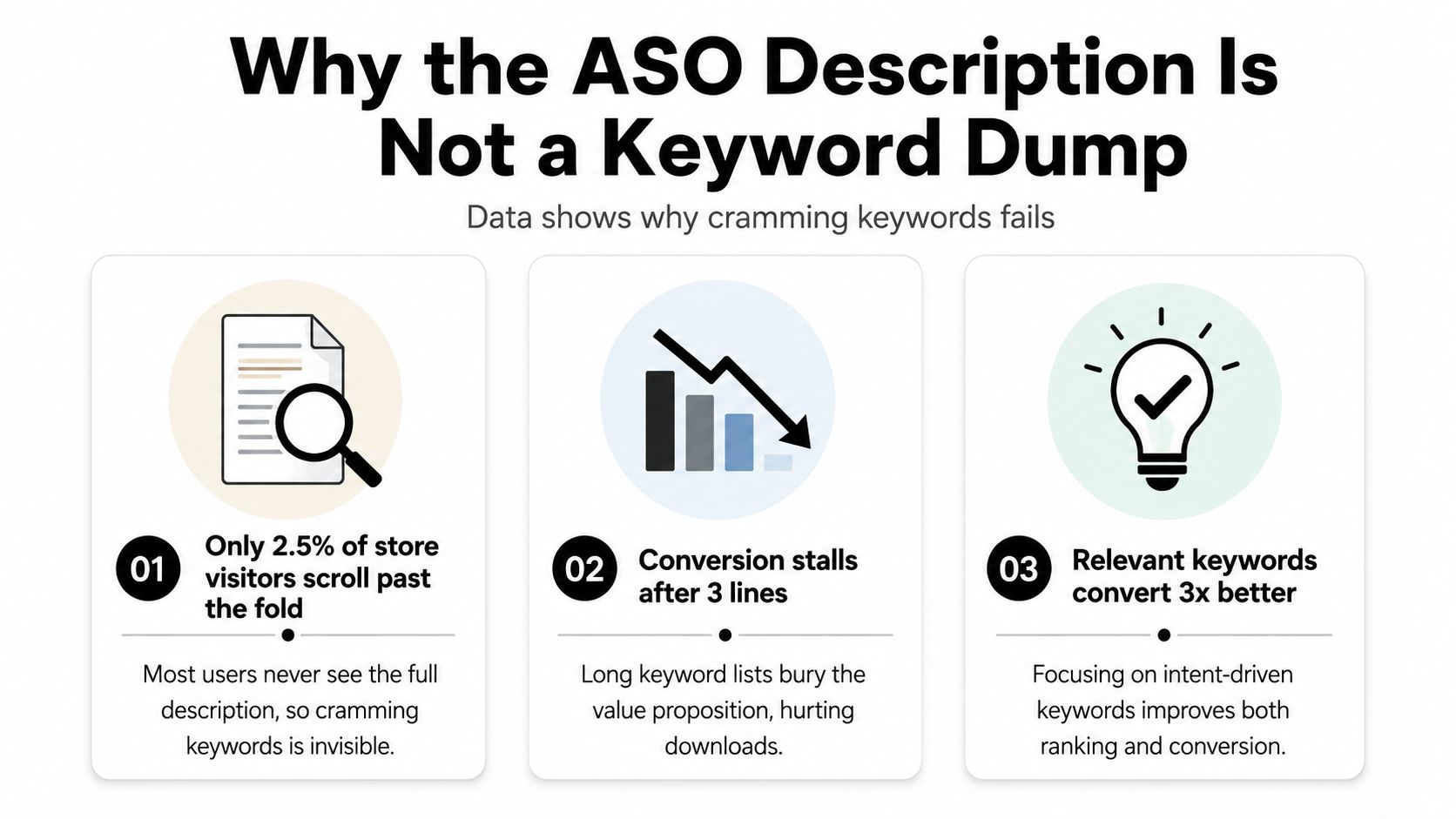
The ASO description is a conversion-support field, not a keyword dump. SplitMetrics' analysis of numerous A/B tests found limited practical conversion impact from the description and no confirmed influence on organic search. Only about 2 to 2.5% of product-page visitors click “Read more” to expand it, according to SplitMetrics' app store description analysis. Your opening screen, icon, screenshots, rating, and short-form copy carry the first decision. The long description earns trust with the smaller group that wants more evidence.
That changes how you write. Lead with the outcome, clarify who the app is for, answer objections, and use keywords where each store can use them. A clean description won't rescue weak screenshots, but a stuffed description can undermine a strong listing.
Table of Contents
- Why the ASO Description Is Not a Keyword Dump
- Anatomy of an ASO Description on iOS and Google Play
- Writing an Opening That Stops the Scroll
- Keyword Placement Rules That Actually Work
- Localizing the Description for Global Markets
- Defending Your Listing Against Reviewer Rejections
- Iteration Cadence and Your Pre-Submit Checklist
<a id="why-the-aso-description-is-not-a-keyword-dump"></a>
Why the ASO Description Is Not a Keyword Dump
Keyword repetition creates a tidy checklist, not a stronger listing. Users install when the page makes the app feel relevant, credible, and easy to understand. Repeating the same term rarely improves that decision.
As noted earlier, only about 2 to 2.5% of visitors expand the description, according to SplitMetrics. Many visitors decide from the title, icon, screenshots, rating, and first visible lines. A long block of awkward phrases cannot persuade users who never open it. It can also weaken trust among those who do.
<a id="give-the-description-a-supporting-job"></a>
Give the description a supporting job
Treat the description as a conversion-support field. It should reinforce the promise established by the first screen and give interested users enough context to continue. If a screenshot says “Plan family meals faster,” the opening paragraph can explain how planning works, which meals users can organize, and why the app suits that household.
The opening lines should work like a landing-page headline and subhead. State the outcome first, identify the intended user, then clarify the product's practical difference. Store-specific keyword rules still matter, but they should guide word choice rather than dictate unnatural sentences.
Use the long field for information that needs context:
- Specificity: Explain what the app does in practical terms, rather than relying on broad category language.
- Objection handling: Address privacy, subscriptions, offline access, account requirements, or difficulty.
- Proof: Include accurate, permitted product details, ratings, awards, or press references.
- Keyword coverage: Add supporting variants naturally inside useful sentences.
Practical rule: If removing a keyword makes a sentence worse for a real user, rewrite the sentence before keeping the keyword.
Primary search intent belongs in store fields with stronger discovery roles. Supporting variants, use cases, and category context belong in the long description. The final copy should read like a product explanation first and metadata second.
<a id="anatomy-of-an-aso-description-on-ios-and-google-play"></a>
Anatomy of an ASO Description on iOS and Google Play
Apple and Google assign different jobs to their description fields, so copying one listing into the other leaves conversion opportunities unused. Apple recommends a concise descriptive paragraph followed by a short feature list in its Product Page guidance. Google Play advises a short, truthful, benefit-led summary because users may read only the opening sentences, as explained in Google Play's metadata guidance.
Draft each store listing from its actual fields, not from one universal document.
<a id="apple-app-store-fields"></a>
Apple App Store fields
Use Promotional Text for timely value, a new capability, or a current reason to try the app. It has a 170-character limit, and you can edit it without a full app update. The description allows up to 4,000 characters, but it should explain the product and reduce hesitation rather than function as a search-term inventory.
Apple's description suits a compact introduction, scannable feature lines, and trust-building detail. Keep formatting simple because the App Store does not provide the same HTML structure available on Google Play.
<a id="google-play-fields"></a>
Google Play fields
Google Play's short description is limited to 80 characters. Use it as a compact value proposition that states the primary outcome quickly. It can also contribute to discovery.
The long description supports up to 4,000 characters. Use it for fuller keyword coverage, feature explanations, use cases, and reassurance. Short paragraphs and clear feature blocks make the copy easier to scan than one uninterrupted wall of text.
| Field | Platform | Character Limit | Ranking Influence | Primary Job |
|---|---|---|---|---|
| Promotional Text | Apple App Store | 170 characters | Supportive listing context | Timely hook and current value |
| Description | Apple App Store | 4,000 characters | No confirmed organic search influence in the cited SplitMetrics analysis | Explain, reassure, and support conversion |
| Keyword Field | Apple App Store | 100 characters | Dedicated keyword indexing field | Add unique search terms |
| Short Description | Google Play | 80 characters | Contributes to discovery context | State the core benefit |
| Long Description | Google Play | 4,000 characters | Supports keyword indexing | Explain the product and cover supporting intent |
| Developer Name | Google Play | Store-controlled field | Can contribute to indexing context | Identify the publisher |
Draft the long copy as separate blocks before polishing the prose. Start with the opening, then write the proof paragraph, feature block, trust section, and closing action independently. Give each block the space its job requires, then combine them and remove repeated claims. This workflow makes gaps visible early and keeps the final description easy to scan.
<a id="writing-an-opening-that-stops-the-scroll"></a>
Writing an Opening That Stops the Scroll
A keyword-rich opening can still lose the install. Store visitors decide quickly whether a listing matches their need, so the first lines should work like a landing-page headline, not a brochure introduction. Business of Apps' benchmark summary cites average time on page of 10 seconds on iOS and 14 seconds on Android. Statista reports first-half 2023 download conversion rates of 30% on the Apple App Store and 31.3% on Google Play in the United States through its ASO topic coverage.
Build the visible opening in three compact moves.
<a id="start-with-the-users-outcome"></a>
Start with the user's outcome
Open with a result-oriented verb. “Track every subscription in one place” is stronger than “Welcome to BudgetPro.” “Create studio-quality reels from your phone” communicates more than “The ultimate video editing app.”
Name the audience or situation when it helps qualify the visitor. A running app for beginners should say so if advanced athletes would find it too limited. Clear qualification protects conversion quality and reduces disappointment after installation.
<a id="add-one-reason-to-believe"></a>
Add one reason to believe
The second sentence should make the outcome credible. Point to a concrete workflow, a meaningful capability, or a trust signal you can verify. Do not invent user counts, awards, ratings, or customer names. If external proof is unavailable, describe the product experience accurately.
For example, explain that the app combines guided sessions with automatic progress tracking. That detail supports the promise without claiming a performance result the product cannot guarantee.
<a id="use-the-third-sentence-to-qualify"></a>
Use the third sentence to qualify
Tell the right visitor what happens next. Mention a key requirement, use case, or differentiator. “Built for teams that need shared approvals, not personal to-do lists” helps more than another sequence of adjectives.
The opening is a decision filter, not a summary of every feature.
Keep keyword language natural. Use the primary phrase once in the first sentence when it fits. If it makes the sentence stiff, place the term in the relevant store field and write the opening for comprehension. The listing earns the expand tap by showing visitors that the app fits their situation, while store-specific metadata handles additional search coverage.
<a id="keyword-placement-rules-that-actually-work"></a>
Keyword Placement Rules That Actually Work
Apple and Google should have separate keyword maps. Their fields don't perform the same function, and the description isn't equally important to indexing on both platforms.
On iOS, place high-value terms in the 100-character keyword field rather than repeating terms already present in the title or subtitle. Apple's product-page system gives you a constrained metadata field, so every character should add distinct coverage. Separate multi-word phrases with commas, remove unnecessary stop words, avoid duplicated concepts, and prioritize the language users search.
Apple practitioners commonly target roughly 2 to 3% density for primary terms and 1 to 2% for secondary terms, based on the methodology summarized by ASOMobile's ASO history and practice overview. Treat those ranges as drafting guidance, not a reason to distort sentences. Relevance and readability outrank an arbitrary count.
| Field | Apple App Store | Google Play |
|---|---|---|
| Title and subtitle | Put the strongest category and intent terms here | Use the title and short description to state the core value |
| Dedicated keyword field | Use the 100-character field for unique terms and variants | No separate keyword field |
| Short description | No direct equivalent with the same role | Keep the primary benefit within 80 characters |
| Long description | Use for explanation and supporting context | Use natural primary and secondary phrases throughout the 4,000-character field |
| Repetition | Avoid terms already covered elsewhere | Repeat important terms only where sentences remain useful |
| Formatting | Favor short paragraphs and simple feature lines | Use scannable formatting supported by Google Play |
Google Play has no dedicated keyword field. Its short description, long description, and developer name contribute to the searchable listing context. Put the primary phrase in the opening portion of the long description, then use secondary terms as complete phrases connected to real use cases. Don't paste comma-separated keyword strings into the closing paragraphs.
Create a placement matrix before writing:
- Term: Record the exact search concept and its variants.
- Field: Assign the title, subtitle, short description, keyword field, or long description.
- Purpose: Mark discovery, category context, feature intent, or use case.
- Frequency: Set a ceiling before drafting so repetition doesn't creep upward.
- Review: Read the finished copy aloud and remove any phrase that sounds inserted.
Google Play practitioners often use roughly 2 to 3% density for primary terms and 1 to 2% for secondary terms, as described in the ASOMobile methodology reference. Never push above natural language merely to reach a target.
<a id="localizing-the-description-for-global-markets"></a>
Localizing the Description for Global Markets
Localization changes more than spelling. Search intent, feature terminology, trust expectations, and sentence length vary by market. A grammatically correct translation can still miss the phrase users enter in the store, or describe a feature in wording that feels unfamiliar inside the app.
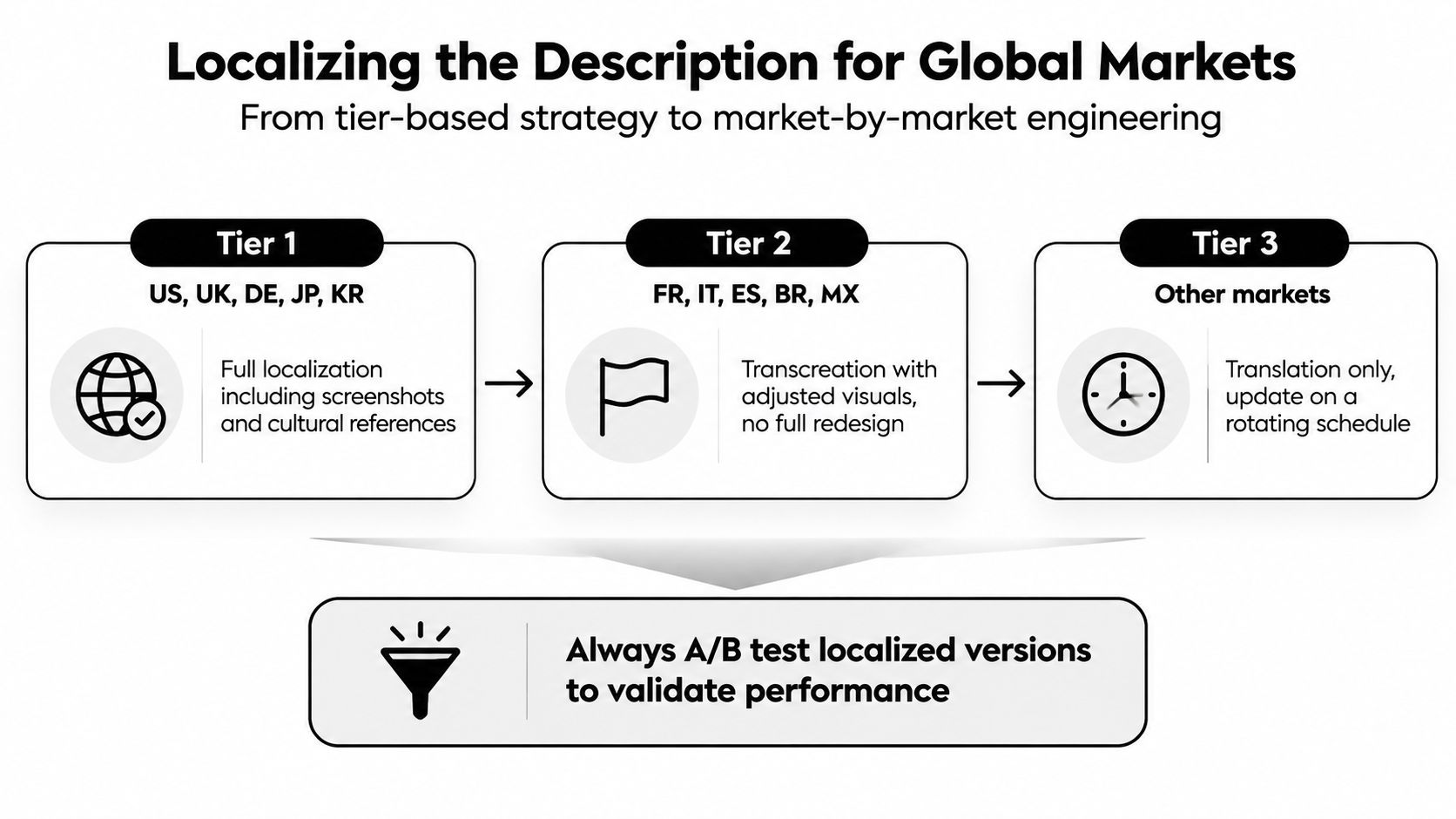
Rank markets by commercial importance, user demand, and available support. For priority markets, localize the complete listing, including screenshots and visible text. For the next group, translate the copy and conduct keyword research in the target language. Keep lower-priority markets in the default language until demand or support capacity justifies deeper work.
<a id="build-a-translator-brief"></a>
Build a translator brief
Send the translator a working brief, not only an English paragraph. Include:
- Primary and secondary terms: Provide target-language search concepts and variants, rather than asking for literal English equivalents.
- Store limits: Record the character cap for every field, including Apple Promotional Text and Google Play short description.
- Product vocabulary: Mark brand names, feature names, and interface labels that must remain unchanged.
- Competitor context: Share relevant local listings as references for tone and terminology, never as copy sources.
- User objections: Explain pricing, account access, privacy, offline behavior, and other details that influence trust.
Translation often expands the original copy, particularly in languages such as German, French, Spanish, and Russian. Leave spare characters in the source draft instead of filling every field to its limit. After translation, recalculate available space and review keyword coverage. A phrase that appeared once in English may occupy more words in the target language, while a direct repetition can make the localized description sound unnatural. Set frequency limits again for each market, based on the translated wording and field length.
A native ASO reviewer should confirm that the copy reflects local search intent, not merely correct grammar.
<a id="review-the-listing-as-a-local-user"></a>
Review the listing as a local user
Read the localized description beside local search results. Does the opening sound like something users would say? Does each feature name match the wording inside the app? Do the screenshots support the same promise as the description?
Keep promotional confidence within claims the compliance team can support. Plain language builds trust more reliably than clever slogans, especially for apps handling money, health information, identity, or private content.
Use this video as a practical reference while checking store presentation and formatting:
<iframe width="100%" style="aspect-ratio: 16 / 9;" src="https://www.youtube.com/embed/TD0Gnq7NQ6s" frameborder="0" allow="autoplay; encrypted-media" allowfullscreen></iframe>A localization is ready when a local reviewer can explain the app's value, intended user, and next action without consulting the English source.
<a id="defending-your-listing-against-reviewer-rejections"></a>
Defending Your Listing Against Reviewer Rejections
A compliant ASO description should make specific claims the product can support. Precision protects conversion and reduces review risk.
Consider a finance listing that uses “guaranteed returns” in screenshot text. A reviewer may treat the phrase as misleading because it implies a financial outcome the app cannot ensure. Deleting the description would miss the source of the problem. The same promise may appear in visual assets and influence the rest of the listing.
<a id="fix-the-claim-at-its-source"></a>
Fix the claim at its source
Edit the screenshot text first. Then check the opening paragraph, feature bullets, promotional text, and review notes for the same implication. Replace absolute language with a clear description of what the app provides. Add a risk explanation where users need it.
Google Play policy messages about misleading claims, or a rejected Data Safety questionnaire, require the same evidence-based review. Compare the listing with the live app, verify every privacy statement, and resubmit answers based on the actual product. Calling a disputed phrase “marketing language” will not resolve wording that could affect a user's decision.
<a id="send-a-concise-response"></a>
Send a concise response
A reviewer response should contain three parts:
- Guideline cited: Copy the policy or guideline reference exactly as shown in the message.
- Copy changed: Identify the screenshot, field, or questionnaire answer you updated.
- Reason for change: State that the revised wording describes the live product accurately and removes an unsupported promise.
Keep a versioned archive for every submission. Store the original and revised copy, screenshots, privacy materials, and reviewer notes together. This record reveals recurring failure patterns and lets you restore a prior version without reconstructing the listing from memory.
Reviewers need a clear path from the claim they flagged to the correction you made.
Do not promise an appeal timeline you cannot control. Respond through the store's provided channel, address the specific concern, and submit evidence that matches the current binary and listing.
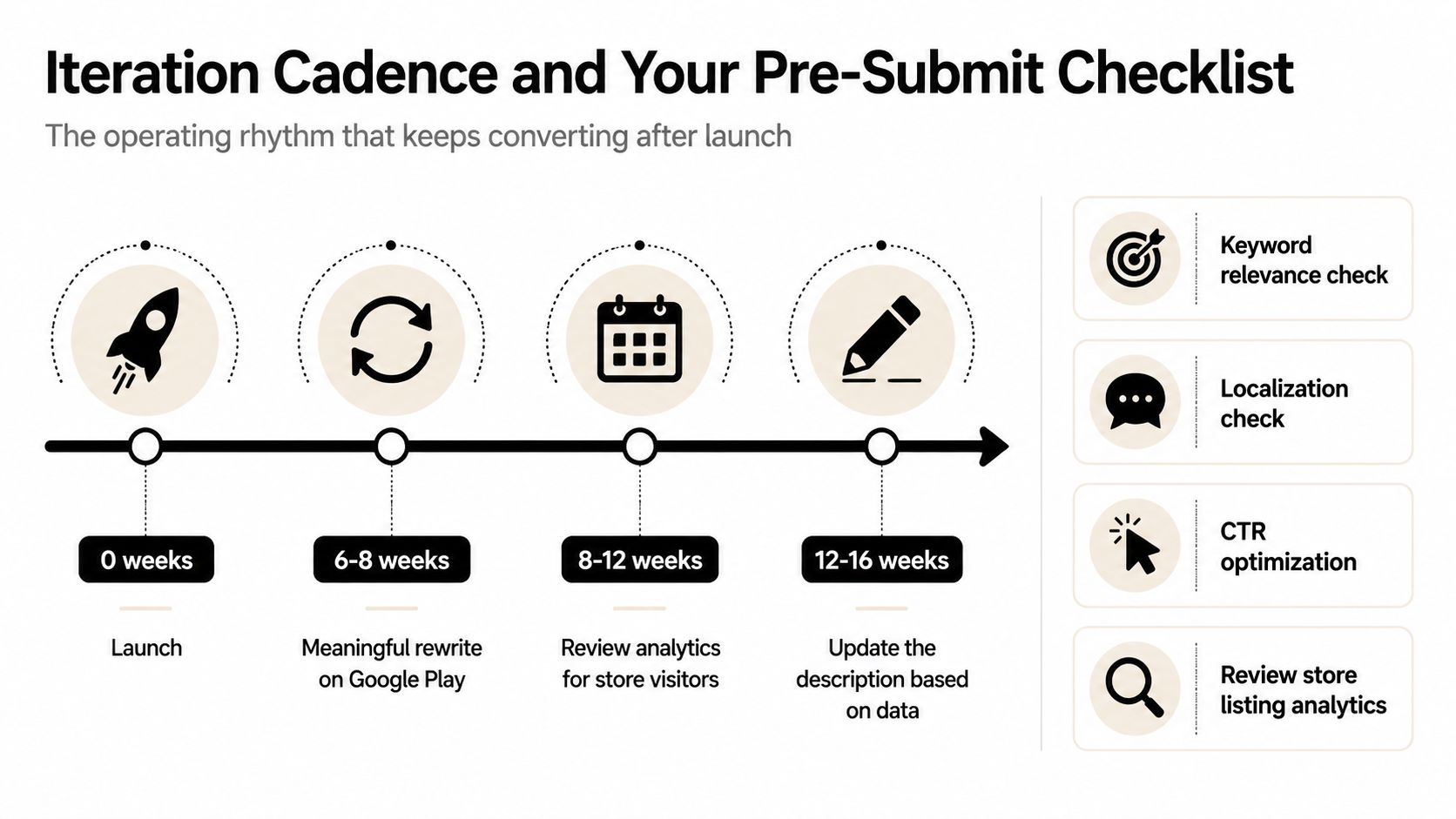
Practitioners commonly refresh metadata every four weeks on iOS and every 6 to 8 weeks on Google Play. Treat these intervals as operating guidance, not a guarantee of indexing speed. A minor wording correction and a positioning change should follow different approval paths.
<a id="iteration-cadence-and-your-pre-submit-checklist"></a>
Iteration Cadence and Your Pre-Submit Checklist
An ASO description should have an owner and a review rhythm. Update it when the product changes, the audience shifts, search language evolves, or listing behavior shows that visitors need different information. A rewrite without a hypothesis creates noise, so record the reason for every meaningful change.
Practitioners commonly refresh metadata every four weeks on iOS and every 6 to 8 weeks on Google Play, according to the execution guidance summarized by ASOMobile. Use those windows as operating guidance, not a guarantee of indexing speed. A minor wording correction and a full positioning change shouldn't follow the same approval process.
<a id="use-a-pre-submit-checklist"></a>
Use a pre-submit checklist
Copy this into Notion, Linear, or your release checklist:
- Opening clarity: Read the first visible lines without expanding the description. They should state the user outcome and audience.
- Field fit: Confirm Apple Promotional Text stays within 170 characters and Google Play short description stays within 80 characters.
- Keyword placement: Verify each primary term has an assigned field and that supporting terms appear in useful sentences.
- Description structure: Check that the long copy has short paragraphs, feature explanations, trust information, and a clear next action.
- Claim review: Remove unsupported guarantees, rankings, comparisons, or outcome promises.
- Store preview: Review the listing on both platforms at mobile width, including screenshots and truncated text.
- Install path: Run a one-tap install test from the live listing and confirm the first session matches the promise.
- Localization: Confirm translated fields, screenshots, and product terminology are aligned in every active market.
- Archive: Save the submitted version and the reason for the change.
The best description is rarely the one with the most keywords. It's the one that makes the right visitor understand the product quickly, find enough evidence to trust it, and arrive at installation with accurate expectations.
LetsDeployIt prepares store listing copy, ASO keywords, screenshots, compliance materials, reviewer notes, and Google Play data safety documentation for React Native and Expo launches, then manages submission and resubmission workflows. Visit LetsDeployIt to have your ASO description and complete store listing prepared for a compliant launch.