Base44 Mobile App: What It Is and What It Can't Do
Base44 mobile app explained: how the store wrapper works, where it falls short of native, and what Apple and Google require before you submit.

The usual advice about a Base44 mobile app skips the most important question. Getting an app into the stores doesn't tell you whether it can work offline, use health data, or behave like the native product your customers expect. Store distribution and native implementation are different decisions.
Base44 can be a useful way to validate a mobile product without starting with separate mobile codebases. Before you export anything or pay for a launch, though, separate how you build the app, how customers open it, and which device capabilities it needs.
Table of Contents
- Four Things Base44 Mobile Can Mean
- How the Store Wrapper Works Under the Hood
- Where Native and Wrapper Apps Diverge
- Fit Verdicts and the Pre-Export Checklist
- Store Requirements You Need Before Submitting
- Choosing Who Handles the Store Submission
Four Things Base44 Mobile Can Mean
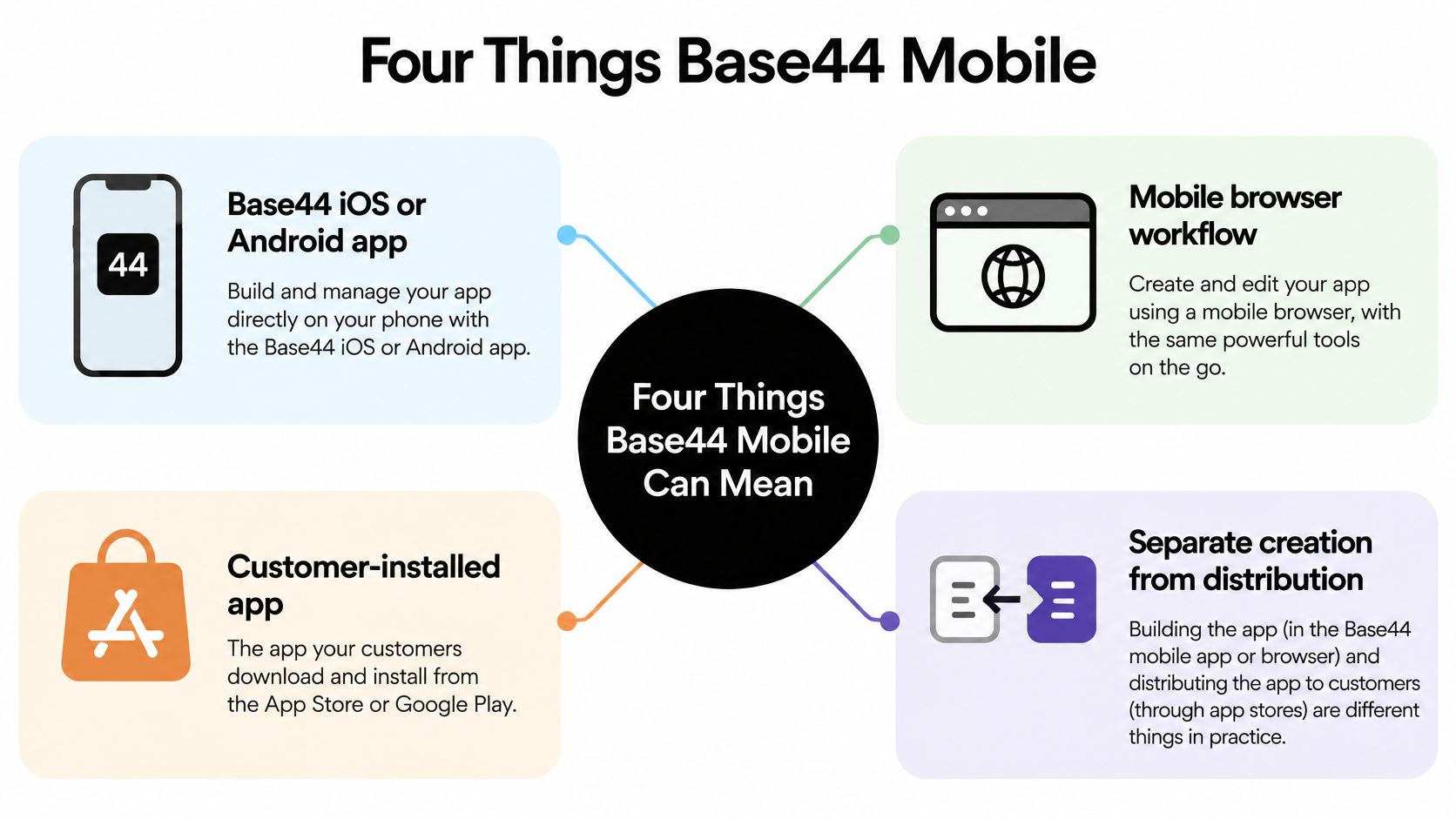
A Base44 mobile app can mean the tool you use to build, or the product your customers use. Those aren't interchangeable. Editing a project from your phone doesn't establish that the resulting customer app uses native screens or has access to every phone feature.
The Base44 mobile-experience documentation describes building through its iOS and Android apps or a mobile browser, alongside a store-distribution option that opens the published app in a secure web view. It also identifies full offline mode and HealthKit as unsupported.
Separate creation from distribution
Start by asking who is holding the phone. If it's you, making changes to a project, you're using a mobile building workflow. If it's your customer, checking an appointment or opening a dashboard, you're evaluating the delivered product.
Four meanings of Base44 mobile
| Meaning | What it is | Best fit |
|---|---|---|
| Building on a phone | Edit and build projects in the Base44 iOS or Android app or a mobile browser | Quick edits and prototypes |
| Mobile browser or web app | The published app opens in a phone browser or is saved to the home screen | Fast validation and browser-based access |
| Store wrapper | A lightweight native shell that loads the published web app inside a web view | Store presence without a separate codebase |
| True native rebuild | A separate React Native, Swift or Kotlin codebase | Heavy device integration and native-only features |
React Native belongs in the last row because it provides a route to native interfaces and integrations, rather than only displaying the existing website. Swift and Kotlin provide platform-specific routes. None of these alternatives means the existing Base44 interface automatically becomes a finished native application.
The distinction is easier to see when creation and installation are kept separate.
Choose the smallest suitable delivery method
Say you're validating a booking portal. Customers need to see availability, sign in, and request an appointment. Browser-based access may be enough to learn whether the service solves their problem, without making store installation part of the experiment.
A store wrapper becomes relevant when installation and store discovery serve a real purpose. A native rebuild becomes relevant when the product's central workflow requires capabilities the web-based delivery method can't reliably provide.
Practical rule: Use mobile access to validate the product, consider a wrapper for store presence, and reconsider the architecture when device integration becomes essential.
That isn't a ranking from bad to good. It's a way to avoid paying for complexity you don't need, or choosing simplicity that prevents the product from working.
How the Store Wrapper Works Under the Hood
Say you've built a client portal with project updates, documents, and approval forms. A customer installs it from a store and taps its icon. The shell opens your published Base44 application, much like a picture frame displaying a web page.
According to Base44's mobile implementation documentation, the store product is a lightweight native shell loading the published web application, rather than a conventional React Native, Swift, or Kotlin implementation. Generating store files doesn't turn the interface into a native-code project.
Follow the customer request
When the customer opens an approval form, the web application still supplies its interface and communicates with its hosted services. The shell supplies the installed container. That division lets you keep the web application as the main implementation instead of recreating every screen for each platform.
It also changes how you maintain the product:
- Web interface work: You continue improving the published application rather than maintaining separate native layouts.
- Native configuration: Shell-level changes still need the appropriate build and release process.
- Service availability: Loading remote screens and data relies on the hosted application and its network connections.
This is useful for an online portal whose value comes from accessing current information. It's less reassuring when a user must complete an important task somewhere connectivity isn't dependable.
Know which responsibilities remain yours
The generated store files are submitted through your own Apple and Google developer accounts. You still need to control those accounts, decide what the listing promises, and ensure the packaged product complies with the relevant store requirements.
Treat the wrapper as a delivery mechanism, not a review outcome. A successful build proves that a package was generated, not that reviewers will approve it or that customers can complete their work.
The shell can simplify delivery. It doesn't remove the need to own the product's behavior.
For planning purposes, separate a web application defect, a shell configuration defect, and a store-listing problem. A broken form, an incorrect native permission, and misleading screenshots need different fixes, even if customers encounter all of them through the same installed icon.
Where Native and Wrapper Apps Diverge
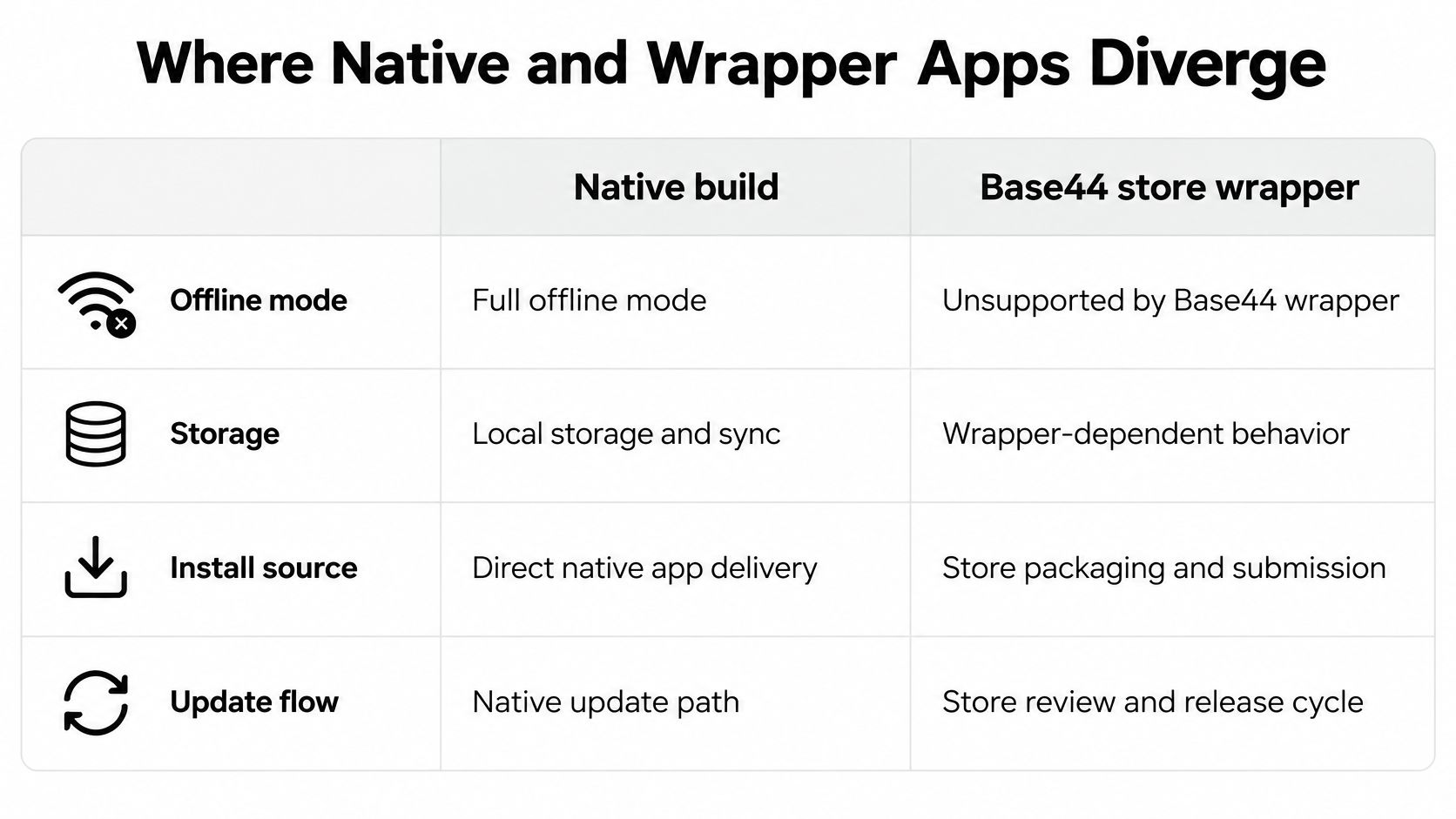
| Capability | Native build | Base44 store wrapper |
|---|---|---|
| Full offline mode | Local storage and sync are possible when implemented | Not supported |
| HealthKit | Supported through an appropriate native module | Not supported |
| Push notifications | Native APNs and FCM setup | Needs push credentials configured in the build |
| Hardware APIs such as Face ID, camera and scanning | Direct native integration is possible, subject to permissions and implementation | Limited; may need custom work or be unavailable |
| Updates to UI | Compiled native UI changes require a store release | Published web changes reach the shell directly |
| Domain connection | Managed through hosting or backend configuration, outside the app | Not available from the mobile building workflow |
Native build versus Base44 store wrapper is a capability comparison, not a promise that choosing native automatically supplies every feature. A native developer still has to implement storage, permissions, synchronization, and error recovery.
Use the visual comparison as an overview, but distinguish changes to web content from changes to the installed binary. They're different release paths.
Offline work needs a product design
Opening a previously loaded screen isn't the same as supporting an offline workflow. A technician may need to create records, attach photos, close the app, and synchronize later without losing changes.
Native local storage makes that architecture possible, but the team must still decide how to handle conflicting edits, expired sessions, and failed uploads. Don't accept a cached dashboard as evidence that field work is safe.
Health integration presents a different decision. If your product needs HealthKit, an attractive web interface can't substitute for the required integration. Define the exact information you need to read or write before choosing a development route.
Treat device access as a specific requirement
Camera access isn't the same as a scanning system. A product might need to capture a photo, continuously recognize barcodes, or process images while guiding the user. Those are different engineering tasks.
Similarly, push credentials are setup inputs, not proof of reliable delivery. The completed workflow needs permission handling, device registration, account association, and a useful destination when someone taps a notification.
If you're reconsidering the implementation, Wistec's guide to choosing between Flutter and native builds offers context for evaluating alternatives beyond a web wrapper. Compare the actual integrations and maintenance work, not just framework names.
Finally, don't confuse builder convenience with customer-facing capability. Domain setup is an administrative task, so needing desktop access for it doesn't make the customer app unsuitable. Write down your must-have device features first, then judge the delivery method against those requirements.
Fit Verdicts and the Pre-Export Checklist
Can it reach the stores? is the wrong first question. Ask whether a customer can complete the product's essential task in the packaged version, under the conditions where they'll use it.
The Base44 store-upload documentation makes capability scope and mobile-workflow limitations relevant to that decision. Building successfully from a phone isn't evidence of complete desktop parity or production readiness.
Use a release-readiness checklist before making a commercial commitment.
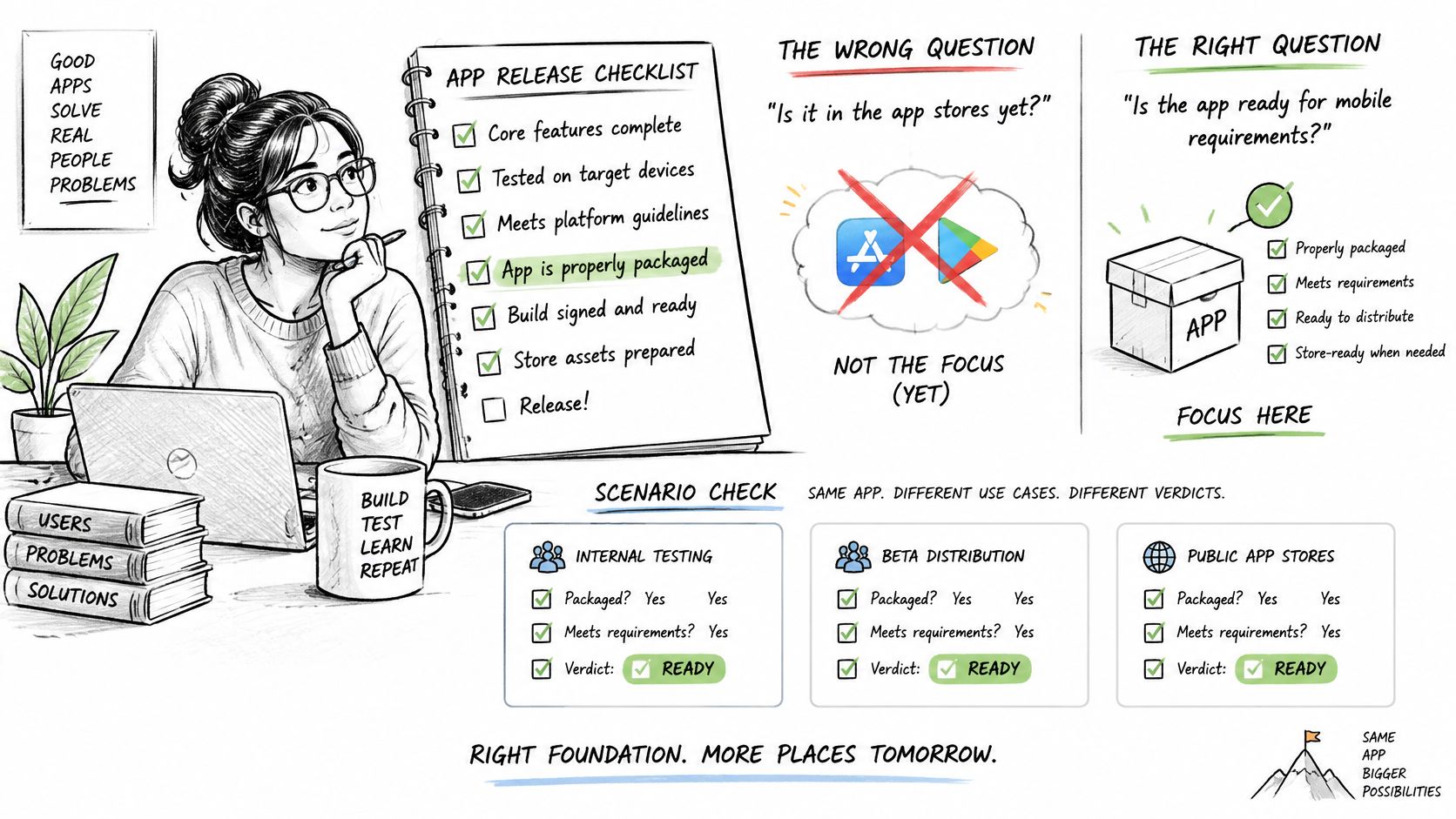
Apply a go or stop verdict
Field-service work with intermittent connectivity is a stop for the standard wrapper. If a worker can't save an inspection underground or at a remote property, the failure affects the job itself. Reconsider the architecture before polishing the installation experience.
A fitness product requiring HealthKit is also a stop. A workout library that customers read online is a different proposition from a product whose value depends on exchanging health information.
- Scanning or background processing: Reassess the architecture. Specify the exact task and prove it works in the proposed implementation before committing.
- Mobile-first demand testing: Go when the objective is learning whether people want the workflow, and browser-based behavior is sufficient.
- Simple online client portal: Conditional go. Approvals, records, and documents can suit this approach once the packaged login and navigation work reliably.
The stop signs are a hard offline requirement, HealthKit dependence, hardware-heavy workflows, and core value tied to device APIs. A fast prototype can still be valuable, but don't mistake temporary validation architecture for a permanent delivery decision.
Run the pre-export check
- Write down the essential device tasks. Use concrete statements such as save an inspection without reception, read health records, or scan a parcel label.
- Compare each task with the proposed implementation. An unsupported essential task means stop before export or payment, not add it to a vague future roadmap.
- Exercise the mobile-first workflow on physical iOS and Android devices. Test login, push where configured, deep links, keyboard behavior, permission prompts, rendering, and network loss. Repeat important tasks after closing and reopening the app.
- Prepare submission only after those checks pass. Have the developer accounts, privacy policy, and reviewer demo account ready, and test payments if they're part of the product.
A preview is useful for finding problems, but it isn't a substitute for testing the release build. We offer a phone preview before payment; our Free plan includes full native conversion, QR-code preview on your device, editor access, and unlimited edits and re-previews. That's a separate conversion route, not an expansion of Base44's standard wrapper capabilities.
Use the accompanying walkthrough alongside your own acceptance checks.
<iframe width="100%" style="aspect-ratio: 16 / 9;" src="https://www.youtube.com/embed/DqBsYVu7UU4" frameborder="0" allow="autoplay; encrypted-media" allowfullscreen></iframe>Record each result as pass, fail, or not required, with a reproducible task attached. Choose the wrapper only when the essential checklist passes on real devices. If it doesn't, keep the useful prototype and change the implementation before investing in store assets.
Store Requirements You Need Before Submitting
Start with account ownership. You'll need developer accounts under your control, and the account fees are separate from our launch price. With our service, the listings stay in your accounts, and your accounts and code remain yours.
Store requirements by platform
| Requirement | Apple App Store | Google Play |
|---|---|---|
| Developer account fee | $99 per year, excluded from our launch price | $25 one-time, excluded from our launch price |
| Pre-release testing | TestFlight can support beta testing | Confirm the closed-testing requirements shown for your account |
| Privacy policy | Prepare an accessible policy URL | Prepare the policy URL and data safety answers |
| Reviewer access | Working demo account and reviewer notes for restricted features | Working demo account and reviewer notes for restricted features |
| Listing assets | App icon and screenshots for supported device categories | App icon and screenshots matching the supported experience |
| Minimum functionality | Assess whether the product offers sufficient app functionality | Check applicable quality and release requirements |
Don't prepare screenshots for device categories you haven't tested or claim features the packaged product doesn't deliver. The listing is a description of the release build, not the product roadmap.
Schedule testing as release work
The Forbes Advisor Base44 review identifies manual steps and paid-plan constraints around device testing or store publishing, with real-device testing outside the normal builder workflow. Budget time for QA rather than treating package generation as the final quality check.
For eligible personal Play accounts, our optional closed-testing add-on supplies 12 real-device testers for 14 days, manages invitations, and runs the test. Check the requirements displayed in your Play Console before setting a launch date.
A thin wrapper also needs a product-level review. Our guide to App Store rules for app-generation services helps distinguish submission ownership from the separate question of whether an app provides enough functionality.
Our pre-flight work includes Guideline 4.2 checks. For Guideline 4.3 template or spam rejections, we differentiate the build, metadata, and listing so reviewers can understand the distinct product. Changing an icon alone doesn't explain why customers need the app.
Use a controlled pre-flight order
- Accounts: Confirm enrollment, access permissions, signing ownership, and recovery details.
- Privacy and data forms: Match disclosures to actual collection, permissions, analytics, and third-party services.
- Reviewer access: Verify demo credentials and explain restricted workflows without requiring reviewers to contact support.
- Device testing: Check authentication redirects, purchases, accessibility, push registration, and supported screen layouts.
- Submission: Submit a known build with matching assets and a clear owner for reviewer replies.
Release safeguard: Freeze unnecessary web changes during review, retain a rollback option, and check compatibility before publishing backend changes.
Because installed users can encounter a newly published web release, store approval isn't the end of release engineering. Keep a repeatable smoke test for the essential customer journey and run it whenever a deployment could affect the mobile experience.
Choosing Who Handles the Store Submission
You can handle submission yourself or pay someone to manage the release work. Neither path fixes an unsuitable architecture. Make that decision before comparing launch costs.
With the DIY route, you generate the store files, configure any required push credentials, manage signing and accounts, test the build, prepare the listing, and answer reviewer messages. It's a reasonable choice when you can own the operational detail and don't need to delegate it.
Compare the work you're buying
Our app-store submission service supports Base44 projects among its builder-specific submission paths. We prepare listing copy and ASO keywords, screenshots, icons, and a preview video, then manage submission and reviewer responses.
Submission cost and timeline by path
| Path | Cost | Timeline |
|---|---|---|
| Do it yourself | Developer account fees, infrastructure, and your release-work time | Set by your readiness, testing obligations, and store review |
| LetsDeployIt launch service | From $999 for one store or $1,799 for both, excluding developer account fees and infrastructure | Typical launch positioning is 10 to 14 days; the staged workflow also identifies submission and reviewer handling in weeks three to four |
Don't interpret those different scheduling descriptions as a guaranteed approval date. Confirm which schedule applies to your project, especially when testing, native development, or reviewer changes are involved.
Payment is half to start and half when the app is live. Phone-only features are scoped separately, so distinguish submission preparation from additional development before comparing quotes.
For a broader assessment, Galliot's guide to choosing a software engineering vendor provides useful context for evaluating scope and responsibility. Ask who owns signing, who fixes build defects, and who responds when reviewers request changes.
Choose DIY if you have the time and release skills. Choose managed submission if delegating those tasks fits your budget, while keeping product acceptance and account ownership under your control.
Before committing your Base44 mobile app to a launch, test the essential customer workflow on your own phone. Visit LetsDeployIt to preview a native conversion before payment and review the store-submission service, with phone-only features scoped separately before work starts.
Want it in the stores without the guesswork?
A Base44 app runs in the browser, and the stores want a native build, signing, a listing and a review.
We handle it end to end. Flat $499.50 for both stores. Approved or your money back.