App Store Optimization Service: Deliverables and Costs
Learn what an app store optimization service delivers, what it costs, and how to pick a provider that protects approval and conversion.

Apple's 2024 App Store Transparency Report recorded 1,961,596 apps available on the App Store and an average of 839,266,915 weekly app downloads. A 0.1% change applied to that weekly download total is roughly 839,000 download events across the marketplace, although an individual app's outcome depends on ranking, demand, competition, and audience fit. The same reporting separates App Store search, browse pages, and external referrals, so you can measure impressions, product-page views, downloads, and conversion rate. At that scale, an app store optimization service is an acquisition system, not a one-time rewrite of the title.
Table of Contents
- ASO Deliverables at a Glance
- How Keyword Strategy Works Inside Store Limits
- How to Test Listing Assets Without Guesswork
- Keeping Claims Aligned With What the App Does
- Rejection Defense and What a Guarantee Can Cover
- Pricing Components and What a Quote Leaves Out
- Choosing a Provider and Briefing It Before You Sign
<a id="aso-deliverables-at-a-glance"></a>
ASO Deliverables at a Glance
An app store optimization service should hand you listing assets, metadata, and a measurement plan. A quote that only says “ASO included” is not a quote. Ask for a line for every item below, and mark any row the provider will not cover before you compare prices.
| Deliverable | What it includes | Metric to watch |
|---|---|---|
| Keyword strategy | Head and long-tail terms mapped to search intent for each market | Search impressions and rank by term |
| Title and subtitle | Primary term and value proposition within length limits | Impressions to product page views |
| Keyword field (Apple) | Up to 100 characters, comma-separated, no duplicates | Search-driven downloads |
| Short and full description (Google Play) | Benefit copy aligned with features in the shipped build | Conversion rate from product page |
| App icon | Refined icon with adaptive variants | Install conversion rate |
| Screenshots | Every required device size with captions for key features | Install conversion rate |
| Preview video | Demo of the core user flow within store length limits | Install conversion rate |
| Localized listings | Market-specific copy and assets for priority languages | Conversion by market |
| Experiment plan | One hypothesis per test, baseline and results | Conversion lift and 1-day retention |
Copy becomes a measured stage only when each row names the metric it is supposed to move. A prettier icon is a guess until install conversion moves. A longer description is a guess until product-page conversion moves in the markets you ship to.
<a id="what-the-quote-is-really-buying"></a>
What the quote is really buying
Treat the table as the scope, not a menu of nice-to-haves. Localization and the experiment plan are the rows teams drop to make a flat fee look smaller, then they wonder why English screenshots underperform in the country that sends the traffic. Category choice belongs in the same conversation, because a miscategorized app can rank for the wrong searches even when the copy is tight.
Paid traffic does not replace this list. Creator campaigns can lower cost per install when the store page already converts, which is why teams pairing listings with lowering CPI with creator campaigns still need the screenshot and metadata rows finished first. A strong creator post that lands on a vague page wastes the spend.
Copy the table into the request for proposal. Next to every row, write included, excluded, or add-on. Anything left blank is a question, not a discount.
<a id="how-keyword-strategy-works-inside-store-limits"></a>
How Keyword Strategy Works Inside Store Limits
A meditation app can burn its whole Apple keyword field on close cousins: meditation app, meditations, meditation apps. Those strings repeat one idea and leave no room for sleep, mindfulness, breathing, or focus. The field holds 100 characters, comma-separated, so every character has to name a distinct intent.
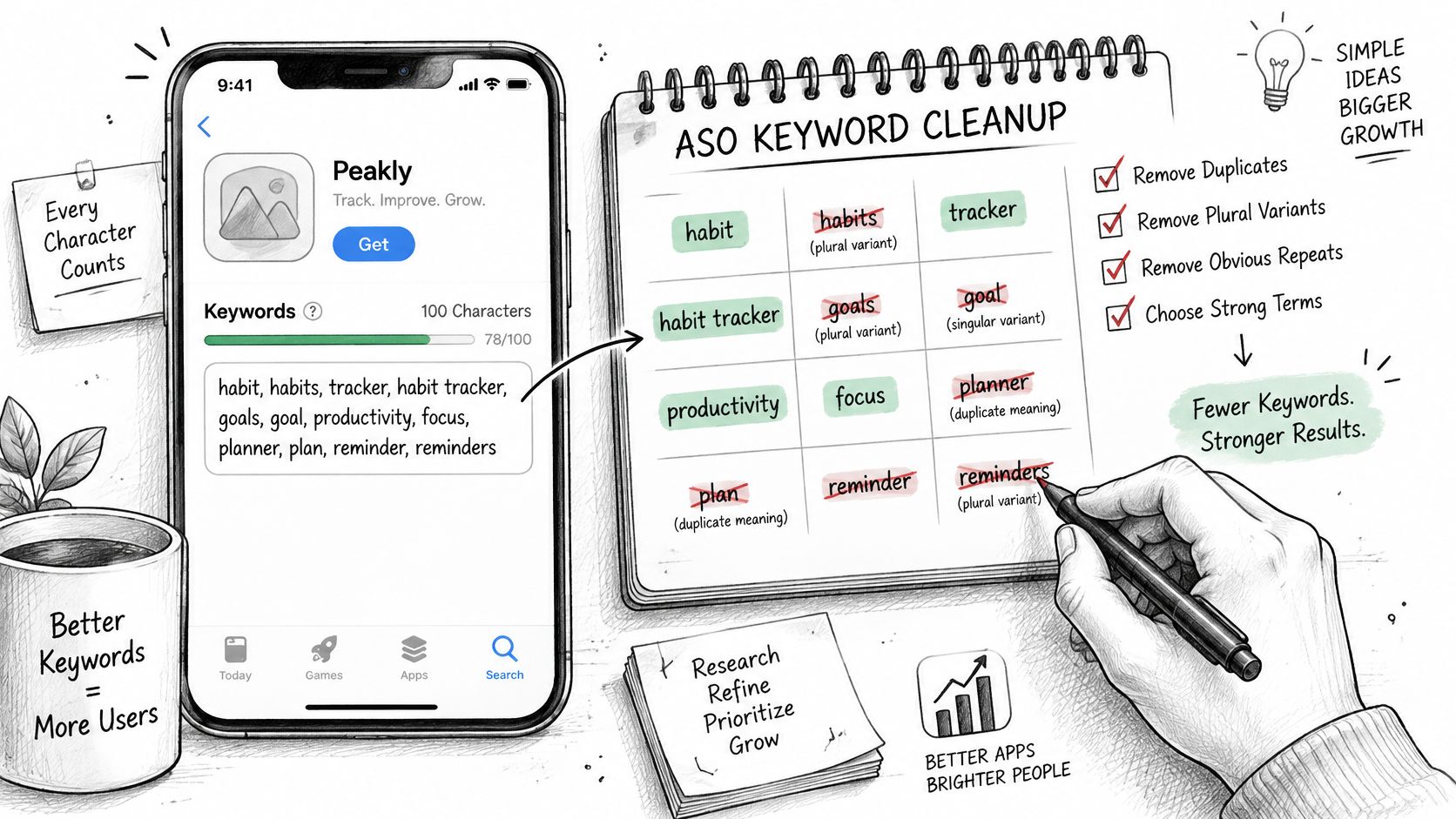
Apple's product page guidance tells you to drop duplicates, plurals already covered by a singular term, generic words such as “app,” filler words, and unnecessary special characters. The useful set is the shorter one. Meditation, sleep, mindfulness, breathing, focus says five jobs. The stuffed version says one job three times and still uses the generic word you were told to remove.
<a id="relevance-is-a-rejection-risk-not-a-style-note"></a>
Relevance is a rejection risk, not a style note
Irrelevant terms, competing app names, and unauthorized trademarks can contribute to rejection. Stuffing a rival's brand into the hidden field is not a clever rank trick. It is a review problem, and it does not describe your product.
Search results are not a keyword contest by themselves. Apple states that results combine text relevance across the title, subtitle, keywords, and primary category with customer behavior such as downloads, ratings, and reviews. A term you cannot defend in the build will not be rescued by a perfect character count.
Google Play has no separate keyword field. The same discipline applies to the title, the short description, and the full description. Place each term where a person can read it, and only where it matches a feature in the shipped build. Repeating a phrase so a crawler might notice it makes the page worse for the human who has to install.
<a id="a-map-you-can-audit"></a>
A map you can audit
Work in this order.
- Seed from the problem. Write the phrases users type when they want the outcome, not your internal feature names.
- Group by intent. Separate “help me sleep” from “teach me to breathe” so you do not spend characters twice.
- Cut close variants. Keep the singular, drop the plural and the word “app,” and remove filler.
- Check the build. If the binary does not do it, the term does not ship.
A provider who will not show that map before you sign is selling a ranking promise. A practical walkthrough of field choices sits in this guide on how to optimize App Store keywords. I would start with the map, not with a tool export of high-volume terms you cannot rank for.
<iframe width="100%" style="aspect-ratio: 16 / 9;" src="https://www.youtube.com/embed/4_8f4vBlMzg" frameborder="0" allow="autoplay; encrypted-media" allowfullscreen></iframe>Keep the map next to the quote. If a later draft adds a competitor name or a feature you cut from the release, the map is how you catch it before submission.
<a id="how-to-test-listing-assets-without-guesswork"></a>
How to Test Listing Assets Without Guesswork
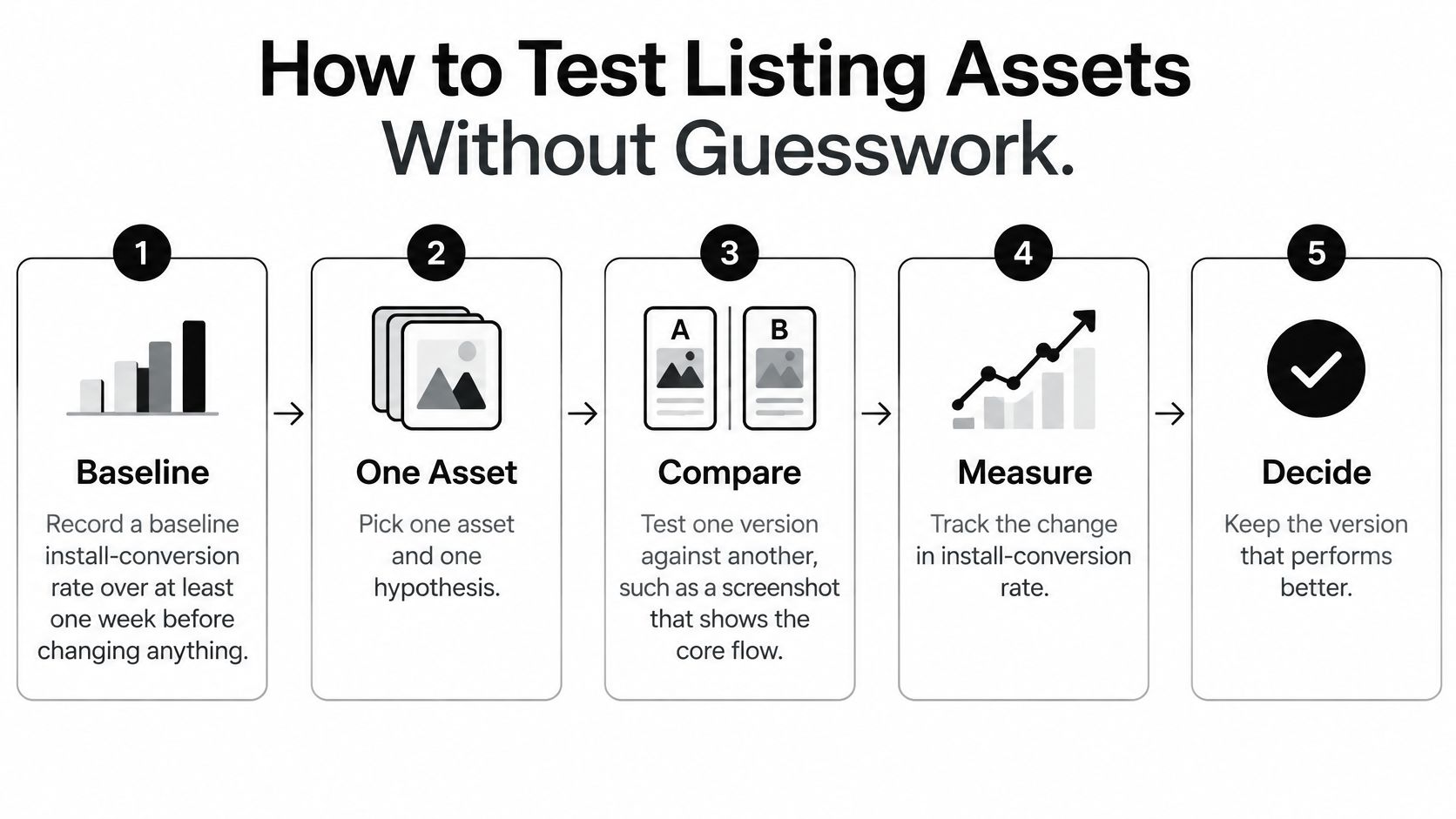
Store listing tests fail when two things change at once, or when a loud weekend ends the test early. Run them as a controlled program. Google Play's experiment framework reports acquisition and 1-day retention for each variant, recommends testing icons, videos, and screenshots, and tells you to change one asset at a time. Apple's product-page tests allow up to three alternative icons, screenshots, and previews, with localized variants judged in App Analytics on estimated conversion lift and confidence.
<a id="six-steps-and-the-slip-that-ruins-each-one"></a>
Six steps, and the slip that ruins each one
- Record a baseline install-conversion rate for at least one week before you change anything. Without that week, a holiday spike looks like a win. The slip is launching the new icon on day one because the designer is finished.
- Pick one asset and one hypothesis. A fair test is a screenshot of the core flow against a screenshot that lists features, not a new icon plus a new title. Changing both means you cannot name the cause.
- Build up to three alternatives, which is Apple's cap for icons, screenshots, and previews. More variants split the traffic until the result is noise. The slip is uploading five “just in case.”
- Localize the variants for priority markets where traffic can support a read. A winner in one country is not a winner in the next. The slip is pasting the English captions onto every locale.
- Run at least one week so weekday and weekend traffic both count. Google recommends that minimum, then a revisit when audiences, locations, or seasonality change. Ending after a strong Saturday is how teams lock in a fluke.
- Read estimated lift and confidence, then check 1-day retention. A persuasive page can raise installs from people the app does not serve. Adopt a winner only when the lift holds in retention and in the market segment that matters most.
Screenshot craft is its own pass. Caption length, device frames, and the order of the first three images are covered in this note on App Store optimization screenshots. Do that layout work before you spend a test cycle on a frame that crops the main action.
Practical rule: One asset, one hypothesis, one week, then retention. If any of those four is missing, do not ship the “winner.”
A listing test also assumes the build behind the screenshots is stable. Pair the experiment with a way to create a reliable QA workflow so a crash on the flow you just advertised does not masquerade as a creative result. Revisit the asset when the season changes. A January fitness frame is the wrong frame in July, even if it won cleanly.
<a id="keeping-claims-aligned-with-what-the-app-does"></a>
Keeping Claims Aligned With What the App Does
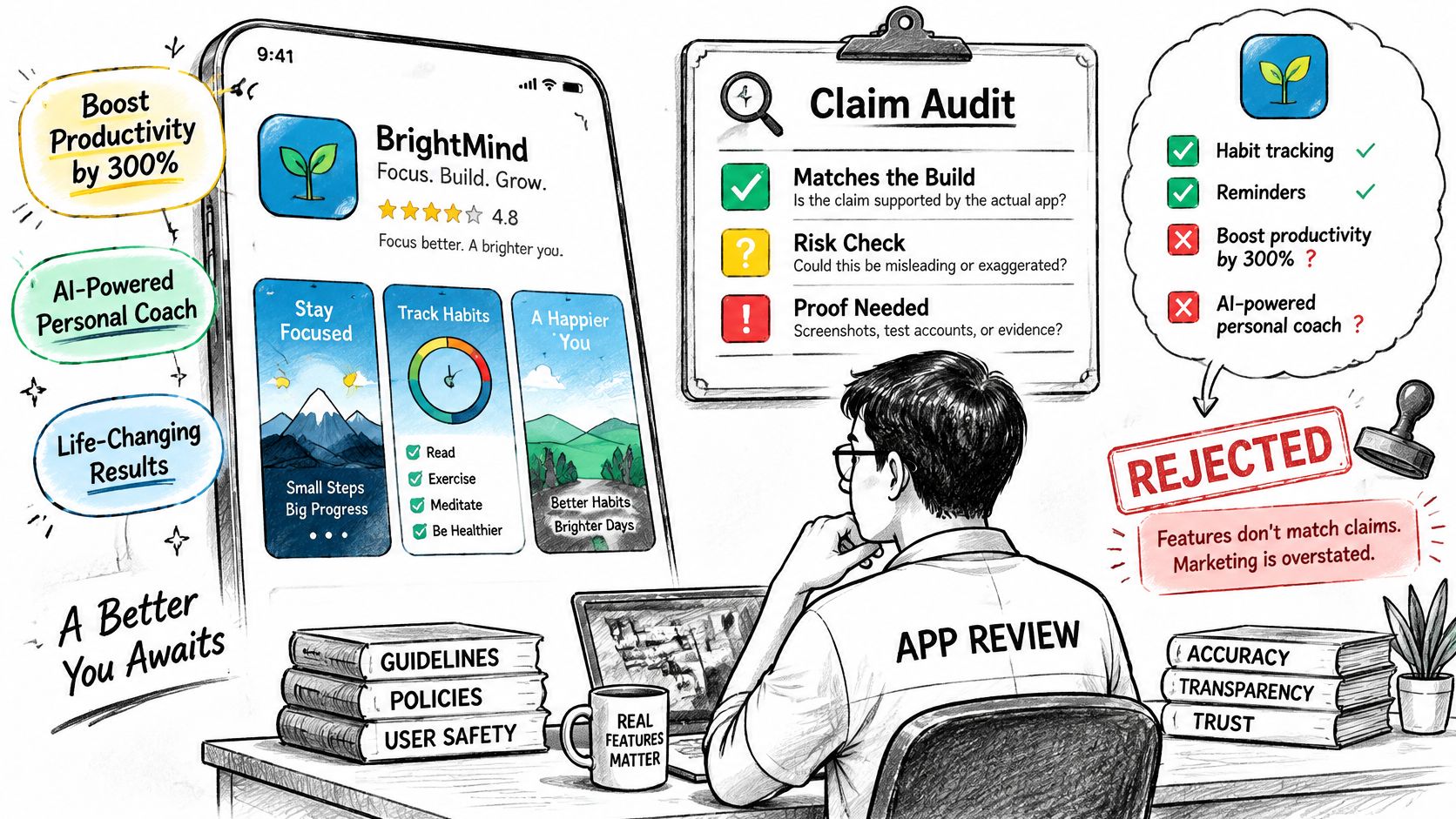
Polished screenshots and bold benefit lines can lift appeal and still get the build rejected. The common assumption is that broader claims and more keywords are always better. They are not. Narrower, accurate positioning often beats a page that promises an AI coach, a live map, or a social feed the binary does not contain.
Apple's App Store Review Guidelines require descriptions, screenshots, previews, and privacy information to reflect the app's core experience. They also require a privacy-policy link in the App Store metadata and inside the app. Aggressive copy that overpromises is a conversion-versus-compliance trade-off, and the compliance side shows up as a rejection, not as a slightly lower install rate.
<a id="a-claim-audit-before-anyone-writes-the-subtitle"></a>
A claim audit before anyone writes the subtitle
List every user-facing claim in the title, subtitle, description, screenshots, and preview video. Map each claim to a feature in the build you will submit. Then check the permissions and SDKs that feature needs, and compare them with the privacy policy, the App Store privacy answers, and the Google Play Data safety form.
Say a fitness app's second screenshot shows an AI coach that is still on a branch, or a bundled analytics SDK requests location while the privacy label never mentions location. Either gap is enough to stall review. Apple also requires purpose strings for sensitive-data APIs and a clear explanation of how data is used. If the app creates accounts, account deletion has to exist, not just a sentence in the policy.
React Native and Expo apps need an extra pass. Bundled libraries can add permissions or data practices a founder did not mean to market. The audit is how you find the library before a reviewer does.
Fewer keywords and less dramatic copy can be the better ASO outcome when the alternative is a rejection and a trust problem on the page that remains.
The output is a one-page claim register: claim, shipped feature, permission or SDK, and the declaration that matches it. Update the register whenever an SDK or a permission changes. If a line on the page has no row, cut the line. I would rather lose a keyword than defend a screenshot of a feature that is not in the binary.
<a id="rejection-defense-and-what-a-guarantee-can-cover"></a>
Rejection Defense and What a Guarantee Can Cover
A guarantee that “we will get you approved” skips the only part you can manage, which is the class of rejection and the smallest fix that answers it. Platform discretion, policy edits, and defects outside the listing are not something a vendor controls. What you can demand is a playbook.
| Rejection type | Typical trigger | Smallest defensible fix |
|---|---|---|
| Metadata | Screenshots or description promise features the build does not include | Edit copy or screenshots to match the build, then resubmit |
| Functionality | Crash, broken flow, or dead link during review | Fix the build, add reviewer steps, resubmit |
| Privacy | Missing privacy policy link, or Data safety answers that do not match SDKs | Update the policy and declarations to match the SDK list |
| Account access | Reviewer cannot sign in | Provide working test credentials and clear notes |
| Policy | Category or content conflicts with store rules | Reclassify, or remove the conflicting feature |
Classify first. A metadata miss is not fixed by rebuilding the app, and a crash is not fixed by rewriting the subtitle. Make the smallest defensible change, then resubmit with evidence: a screenshot of the fix, working test credentials, and reviewer notes that say what changed.
Google's 2025 Play safety update reported that Play blocked more than 255,000 apps from obtaining excessive access to sensitive user data in 2025, while expanding AI-assisted detection and pre-review checks. Those checks cover privacy-policy links, login credentials, data-deletion links, Data safety inaccuracies, and crashes. A polished listing does not shortcut that gate. Read the current rules in this summary of App Store review guidelines before you treat a rejection as a surprise.
<a id="what-a-promise-can-actually-cover"></a>
What a promise can actually cover
Apple and Google control review times. That clock sits outside our control, and outside any other provider's control. We are not responsible for policy changes Apple or Google make after submission, for store outages, or for rejections caused by code or content you change after handoff.
A meaningful guarantee names artifacts, response times, how resubmissions are handled, exclusions, and refund conditions. Our launch plans include fixing and resubmitting free until the app is approved. Confirm the boundary in writing. If you change the binary or the marketing claims after handoff, that free pass does not automatically cover the new defect.
Ask three questions before you sign.
- Which classes have they handled? Metadata, functionality, privacy, account access, and policy are different jobs.
- What evidence goes on the resubmission? A note that says “fixed” without a screenshot or test login wastes the next review.
- What does the refund rule say about rejections outside their scope, including policy changes and client edits after handoff?
Speed and keyword volume are the wrong things to buy. Traceable compliance and a documented resubmission are the parts a provider can stand behind.
<a id="pricing-components-and-what-a-quote-leaves-out"></a>
Pricing Components and What a Quote Leaves Out
A launch quote usually prices the service work. Platform fees, infrastructure, and several add-ons sit outside it. Compare those lines before you compare the headline fee.
| Cost item | Who pays | Included in flat fee? |
|---|---|---|
| Apple Developer Program | Developer | No, $99 per year |
| Google Play Console | Developer | No, $25 one-time |
| Store listing, icons, screenshots, and metadata | Provider | Yes, in launch plans |
| In-app purchases with RevenueCat | Developer | No, required add-on for digital goods |
| Analytics and attribution | Developer | Add-on, check the quote |
| Android closed testing (12 testers, 14 days) | Provider | Add-on, personal Play accounts only |
| BaaS or server monthly costs | Developer | No |
| Custom brand redesign | Developer | No |
| Post-launch updates | Developer | No |
The $99 per year Apple Developer Program fee and the $25 one-time Google Play Console fee stay on the developer. So do backend hosting, a custom brand redesign, and updates after the first production release. In-app purchases through RevenueCat are a required add-on when you sell digital goods, because Apple and Google mandate their own billing. The analytics add-on is events and install attribution, and it is not assumed inside a listing fee. The Android closed-testing add-on, 12 testers for 14 days, applies only to personal Play accounts.
<a id="how-to-read-two-quotes-on-the-same-page"></a>
How to read two quotes on the same page
Our launch plan for both stores is $499.50 flat. The single-store plan is $349.50 flat. Fees are paid 50% to start and 50% when the app is live in the store. Those figures are the current plan prices, and you should still pull the live number from each provider's own pricing page rather than from a roundup.
Providers usually sell one of three shapes. A flat launch package covers listing assets and submission. A monthly retainer covers later experiments and metadata updates. Per-asset or per-market pricing covers extra languages and video. For each shape, ask which table rows recur, whether post-launch experiments are included, and whether a rejection resubmission is billed again.
Put both quotes on the same grid. Mark included or excluded on every row. An item with no mark is a question to answer before any payment, not a detail to discover on the invoice.
<a id="choosing-a-provider-and-briefing-it-before-you-sign"></a>
Choosing a Provider and Briefing It Before You Sign
Score every shortlisted provider on the same six rows, including freelancers and agencies. A promise with no artifact loses to a narrower plan you can audit.
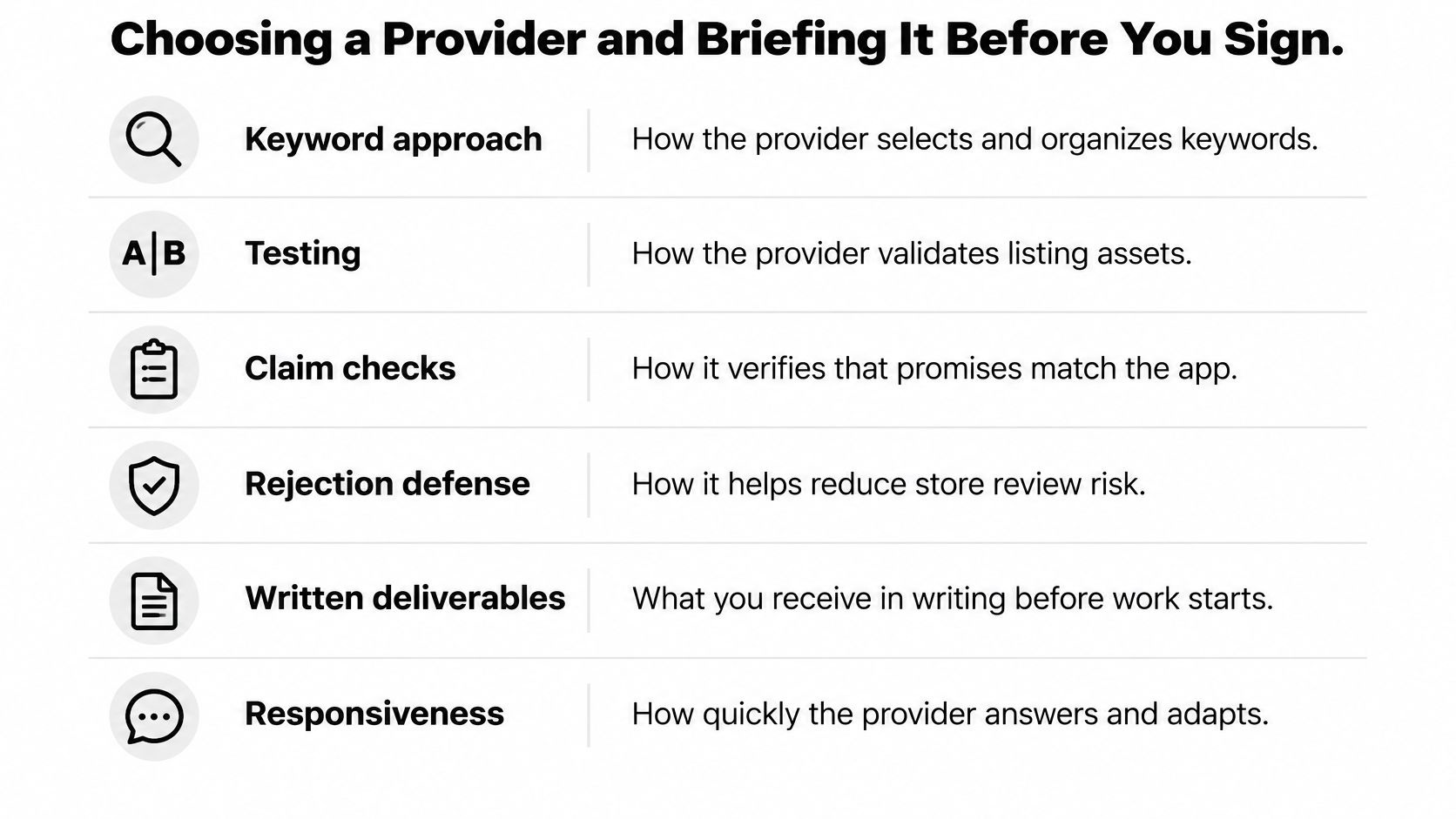
| Criterion | Strong signal | Weak signal |
|---|---|---|
| Keyword approach | Maps terms by intent and market, with a field plan | Promises top rankings without a term list |
| Testing | Baseline, one hypothesis per test, retention checked | Changes many assets at once with no baseline |
| Claim checks | Audits claims against build, privacy, and declarations | Writes copy without checking SDK permissions |
| Rejection defense | Classifies rejections and attaches evidence to resubmissions | Resubmits without a changed artifact |
| Written deliverables | Named list of artifacts and response times | Vague scope described as full service |
| Responsiveness | Specific reply time after reviewing the app | No timeline before a contract is signed |
Say Provider A shows a baseline, one hypothesis, and a retention check, but no SDK or permission audit. That is a pass on testing and a miss on claim checks. Provider B promises top rankings, sends no term list, and will not name a timeline before the contract. That fails keyword approach and responsiveness even if the slide deck looks busy. Run that scoring on every name on the list. Do not give an agency a pass because the logo is familiar.
<a id="the-same-brief-sent-to-all-of-them"></a>
The same brief, sent to all of them
We cover booking, fitness, marketplace, and community apps, and the brief should still be identical for every vendor you ask.
- Name each store, and say whether a personal Play account needs the closed-testing add-on.
- Send the build, the SDK list, and the permissions it requests, so claims and privacy answers are checked before copy is written.
- Ask for deliverables as a named list that matches the quote table, not a paragraph that says full service.
- Request the resubmission process in writing, including response times, what counts as a free fix, exclusions, and refund conditions.
- Agree the payment split, and confirm which costs sit outside the quote, including platform fees, backend hosting, and post-launch updates.
- Record a baseline install-conversion rate before launch so the first experiment has a fair comparison.
In weeks 1 to 2, AI drafts the store copy, ASO keywords, screenshots, app icon polish, and policy, and every step has a human sign-off. We try the app and reply within two business days with how we would get it into the stores. That reply time is a responsiveness signal you can score, not a slogan.
Shortlist three. Lay their quotes on the cost grid and keep only the providers who answered every row. I would sign the one whose claim register, keyword map, and resubmission rules are already in the packet, even if another bid is a little cheaper and silent on those three.
LetsDeployIt prepares store listing copy, ASO keywords, screenshots, icon polish, privacy labels, and submission for React Native and Expo apps, with human sign-off on the draft and free resubmissions until the first production release is approved. If you want that scope checked against your build before you pay a platform fee twice, send the app through LetsDeployIt and you will get a store plan within two business days.