How to Optimize App Store Keywords: A Step-by-Step Guide
Learn how to optimize app store keywords on Apple and Google Play, from building a list and placing terms to testing and localizing for each market.

The most popular advice about app store keywords is also the easiest to misuse: find high-volume terms, put them everywhere, and wait for rankings. That approach confuses visibility with useful acquisition. If people arrive expecting a feature your app doesn't deliver, more search traffic won't fix the mismatch.
Learning how to optimize app store keywords means making separate decisions for Apple and Google Play, then checking what happens after the install. Choose searches your app satisfies, place those concepts in the fields each store uses, and judge the result by qualified installs and continued use, not a longer list of ranking keywords.
Table of Contents
- Keyword Fields and Limits on Each Store
- How to Build a Keyword List From Scratch
- Choose Keyword Research Tools
- Placing Keywords in Each Listing Field Without Stuffing
- Test Each Change and Avoid Costly Mistakes
- Localize Keywords by Market Instead of Translating
- Decide Whether to Run Keyword Work In-House or Outsource
<a id="keyword-fields-and-limits-on-each-store"></a>
Keyword Fields and Limits on Each Store
| Field | Apple App Store | Google Play |
|---|---|---|
| Title | App name, used for search relevance | 30 characters, indexed for search |
| Subtitle or short description | Subtitle, used for search relevance | 80 characters, indexed for search |
| Keyword field | 100 characters, hidden from shoppers, comma-separated | None, no hidden keyword field |
| Full description | Use for explaining benefits and converting shoppers | 4,000 characters, used for search relevance |
| Promotional text | Promotional copy, separate from the keyword field | None |
| Custom listings | Custom product pages for tailored experiences | Up to 50 custom store listings |
The Google Play limits and custom-listing allowance above come from Google's store-listing guidance, which also recommends clear descriptions and warns against keyword stuffing and intellectual-property violations.
Apple gives you a hidden keyword field. Google Play doesn't, so its keyword strategy has to work inside copy shoppers can read.
On Apple, allocate concepts between the app name, subtitle, and keyword field rather than treating them as interchangeable containers. The visible fields must communicate the product immediately, while the hidden field can accommodate relevant vocabulary that would make the public copy awkward.
Google Play requires a different editorial decision. Your short description needs to express the app's purpose, while the full description gives you room to explain features, audience, and use cases naturally. Filling the available space isn't an objective.
<a id="spend-the-visible-space-on-clarity"></a>
Spend the visible space on clarity
Say you're launching a household expense tracker. A title built around expense tracking gives shoppers a clearer starting point than an invented brand name followed by vague language about simplifying life. Keep the brand recognizable, but don't make users decode the category.
For the writing discipline behind concise titles, DesignStack's page title guidance for Dorset businesses is a useful companion. Apply the clarity principle, not website ranking assumptions, to store metadata.
Use these placement rules when drafting:
- Give each Apple term a purpose. Don't spend hidden-field space repeating a concept already represented prominently.
- Write Google Play copy for readers. Repeat a phrase only when the sentence needs it, not to reach a density target.
- Separate discovery from persuasion. Use Apple's description to explain the experience, resolve objections, and support the download decision.
- Tailor deliberately. A custom listing should address a distinct search intent or audience, not merely rearrange identical copy.
<a id="how-to-build-a-keyword-list-from-scratch"></a>
How to Build a Keyword List From Scratch
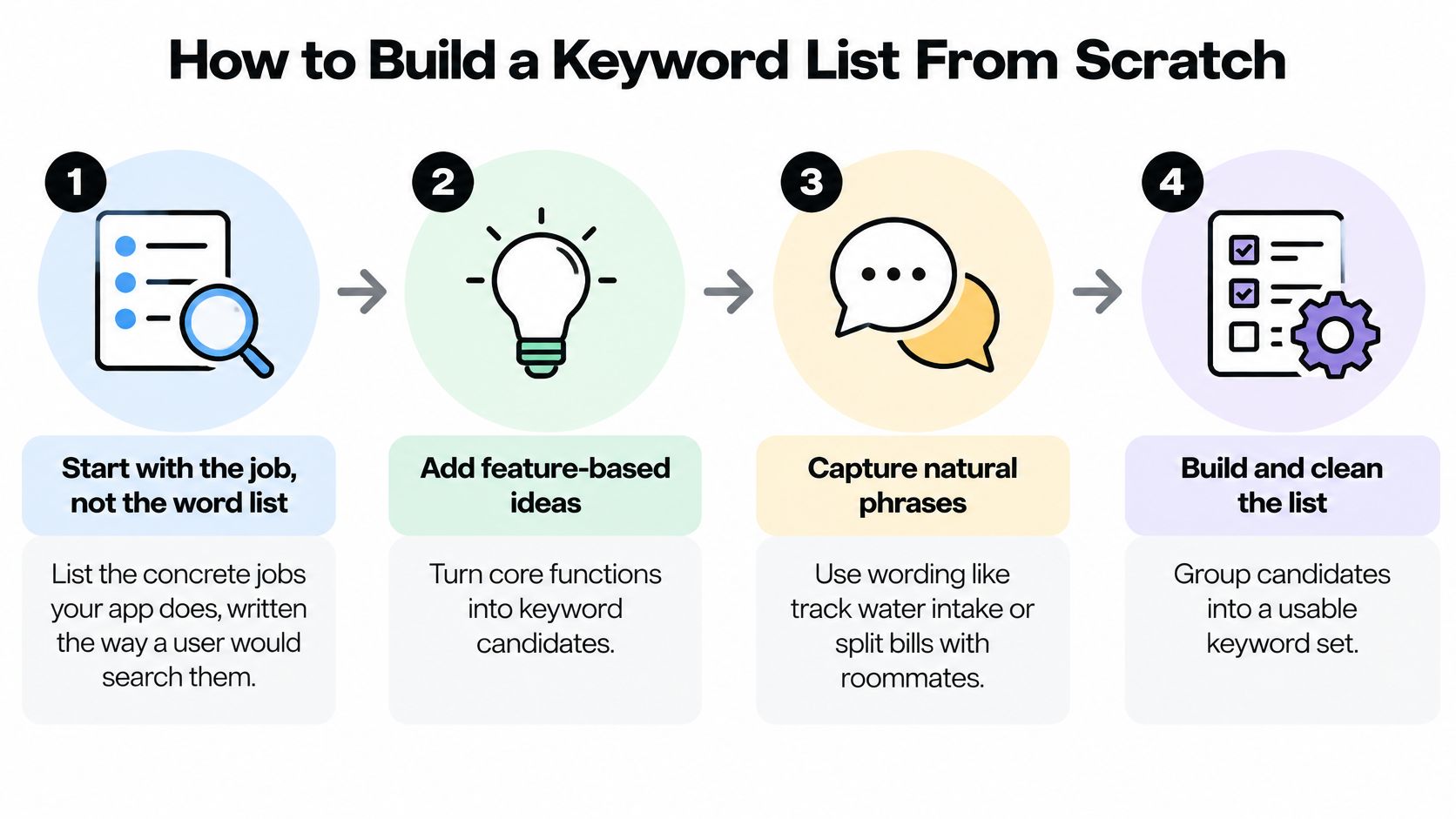
Start with the job someone needs to finish, not a keyword export. A feature called Smart Hydration Insights might matter internally, but a prospective user is more likely to describe the task as tracking water intake.
Apple's search guidance explains that search ranking combines text relevance with behavioral signals such as downloads, ratings, and reviews; its Search Ads guidance uses a 1–5 popularity scale to help evaluate demand. Treat popularity as a prioritization input, not permission to target an unrelated query.
Use this process to turn product knowledge into a testable shortlist.
-
Write the concrete jobs. List tasks such as tracking water intake, splitting bills with roommates, or planning meals around a grocery budget. For each task, identify the screen or workflow that proves your app can do it, because unsupported promises shouldn't become keywords.
-
Expand into feature and problem language. Add synonyms, category terms, and phrases people use before they know the solution. An expense app might support shared expenses, household bills, and settling balances, but each phrase should correspond to something the product handles.
-
Collect language from shoppers. Inspect competing listings, store autocomplete suggestions, and reviews for recurring descriptions of the problem. Record the wording and its origin, but use competitor names for analysis rather than inserting them into your metadata.
-
Check demand on each store. Use Apple's popularity indicator to compare relevant iOS candidates, then inspect Google Play suggestions and whatever search-term reporting your console exposes for Android. Autocomplete is a source of ideas, not a reliable measurement of search volume.
-
Clean before you score. Remove duplicates, unnecessary plurals where already covered, filler such as app, protected names, and phrases that attract the wrong audience. Don't preserve an irrelevant term just because a tool assigns it an attractive score.
-
Balance opportunity with attainability. Keep category language that accurately describes the product, but test specific phrases where the app offers a convincing answer. A smaller app may have a more defensible proposition for roommate bill splitting than for a broad finance query.
The workflow below captures the move from product tasks to usable keyword groups.
<a id="turn-candidates-into-decisions"></a>
Turn candidates into decisions
Create a worksheet with columns for user intent, feature evidence, locale, relevance, demand signal, competition, and proposed field. Keep brand, competitor-research, and category groups separate so you don't confuse navigational searches with opportunities to attract new users.
SubmitMySaas's explanation of how to prioritize SaaS keywords beyond search volume offers a useful parallel: a term's business fit matters more than its apparent size. For an app, add a practical question: will the person who searches this phrase complete the core task after installing?
Shortlist test: If you can't name the user's intended task and show where your app fulfills it, the keyword isn't ready for metadata.
The result should be a manageable set of candidates with a reason to test each one, not an exhaustive dictionary of loosely related words.
<a id="choose-keyword-research-tools"></a>
Choose Keyword Research Tools
Choose tools by the decision you need to make. A small app doesn't need overlapping subscriptions that produce different estimates of the same uncertain demand.
| Tool category | Practical options | The job it should do |
|---|---|---|
| Demand discovery | Apple Search Ads, store autocomplete | Compare candidate interest and discover phrasing |
| Rank monitoring | AppTweak, Sensor Tower, AppFollow | Track selected queries and competing listings by locale |
| Prioritization | Spreadsheet | Keep relevance, evidence, difficulty, and placement together |
| Owned reporting | App Store Connect, Play Console | Check actual visibility and acquisition outcomes |
| Review analysis | Review exports and a tagging sheet | Extract users' descriptions of needs and frustrations |
Apple Search Ads is useful for directional demand assessment, while store suggestions help surface language worth investigating. Don't treat either as a forecast of the organic installs a metadata change will produce.
A rank tracker becomes useful when manual searches stop being a dependable record. Evaluate platforms such as AppTweak, Sensor Tower, or AppFollow against your actual requirements: storefront coverage, historical tracking, competitor metadata, exports, and the queries you need to monitor. Don't buy a platform solely because its keyword database is large.
<a id="keep-estimates-separate-from-observations"></a>
Keep estimates separate from observations
In your spreadsheet, label third-party popularity and difficulty values as estimates. Store your console's impressions, listing visits, and downloads separately so an attractive vendor score doesn't override actual acquisition performance.
For early-stage discovery, Orchory's guide to find keywords without paid SEO software can help you build a low-cost research routine. Web keyword tools can suggest vocabulary, but web search demand isn't interchangeable with app-store demand.
Review mining often needs less software than teams expect. Export recent reviews, tag phrases by task and frustration, and distinguish feature requests from benefits the app already delivers.
- Start lean. Use a spreadsheet, store suggestions, owned reporting, and a rank tracker when ongoing monitoring justifies it.
- Upgrade for operational complexity. Add tooling when managing markets and competitors becomes cumbersome.
- Retain human review. A tool can surface a phrase, but someone still needs to decide whether the app deserves that traffic.
<a id="placing-keywords-in-each-listing-field-without-stuffing"></a>
Placing Keywords in Each Listing Field Without Stuffing
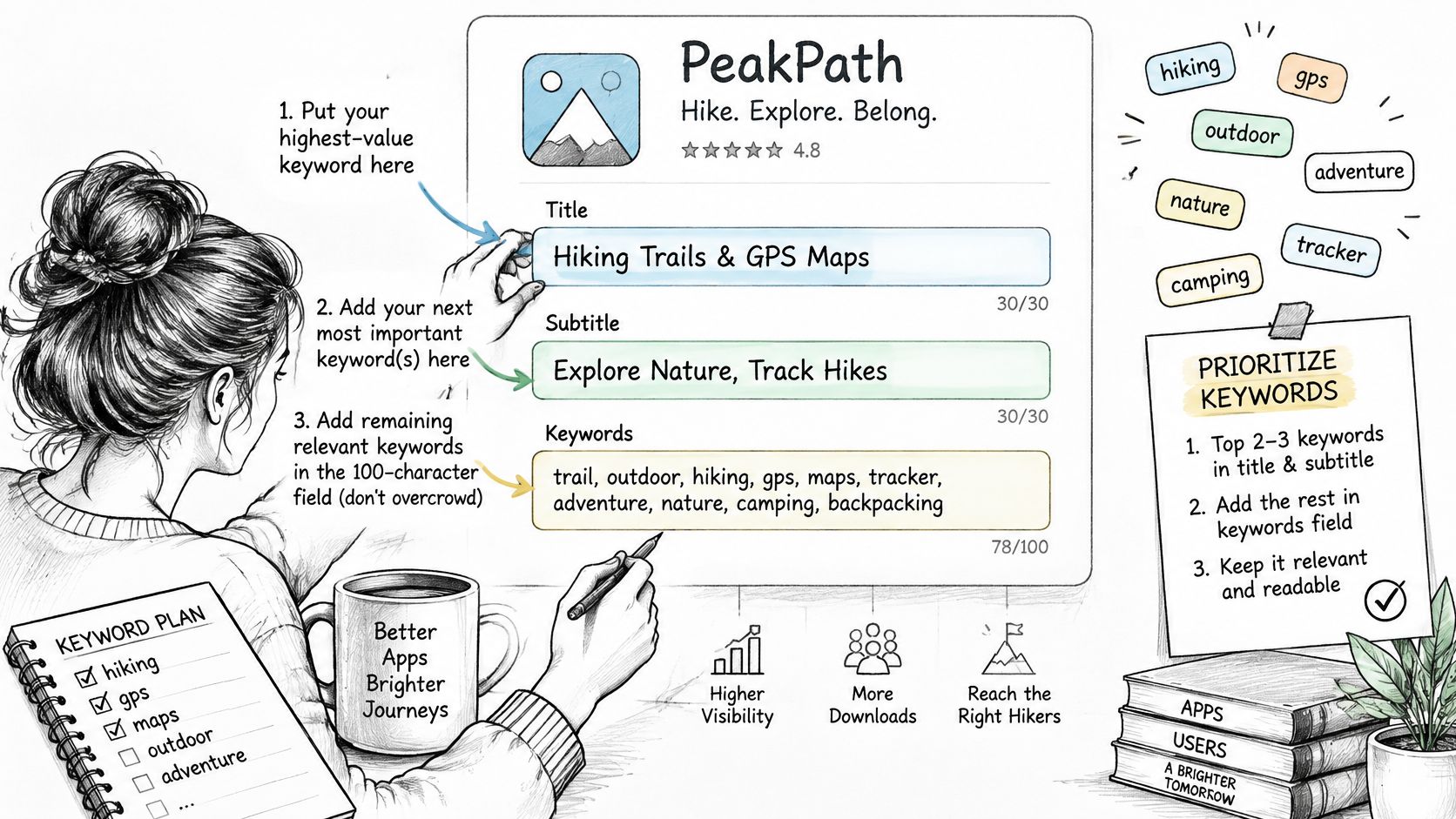
On Apple, assign the clearest category and benefit language to the app name and subtitle. Reserve the hidden field for relevant concepts that aren't already represented, using comma-separated terms rather than sentences.
This placement illustration is useful for checking the relationship between visible copy and keyword choices.
<a id="an-apple-placement-example"></a>
An Apple placement example
Say you're positioning a meal-planning app around everyday household organization:
- Title: Meal Planner
- Subtitle: Weekly Recipes and Lists
- Keyword-field candidates: dinner,grocery,budget,cooking,menu
This is a hypothetical draft, not a universal winning combination. Keep budget only if the app genuinely helps users plan spending, and check whether every candidate adds a distinct concept before submission.
Avoid stuffing the hidden field with complete phrases that repeatedly consume space on the same words. The visible title and subtitle should still sound like a product people would trust, not a sequence copied from a keyword report.
<a id="google-play-needs-explanatory-copy"></a>
Google Play needs explanatory copy
For Google Play, make the primary intent clear in the title and opening description, then explain supporting tasks in ordinary sentences. A meal planner might describe turning a weekly menu into a grocery list, organizing batch cooking, or choosing budget meals, provided those functions exist.
Google Play's store-listing guidance emphasizes the overall app experience, including ratings, reviews, and downloads, and prohibits ranking-style language such as “#1” or “Best.” Descriptive benefits are more useful than unverifiable superiority claims.
Use the full description to answer practical questions: can users save recipes, edit serving sizes, or share lists? The ASO description guide can help you organize those answers into readable listing copy.
For an additional walkthrough, use the video alongside your draft metadata.
<iframe width="100%" style="aspect-ratio: 16 / 9;" src="https://www.youtube.com/embed/VOISGFhK_Ns" frameborder="0" allow="autoplay; encrypted-media" allowfullscreen></iframe>Read the title, opening copy, and first screenshot together before publishing. They should describe the same use case, with the screenshot showing the workflow rather than introducing an unrelated benefit.
A keyword is a promise about what someone will find after installing. Only make promises the product can keep.
Delete near-identical variants that make the listing sound repetitive. If removing a phrase improves readability without losing a meaningful use case, it probably didn't deserve the space.
<a id="test-each-change-and-avoid-costly-mistakes"></a>
Test Each Change and Avoid Costly Mistakes
| Metric | Apple App Store | Google Play |
|---|---|---|
| Visibility | Impressions, supplemented by search-rank tracking by locale | Impressions and query-level visibility where available |
| Click-through | Product-page views from search | Store-listing visitors from search |
| Conversion | Product-page conversion to download, with the denominator recorded | Listing-to-install conversion |
| Test tool | Product Page Optimization for eligible visual assets | Store-listing experiments for eligible text and graphics |
| Quality | Ratings and reviews, plus owned activation and retention reporting | Rating distribution, uninstall rate, and owned retention reporting |
These measurements answer different questions. Visibility tells you whether users encounter the app; conversion tells you whether the listing persuades them; activation and retention tell you whether those installs were useful.
Don't assume every rank measurement comes from the store console. Keep third-party rank tracking identifiable, and record each report's denominator and traffic source before comparing results.
<a id="isolate-the-hypothesis"></a>
Isolate the hypothesis
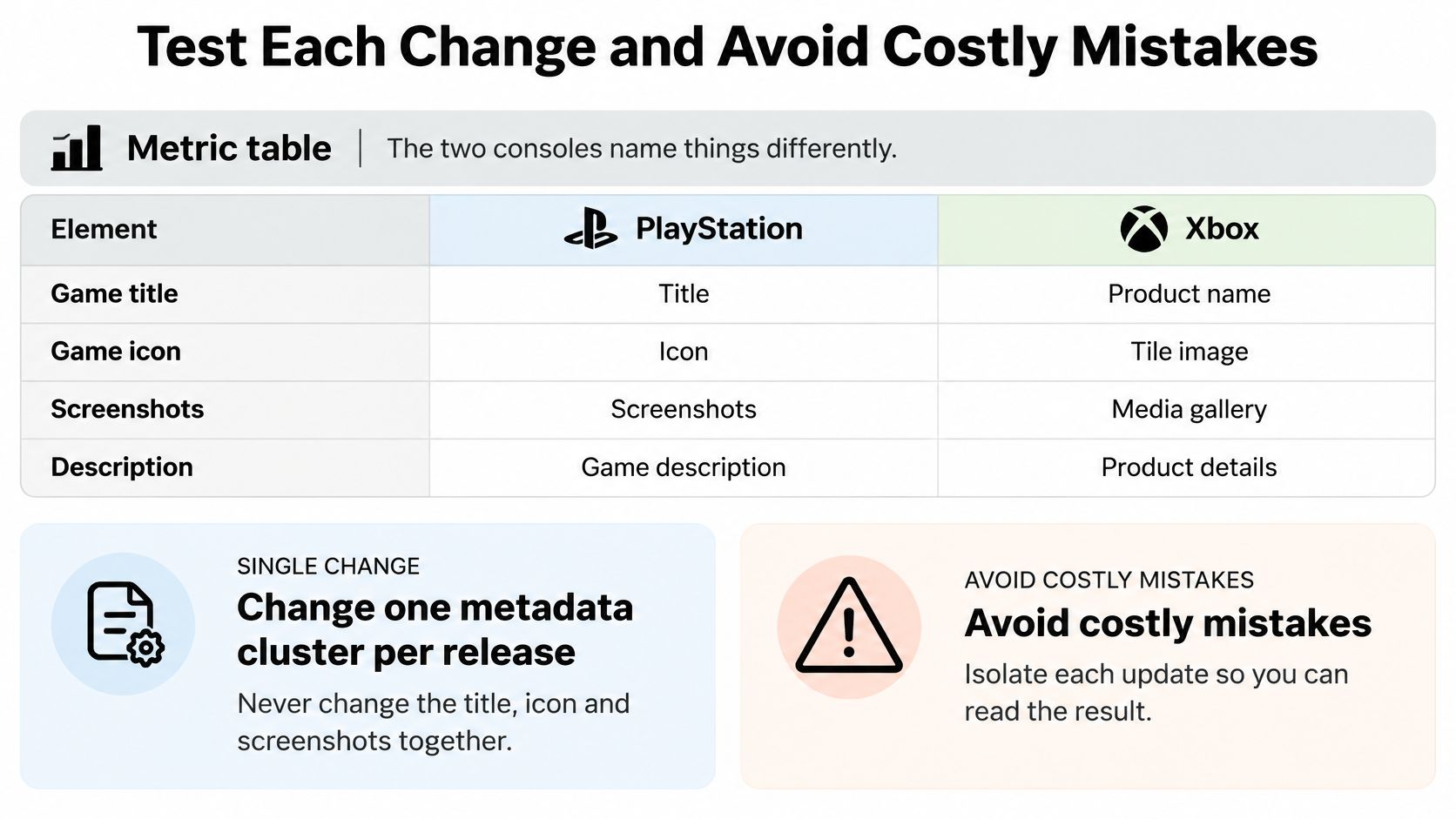
Change a coherent metadata cluster per release rather than revising the title, icon, and screenshots together. Write down the hypothesis before publishing, such as replacing broad productivity language with shared-household expense terminology will attract users who complete a bill split.
Record impressions, product-page or listing visits, conversion, installs, and tracked rank by locale before and after the change. Annotate paid campaigns, promotions, product changes, and unusual acquisition events so you don't mistake outside activity for a keyword effect.
Use the visual below as a reminder to isolate updates when planning your release.
Use native experiments for supported assets, but don't confuse a before-and-after keyword comparison with a randomized test. For experiments, respect the tool's confidence reporting; for release comparisons, acknowledge uncertainty and check whether the apparent gain persists across comparable acquisition conditions.
<a id="interpret-the-result-commercially"></a>
Interpret the result commercially
SplitMetrics' 2024 Apple Search Ads Search Results Benchmarks Report recorded an average tap-through rate of 10.22% across campaigns run on its platform, as reported by Tenjin. That's paid-campaign context, not an organic listing target or a pass-fail threshold.
Use this decision checklist:
- More visibility, fewer qualified installs: Reassess intent and the promise in the listing before keeping the change.
- Lower conversion, more activated users: Examine the full acquisition outcome rather than reverting automatically.
- Better installs, weaker retention: Check whether the keyword attracts people whose needs the product only partly satisfies.
- A global gain with local losses: Inspect country and device segments before rolling out more broadly.
The ASO search optimization guide provides additional context for connecting discovery work to acquisition decisions. Keep your experiment log focused on decisions, including what stays, what reverts, and what needs another test.
Keywords bring people to the page. The page has to convert them, and the app has to justify the download.
<a id="localize-keywords-by-market-instead-of-translating"></a>
Localize Keywords by Market Instead of Translating
Translation alone can preserve the words while losing the search intent. People in different countries may use different terminology, prioritize different features, or interpret the same benefit differently, even when they share a language.
Google documents a case in which country-specific custom listings increased organic installs by 15% in non-English languages in relevant markets, and its localized store-listing experiment guidance supports testing localized text and graphics in up to five languages at the same time. The case supports testing market-specific positioning, not assuming every translation will produce that lift.
| Market situation | Recommended approach | What to measure |
|---|---|---|
| Large market, same language, different search terms, such as US and UK English | Adjust spelling and terms, keep the core listing | Impressions and installs by storefront |
| Large market in a language you haven't researched | Run native keyword research, then localize the copy | Search visibility and conversion by locale |
| Smaller market with low search volume | Translate the core listing with a native-speaker check and test it in a focused experiment | Installs per listing visit |
| Market where a dominant competitor owns the category | Test a distinct value proposition in the screenshots first | Listing conversion before and after the change |
<a id="choose-markets-by-product-readiness"></a>
Choose markets by product readiness
Start where potential demand overlaps with an experience you can support. A localized listing can attract the right users and still disappoint them if onboarding, payment options, or the core interface don't meet their expectations.
For an unfamiliar language, give a native reviewer more than a translation file. Provide the intended audience, screenshots of the workflow, candidate search terms, and the distinction you want users to understand. Ask which phrases sound like genuine searches and which sound like translated marketing copy.
- Research independently when intent differs. Different category vocabulary requires more than spelling changes.
- Adapt copy when the job stays consistent. Preserve the product promise while replacing unnatural phrasing.
- Experiment when the opportunity is uncertain. Test the market-specific hypothesis before expanding production work.
A market with limited traffic may not produce a decisive experiment quickly. Don't force a confident conclusion from a small sample; combine directional acquisition results with native-language review and evidence of product usage.
Finally, evaluate each localized listing as an acquisition experience, not a translation deliverable. Apple's relevance model includes customer behavior as well as text, so a well-matched phrase still needs a convincing page and a satisfying product experience.
<a id="decide-whether-to-run-keyword-work-in-house-or-outsource"></a>
Decide Whether to Run Keyword Work In-House or Outsource
Does your team have time to research, publish, and review keyword changes through successive releases? Choose ownership based on the ongoing work, not just who can produce the first draft fastest.
- Market coverage: Identify the languages and storefronts that need independent judgment.
- Policy ownership: Name someone who can track store rules and review metadata.
- Launch pressure: Separate submission preparation from longer-term acquisition experiments.
- Testing capacity: Assign the person who will read results and decide the next change.
<a id="compare-the-scope-not-just-the-deliverable"></a>
Compare the scope, not just the deliverable
In-house work suits teams with product knowledge and a named acquisition owner. The advantage is a tight connection between search intent, onboarding, and retention; the cost is recurring attention across releases.
A freelance ASO specialist can handle a defined research and copy brief. Specify storefronts, keyword rationale, proposed field placement, and handover requirements so you receive decisions you can maintain rather than an unexplained spreadsheet.
A launch submission service addresses a different operational need. At LetsDeployIt, we prepare listing copy, ASO keywords, screenshots, and submission materials; during Weeks 1 to 2, AI drafts the assets and policy, with human sign-off.
The screenshot below shows the launch-service option.
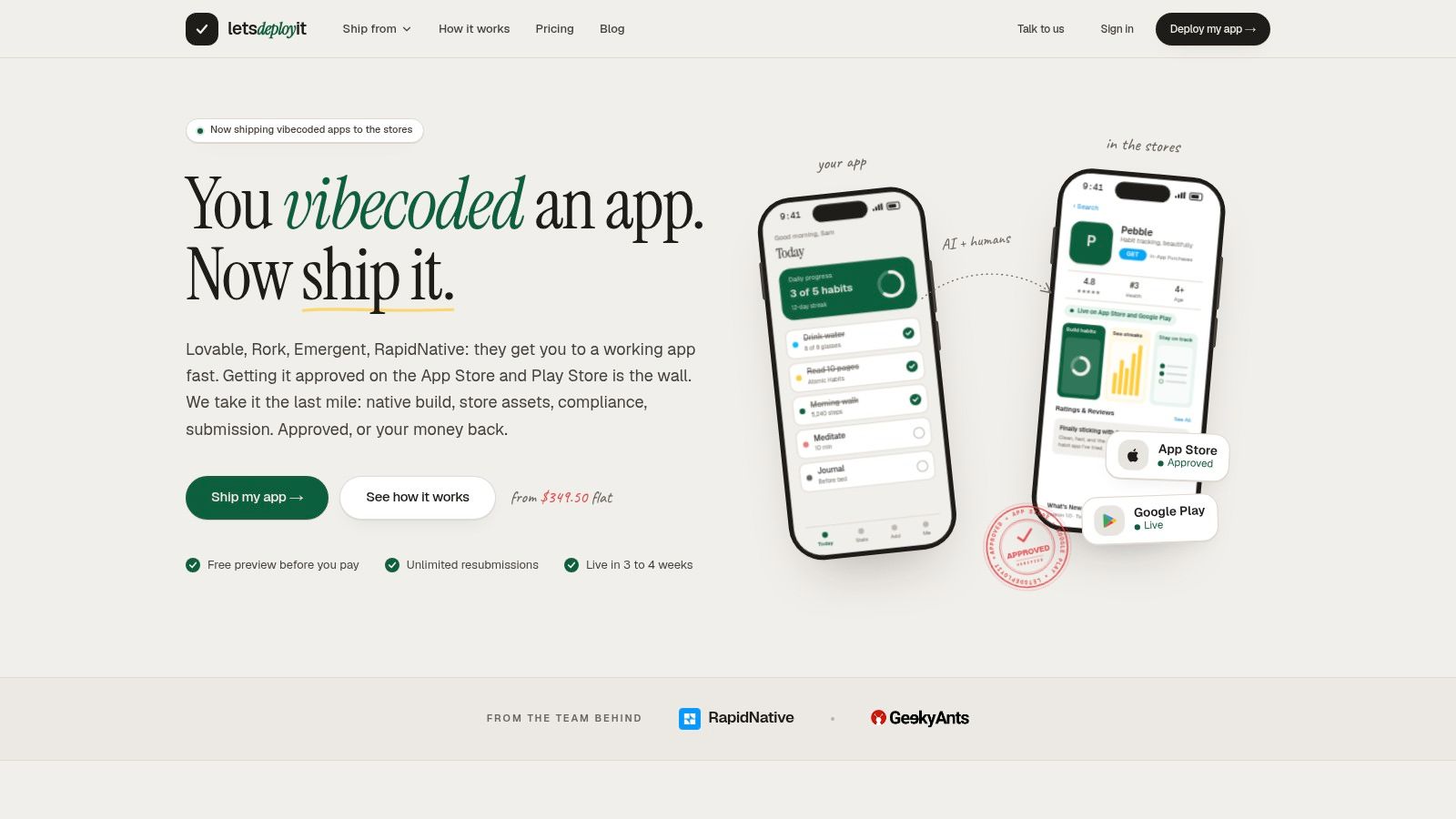
Our price doesn't include BaaS or server monthly costs, custom brand redesign, or post-launch updates. That makes the ongoing keyword test owner a separate decision, even when launch preparation is outsourced.
Use this comparison of app store optimization services to distinguish launch deliverables from ongoing optimization support. Before submission, finish your keyword inventory, document the first test hypothesis, and name the person responsible for reviewing the next release.
LetsDeployIt prepares store listing copy, ASO keywords, screenshots, and submission materials so your launch presents a consistent product promise. Visit LetsDeployIt and share your app's link and contact details; our team will try the app and reply within two business days with how we would get it into the stores.