10 ASO Optimization Techniques for App Store Growth
Discover 10 ASO optimization techniques for the App Store and Google Play, from keyword research and metadata to screenshots, A/B tests, and reviews.

Your app solves a real problem. The onboarding works, the main feature is useful, and you're ready for users. But organic installs barely move because the listing uses a brand name nobody knows, blurry screenshots, and an empty keyword field.
People can't install an app they don't discover. They also won't investigate a listing that makes them work to understand its value. Before you spend more on acquisition, check whether your store presence explains what the app does, matches relevant searches, and gives visitors a convincing reason to try it.
ASO optimization techniques work best in priority order, starting with inexpensive metadata changes and moving toward creative production, experiments, and audience-specific pages. The order below reflects an early-stage app's likely impact-to-effort trade-off, not a promise that every app needs the same changes.
- Start with relevance. Match the language users search with the functionality your app delivers.
- Improve the install decision. Make the name, icon, screenshots, and opening copy tell a consistent story.
- Add complexity selectively. Localization and personalized pages create maintenance work, so expand only when you can measure and support them.
Apple and Google Play don't treat every field or experiment the same way. Keep separate metadata plans and measurement records for each store rather than copying a listing across platforms and assuming it'll perform identically.
Table of Contents
- 1. Keyword Research and Targeting
- 2. Optimizing the App Name, Title, and Subtitle
- 3. Using the Apple Keyword Field and Google Play Description Keywords
- 4. Writing a Compelling Short Description and Promotional Text
- 5. App Icon Design and Testing
- 6. Screenshots and Preview Videos
- 7. Ratings and Review Management
- 8. Localization of Store Listings
- 9. Store Listing A/B Testing
- 10. Custom Product Pages and Campaign-Specific Listings
- How the 10 ASO techniques compare by impact, effort, and platform
- Sequence These Techniques for Compounding Gains
<a id="1-keyword-research-and-targeting"></a>
1. Keyword Research and Targeting
Impact-to-effort priority: Highest. Keyword research is inexpensive compared with producing new creative assets, and it determines which audience you're trying to attract.
Apple has reported that nearly 65% of App Store downloads occur after users search, according to AppDrift's ASO statistics summary. That makes relevant search intent a sensible starting point, but it doesn't make every popular keyword worth targeting.
Say you're launching a meditation app. Sleep sounds and breathing exercises describe distinct needs; meditation puts you against a broader set of alternatives. Start with the specific need your app handles best, then assess whether broader terms deserve scarce metadata space.
<a id="build-a-usable-keyword-map"></a>
Build a usable keyword map
Group candidate terms by user problem, feature, and intended outcome. For each cluster, record relevance, estimated demand, competing apps, and the screen or workflow that proves your claim.
- Inspect store results. Search the phrase on each platform and check whether the results match your app's purpose.
- Read competitor reviews. Collect the words people use to describe needs, frustrations, and missing functionality.
- Reject weak matches. A term isn't useful if visitors arrive expecting something your app doesn't provide.
Use app store keyword analysis to organize the store-specific work. The keyword tips from AI Optimization Services can also help broaden your initial vocabulary, but validate candidates inside the app stores rather than treating web-search demand as equivalent.
Quick check: Can you connect every priority phrase to an actual user benefit and working feature?
<a id="2-optimizing-the-app-name-title-and-subtitle"></a>
2. Optimizing the App Name, Title, and Subtitle
Impact-to-effort priority: Very high. A clearer title can explain the app before someone opens the product page. It's usually a better early investment than rewriting copy buried deep in the description.
Consider a hypothetical budgeting app called PennyPath. The brand alone tells an unfamiliar user little; PennyPath Expense Tracker supplies context. On Apple, the subtitle can introduce a complementary benefit, such as planning spending, instead of repeating the same phrase.
The platform constraint is limited visible space. Apple separates the name and subtitle, while Google Play uses its title alongside description fields. Draft directly against each console's current character counter, including punctuation and spaces, rather than squeezing an overlong master title into both stores.
Naming rule: Preserve a recognizable brand, then spend the remaining space explaining why someone would search for the app.
Read candidate names aloud. If a title sounds like disconnected search terms, simplify it. Keyword coverage isn't worth a name that looks untrustworthy or becomes difficult to recognize on a device.
<a id="keep-the-promise-consistent"></a>
Keep the promise consistent
Compare the title with the opening screenshot and onboarding screen. If the title promises expense tracking but the screenshots emphasize investing, visitors have to resolve the mismatch themselves.
Avoid changing an established name merely to chase a marginal keyword opportunity. Renaming also affects recognition, support material, and campaign consistency. For a new app with little branded demand, however, descriptive clarity usually deserves more weight than a clever but unexplained name.
<a id="3-using-the-apple-keyword-field-and-google-play-description-keywords"></a>
3. Using the Apple Keyword Field and Google Play Description Keywords
Impact-to-effort priority: Very high. Copying the same metadata strategy between platforms creates avoidable waste.
Apple's search guidance specifies a 100-character keyword field, with comma-separated terms, and recommends excluding words already used in the app name, subtitle, or category. It also explains that relevance works alongside downloads, ratings, and reviews, so filling the field isn't a substitute for delivering a good app.
For a hypothetical app named Budget Planner, don't spend hidden keyword space repeating budget. Consider relevant alternatives such as expenses, spending, or money, after checking which terms already appear elsewhere.
<a id="allocate-terms-by-platform"></a>
Allocate terms by platform
- Apple: Treat the hidden field as constrained inventory. Remove duplication and prioritize specific, relevant vocabulary.
- Google Play: Work search terms naturally into the title, short description, and full description. There's no equivalent hidden keyword field.
- Both stores: Maintain a record of changes so you can connect metadata revisions with later discovery and acquisition patterns.
A Google Play description for a notes app might explain that users can capture ideas offline and organize meeting notes. That conveys searchable functionality without repeating notes app in every paragraph.
The App Store Connect keywords guide can help structure your Apple field before submission.
Quick check: Read the visible listing without thinking about rankings. If the wording feels repetitive or awkward, rewrite it. Search relevance should come from accurately describing the product, not forcing a keyword-density target.
<a id="4-writing-a-compelling-short-description-and-promotional-text"></a>
4. Writing a Compelling Short Description and Promotional Text
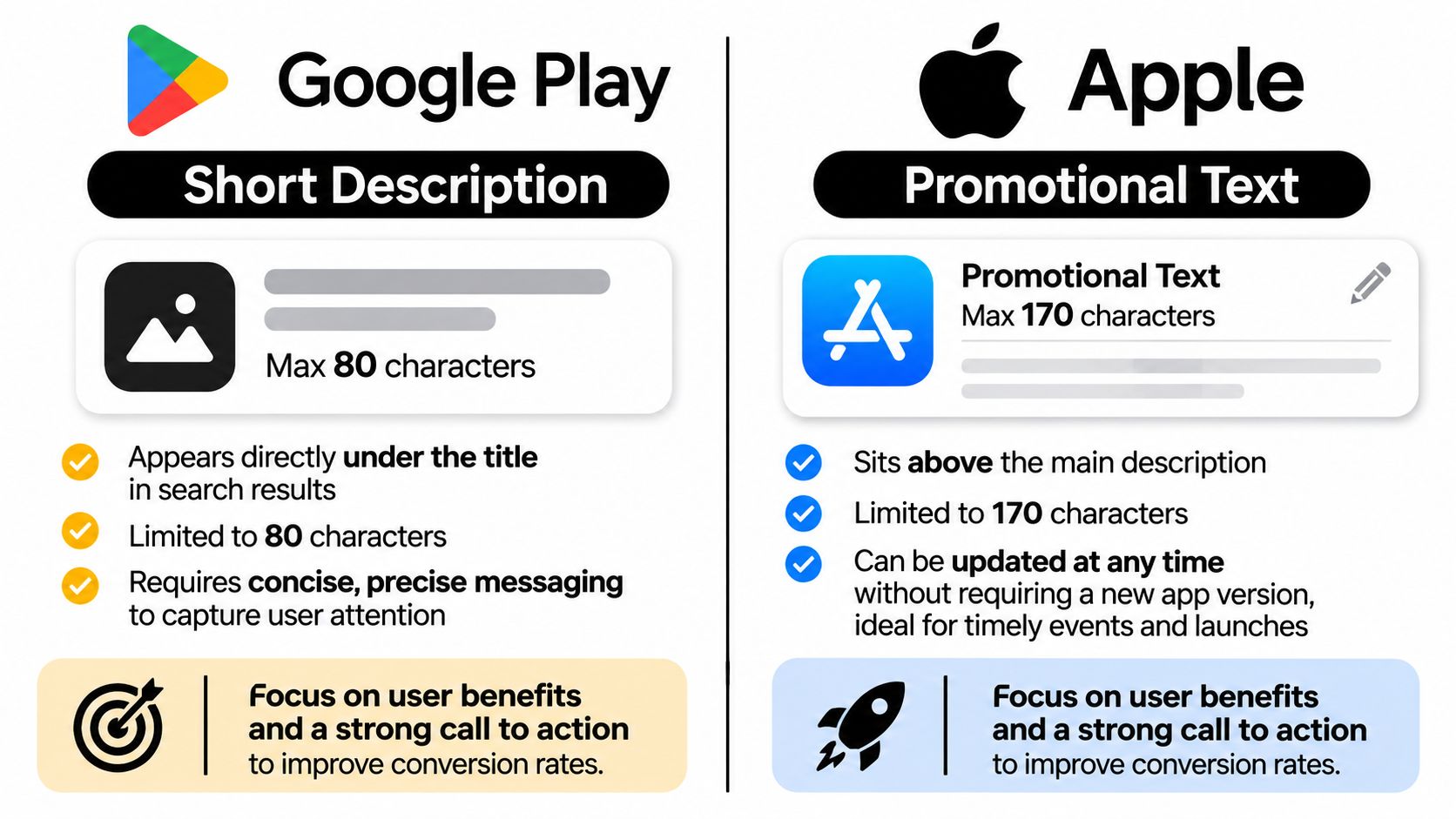
Impact-to-effort priority: High. Opening copy is cheap to revise, but it needs a specific job.
For a habit tracker, Plan routines and see your progress communicates an outcome more clearly than Powerful tools for better living. The stronger version describes what users can do without promising a result the app can't guarantee.
Google Play's short description and Apple's promotional text aren't interchangeable. Treat the former as part of the app's core positioning and the latter as customer-facing promotional messaging, not extra hidden keyword inventory.
<a id="write-for-the-immediate-decision"></a>
Write for the immediate decision
Lead with the main user outcome, then add the feature that makes it credible. A photo editor announcing a new filter should explain what users can create, not merely announce that something new exists.
Copy depth also deserves category-specific judgment: MacTech's coverage of SplitMetrics' 2024 report reports a 14% description-read rate for Finance app pages on iOS, compared with 6% on Google Play. Don't turn that category finding into a universal rule, but don't assume visitors will read the full description either.
Use the ASO description guide to align opening copy with the rest of the listing. Lumi Humanizer's product copywriting guide offers a useful complementary lens for converting feature language into understandable benefits.
Quick check: Could a new visitor explain the app's purpose after reading only the opening line?
<a id="5-app-icon-design-and-testing"></a>
5. App Icon Design and Testing
Impact-to-effort priority: High when the current icon is unclear, moderate when it's already recognizable. Fixing a muddy symbol is worthwhile; repeatedly polishing an effective icon may be less valuable than improving the screenshots.
Start by viewing your icon at the size users encounter in search results. Fine lines, miniature interface elements, and small lettering can disappear even when the full-size design looks polished.

For a hypothetical document scanner, compare a clear document symbol with a more abstract brand mark. Keep the surrounding listing stable so the comparison addresses recognition rather than an unrelated change in messaging.
<a id="test-a-design-hypothesis"></a>
Test a design hypothesis
- Choose a meaningful contrast. Compare recognizable concepts, silhouettes, or color treatments rather than nearly identical exports.
- Inspect real contexts. Preview against neighboring search results, light backgrounds, and dark backgrounds.
- Protect brand continuity. Don't discard a recognizable identity merely because a competitor uses a brighter color.
The platform constraint is the testing workflow. Google Play supports listing experiments; Apple's Product Page Optimization has its own asset and submission requirements. Prepare assets for the platform where you'll test rather than assuming the same setup transfers unchanged.
Judge an icon by acquisition quality, not internal voting. A more attention-grabbing variant that attracts people who misunderstand the app isn't necessarily an improvement. For a low-traffic launch, fix obvious legibility problems first and avoid spending production time on experiments that can't produce a clear decision.
<a id="6-screenshots-and-preview-videos"></a>
6. Screenshots and Preview Videos
Impact-to-effort priority: High, with more production effort than metadata. Screenshots need to demonstrate the promise visitors just read, not present an inventory of screens.
For a fitness app, lead with a useful outcome, such as seeing workout progress, and show the interface that supports it. Follow with evidence of how someone starts a workout and reviews results. Captions should explain the benefit without competing with the interface.
Digital Applied's ASO benchmark summary reports a median screenshot A/B-test lift of about 11.8% across the testing summaries it cites. Treat that as a reason to test creative, not an expected lift for your app.
Show what the user can accomplish before asking them to admire the interface.
<a id="give-video-a-distinct-job"></a>
Give video a distinct job
Use a preview when motion explains something a static image can't. A navigation app, for example, can demonstrate route updates more clearly through a short workflow than through disconnected screenshots.
Use this video as a prompt to review your own visual presentation:
<iframe width="100%" style="aspect-ratio: 16 / 9;" src="https://www.youtube.com/embed/MuYLtd4svbw" frameborder="0" allow="autoplay; encrypted-media" allowfullscreen></iframe>The platform constraint is asset compatibility. Apple preview requirements and Google Play video presentation differ, so plan separate exports and verify current console requirements before production.
Keep the demonstration understandable without sound. Capture the actual app, remove private information, and prepare the required device-size assets. A polished video isn't the next priority if your existing screenshots still fail to explain the core task.
<a id="7-ratings-and-review-management"></a>
7. Ratings and Review Management
Impact-to-effort priority: High over time, but dependent on product work. You can improve the review workflow quickly; you can't copywrite your way out of recurring crashes or broken purchases.
Ask for an honest rating after users have experienced meaningful value. For a document scanner, that might follow a successful scan and export, rather than interrupting camera access or appearing immediately after installation.
The platform constraint is the native review flow. Use the supported rating APIs and respect their display behavior. Don't assume every request produces a visible prompt, and don't build a critical interaction around that assumption.
<a id="turn-feedback-into-an-operating-process"></a>
Turn feedback into an operating process
- Request without pressure. Don't reward ratings or steer dissatisfied users away from public feedback.
- Respond with substance. Acknowledge the specific issue and explain the next useful action.
- Protect personal information. Move account-specific troubleshooting into a private support channel.
- Tag recurring problems. Separate reliability, pricing, usability, and missing-feature complaints so the right person can act.
A public response to a sync complaint should explain what information support needs without claiming the issue is fixed prematurely. Once a fix ships, update the response where appropriate and describe the change accurately in release notes.
The trade-off is engineering capacity. If reviews repeatedly describe failed exports, repairing exports deserves priority over another screenshot revision. Review management supports ASO most effectively when the team uses feedback to improve the experience the listing promises.
<a id="8-localization-of-store-listings"></a>
8. Localization of Store Listings
Impact-to-effort priority: Selectively high, with ongoing maintenance costs. Localization is valuable when you can serve the audience you attract, not just when you can translate the listing.
Suppose a productivity app already supports Spanish. Research how its intended users describe tasks, reminders, and shared work before translating the English keyword list. The most natural search phrase may not be a literal translation of the original.

<a id="localize-the-promise-and-the-proof"></a>
Localize the promise and the proof
Translate screenshot captions alongside visible interface text. Check line wrapping, punctuation, currencies, and example content. A native reviewer should assess whether the copy sounds like a useful app description rather than a translation exercise.
The platform constraint is locale management. Apple's localized metadata and Google Play's language and country configurations require separate checks. Record which assets and fields belong to each market so later releases don't leave outdated claims behind.
Expansion test: If a user installs from the localized listing, can they complete the advertised task comfortably in that language?
Prioritize markets using existing demand, product language support, and your ability to provide help. Don't select a language solely because it has a large potential audience.
Localization also multiplies revision work. Every feature rename or screenshot redesign may need corresponding updates across localized assets. A smaller set of accurate, maintained listings is preferable to broad coverage that promises an experience the app doesn't deliver.
<a id="9-store-listing-ab-testing"></a>
9. Store Listing A/B Testing
Impact-to-effort priority: Strong once traffic supports decisions. A/B testing belongs behind basic cleanup because an experiment needs both a meaningful hypothesis and enough exposure to distinguish alternatives.
Google recommends running store-listing experiments for at least one week to account for weekday and weekend behavior in its Store Listing Experiments guidance. That's a minimum methodological consideration, not proof that every experiment will be decisive on that schedule.
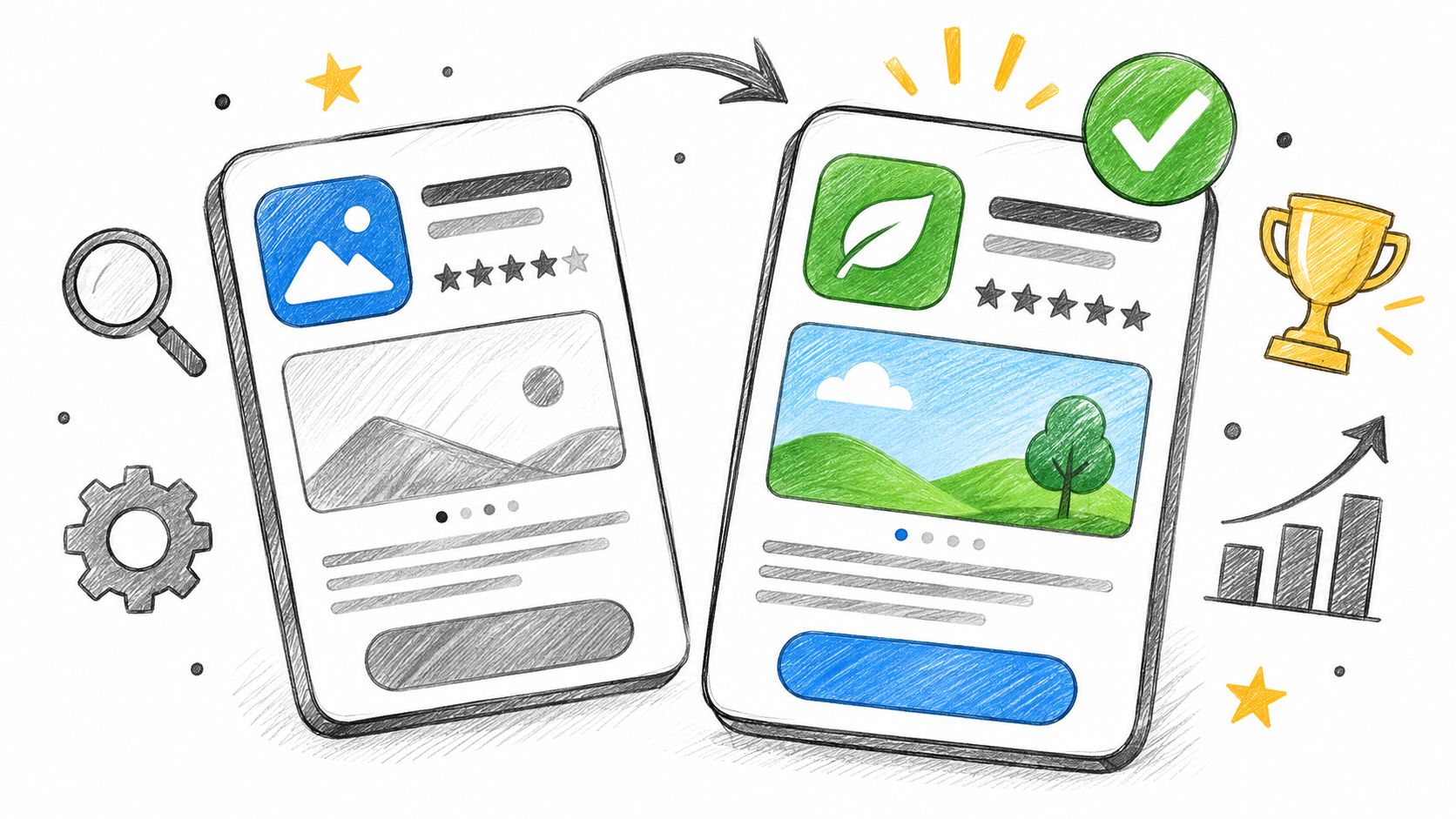
For a budgeting app, test a screenshot sequence led by spending visibility against the current feature-led sequence. Write down the expected behavior change before launching the experiment.
<a id="define-the-decision-in-advance"></a>
Define the decision in advance
- Primary outcome: Choose the install or acquisition measure you'll use to decide.
- Quality guardrail: Check whether acquired users activate and retain, where measurement allows.
- Audience scope: Specify the store, language, market, and relevant traffic segment.
- Stopping rule: Don't stop merely because an early result looks favorable.
The platform constraint is experiment coverage. Google Play's Store Listing Experiments and Apple's Product Page Optimization support different workflows. Don't assume every text field can enter a native randomized test.
A before-and-after title change isn't equivalent to an A/B experiment because traffic and competition may also change. Record inconclusive results accurately, and keep a test history so your team doesn't repeatedly fund the same unresolved idea.
<a id="10-custom-product-pages-and-campaign-specific-listings"></a>
10. Custom Product Pages and Campaign-Specific Listings
Impact-to-effort priority: High for distinct campaigns, lower for an unfocused launch. Personalized pages make sense when audiences need different reasons to install.
A travel app might emphasize expense organization for business travelers and itinerary sharing for families. Each page should connect the campaign promise to the relevant interface, rather than merely changing a headline.
Apple supports up to 70 custom product pages, according to its custom product page configuration guidance. Apple also specifies that assigned keyword combinations should match page intent and be unique to the page.
<a id="create-a-page-only-when-the-intent-differs"></a>
Create a page only when the intent differs
Give every page a named audience, acquisition source, core benefit, and measurable business outcome. Keep a record of its assets and destination so campaign changes don't send users to outdated messaging.
The platform constraint is configuration and attribution. Apple custom product pages and Google Play custom store listings aren't interchangeable products. Check the available targeting and reporting options before promising a particular campaign setup.
Don't judge success only by install conversion. A page focused on a premium workflow could attract fewer installers but more users who activate that workflow or subscribe. Use downstream measures where available, while acknowledging when traffic is too limited for a confident comparison.
The maintenance cost is real: more pages mean more screenshots, localized copy, and feature claims to keep accurate. Start with a clearly differentiated audience, retain a strong default listing, and expand only when the additional page answers a measurable acquisition need.
<a id="how-the-10-aso-techniques-compare-by-impact-effort-and-platform"></a>
How the 10 ASO techniques compare by impact, effort, and platform
| Item | Impact Priority | Effort Level | Platforms Affected | Best For |
|---|---|---|---|---|
| Keyword Research and Targeting | High | Medium | Apple App Store, Google Play | Improving organic search visibility and installs |
| Optimizing the App Name, Title, and Subtitle | High | Low | Apple App Store, Google Play | Strengthening search relevance and clarifying app value |
| Using the Apple Keyword Field and Google Play Description Keywords | High | Medium | Apple App Store, Google Play | Allocating keywords to each store's indexing rules |
| Writing a Compelling Short Description and Promotional Text | High | Low | Apple App Store, Google Play | Improving listing conversion with concise benefit-led copy |
| App Icon Design and Testing | High | Medium | Apple App Store, Google Play | Improving visual recognition and install rates |
| Screenshots and Preview Videos | High | High | Apple App Store, Google Play | Showcasing app benefits and increasing conversion |
| Ratings and Review Management | High | Medium | Apple App Store, Google Play | Building trust and addressing user feedback |
| Localization of Store Listings | High | High | Apple App Store, Google Play | Reaching international audiences and local searchers |
| Store Listing A/B Testing | High | Medium | Apple App Store, Google Play | Making data-driven listing improvements |
| Custom Product Pages and Campaign-Specific Listings | Medium | High | Apple App Store, Google Play | Tailoring listings to campaigns and audience segments |
<a id="sequence-these-techniques-for-compounding-gains"></a>
Sequence These Techniques for Compounding Gains
Start with keyword research, the name, subtitle, and keyword allocation. These are comparatively inexpensive changes, and they force useful decisions about audience and positioning. If you can't describe the app's main value in plain language, producing more creative assets won't solve that problem.
Keep Apple and Google Play work separate from the beginning. Maintain store-specific metadata, asset inventories, and change records. Use each platform's native acquisition definitions rather than comparing raw conversion percentages as though they describe identical behavior.
<a id="match-the-next-task-to-the-problem"></a>
Match the next task to the problem
- Weak relevant visibility: Revisit search intent, metadata coverage, and whether the targeted queries accurately describe the app.
- Visitors without installs: Inspect the promise, opening screenshot, icon clarity, and evidence that the app can deliver.
- Installs without useful engagement: Check whether the listing attracts the wrong audience or onboarding fails to fulfill expectations.
- Strong default performance: Consider localization and campaign-specific pages where you can support distinct audiences.
Improve the visual story after the positioning is coherent. Capture real workflows, make captions readable, and use video only when motion adds useful explanation. Don't let asset production become a substitute for deciding which user outcome matters most.
Build experimentation around actual decisions. Save the current listing, document the proposed change, choose the outcome measure, and identify what would justify adoption. When results are inconclusive, retain that finding instead of turning a small fluctuation into a confident recommendation.
Ratings deserve a parallel workflow rather than an occasional cleanup. Assign responsibility for review responses and route recurring problems to product owners. A reliable app gives you stronger material for every part of the listing, from benefit claims to demonstrations.
These ASO optimization techniques aren't a one-time launch checklist. Revisit them when functionality changes, new markets become viable, or acquisition patterns reveal a mismatch. Avoid revising everything simultaneously, because you'll lose the ability to understand which change helped.
For store-side execution, our flat-fee launch work includes listing copy and ASO keywords, screenshots for every device size, and a demo or preview video, with human sign-off. Our free Preview plan lets you see the app running on your own device before you commit. Keep the same priority discipline whether you prepare those assets yourself or delegate them: establish relevance first, explain value clearly, then test and expand.
We prepare store listing copy, ASO keywords, screenshots, icon assets, and preview video as part of our launch service. Visit LetsDeployIt to explore the launch options and try the free Preview plan on your own device before committing.